

Whether you’re just starting a new business or you’ve been in business for years, you will always be able to manage your time more efficiently when you have an organized office. Paper Tiger Filing System Software is a system for office organization, which is being used in companies of all sizes, ages and types. Employees won’t be wasting time searching for paper files when they could be doing things that are much more productive, thus saving companies money while increasing productivity.
No matter how electronic (translated as “paperless”) we claim to be, we find that 80% of companies are still struggling with stacks of papers. So if you are still trying to organize your paper files with the traditional alphabetical filing system, and you are still having trouble finding documents when you need them, consider implementing (and using) Paper Tiger.
Paper Tiger allows you to maintain your paper files that you need to keep in hard copy format. You can keep your paper in its original form (you do not have to scan it), but simply index your paper files into Paper Tiger’s database and use the power of the computer to quickly and easily find the information when you need it. You can index anything in Paper Tiger; it’s not just document management! Some things just can’t be scanned, i.e., passports, contracts, binders, books, flash-drives, CDs, DVDs, etc. That cannot be done with systems that require scanning into an electronic file. The beauty of Paper Tiger is that keywords allow anyone in the office to find the document that might have been named many ways by many employees.
You have three types of files that you deal with every day:
- Daily Action: Things needing to be done; daily tasks; tickler/follow-up file
- Project Files: Active folders that are ongoing for a specific period of time (see ‘3 Types of Action Files‘)
- Reference Files: Nothing more needs to be done on that item, but you want to keep it for possible future reference
The strength of Paper Tiger relates to the last type of file. Whether you are dealing with your own files within your office space or with a company-wide document management system that encompasses rooms of file cabinets, Paper Tiger can help. It provides you with the two required features of a strong filing system:
1. You can find anything you need, whether it is six months from now or five years from now, and you can find it within seconds!
2. You can quickly tell someone else how to find the required material.
Paper Tiger is simply a software program that allows you to catalog your paper documents, and the computer then uses its search capabilities, to pull up your keyword and point you to the correct folder in your desk or file cabinet.
When using Paper Tiger, you eliminate many of the factors that make filing difficult or the reason filing is put off until the paper stacks begin to build beyond control:
- What do I name this so that I can remember how to find it? Call it multiple names, listing all keywords you might possibly think of when trying to locate the document again. Add keywords when necessary.
- I don’t have the right colored folder. Purchasing different colored folders as a way to categorize files in the hopes of narrowing down our search later is completely unnecessary when using Paper Tiger.
- I don’t have time to create a tab for a new file. Your file folders are numbered and are made up in advance. Filing a new item simply becomes a matter of dropping it into the next open folder.
No matter how large or small a company, time management is a must. When people are wasting time searching for items, they aren’t being productive. Searching for files is a huge waste of time, especially when there is Paper Tiger to make the job faster and easier. The less time one has to spend searching for files, the more time can be spent doing things that are actually fruitful. The better you and your employees are at managing time, the more efficient your company. When documents are filed using Paper Tiger, various keywords are input, and anyone who has permission to access the database can conduct a quick search of keywords, and the needed document can quickly be retrieved. The keyword search can also work for returning the document to the correct file.
Of all of the office supplies you pay for, this software is one of the most important. In addition, Paper Tiger will virtually return the investment when the time wasted is put towards working! Allow Paper Tiger Filing System Software for office organization to help reduce wasted time, make filing less of a chore, and keep you and your employees working more efficiently.
When using Paper Tiger, you have the decision as to how you want to differentiate your types of files by creating what we call ‘Locations’ in the database. A Location is a group of like items, and could relate to where you will store your physical items or could relate to the types of physical items that you plan to index (paper files, books, CDs, DVDs, storage boxes, etc.) Your Locations can be named anything you want – however you relate to what you are indexing, i.e., Office files, Home files, Action files, Reference files, House, Basement, Garage, etc. Paper Tiger uses Locations to represent these places where you store the items you want to be able to find later.
You decide what is best for the way you wish to file. Remember, Paper Tiger is not just a filing system, it’s a ‘finding system’, so as long as you put in a few keywords for each hanging file folder, you will be able to find anything you need…and when you need it without time-wasting searches. A simple search in the database for whatever keyword you’re thinking of that day, will help you find the file quickly.
Paper Tiger experts recommend starting with Locations named ‘Action’ and ‘Reference’. Later you can create an ‘Archives’ Location for those files that you can’t part with for legal or tax reasons, but need to be moved from your general file area. These items can be transferred from one Location to another in your Paper Tiger database so you can still find them if you ever need them.
Reference Files are files you need to refer to from time to time, maybe occasionally, maybe once a year, or maybe just hold onto just in case you need to review the file again. For example, your Reference files Location might contain an index of all files in your 5 file cabinets of 4 drawers each, and Item #1 in Paper Tiger starts with the documents in the first hanging file folder in file cabinet 1, and end with Item #500 in with all documents indexed from the last hanging file folder in file cabinet 5. Or you could differentiate your paper files even further with additional Locations such as Clients, Financial, Administrative, Research, etc.
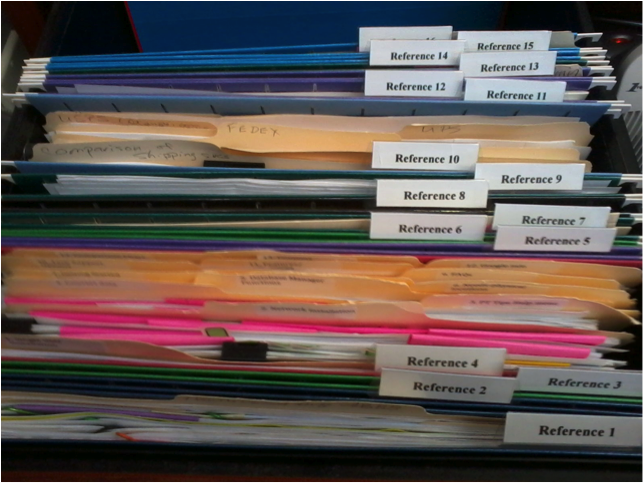
In the Reference Files Location, you might have hanging file folders for the following:
1. Invoices (within this hanging folder, you can file invoices either by month, chronologically or alphabetically)
2. Purchases (within this hanging folder, you can file purchases either by month, chronologically or alphabetically)
3. Expenses (within this hanging folder, you can file expenses either by month, chronologically or alphabetically)
4. Taxes (within this hanging folder, you can file the documents relating to only the current year’s taxes. Previous year’s taxes should be Archived, along with the invoices, purchases and expenses for those respective years.)
5. Utilities (within this hanging folder, you can file utility bills either by month, by the type of utility or company name. You might have manilla folders within this hanging folders with the type of utility: -Electricity, -Gas, -etc….then you could just input each new bill in the front of the respective manilla folder so the latest bill would be at the front)
6. Insurance (within this hanging folder, you might have manilla folders filed alphabetically for Autos, House, and Office) The Item name would be Insurance and keywords might be ‘automobiles, cars, Ford, Honda, State Farm, name, address and phone number of agent(s), policy, home, office, equipment, health, employee, employers, personal, workers compensation, … You could also sub-divide this to Insurance-Auto, Insurance-Home, Insurance-Office into 3 separate hanging folders.
7. Software
8. Passport
9. Sports activities (schedules for tennis, baseball, classes, team members, etc.)
10. Billy (school papers, immunizations, schedules for classes and other activities, awards, etc)
11. Susie (school papers, immunizations, awards, schedules for classes and other activities, etc)
12. Community Service
13. Personnel/Human Resources (within this hanging folder, you might have manilla folders for each person in your company filed alphabetically) However, if the documents for each employee is greater than what will fit into a manilla folder, you might create a Location separately for Personnel/Human Resources. This would give you the option of creating a separate hanging folder for each employee.
14. Medical records
15. Time sheets and/or pay stubs
As you see these are not in alphabetical order, and of course, they do not need to be since we are indexing our files with Paper Tiger, however you might want to think about what types of files that you want to put together. For example, the files that you will be referencing more frequently in the first 1 or 2 file cabinet drawers convenient to you. The list above would be indexed Reference 1, Reference 2, Reference 3, Reference 4, Reference 5, etc. through Reference 15. The next file that you add to Paper Tiger then would be assigned Reference 16 and would go into Reference 16 hanging file folder.
You might also have an Archives Location for the older files that you need to keep for legal or tax or various other reasons for longer periods of time, but most likely will not need to reference again. See our blog posts for Records Retention Guidelines. You would be able to transfer these files in the database from one Location (i.e.: Reference) to the Archives Location so that you can still keep track of where they are. Then move the physical files to the physical location to coincide with the indexed file item number in your Paper Tiger database. (Whatever you change in your Paper Tiger database, you will want to ensure that you match the change in your physical files.) As information, when you transfer files from one Location to another, this opens the Item Number from the original Location for new documents.
When a hanging file has gotten too overstuffed, you can sub-divide that file chronologically by year. For example, your hanging file folder Reference 12 for Community Service for 2010 through 2014 could be moved to new hanging file folders with Item Names ‘Community Service-2010′ and ‘Community Service-2011′, etc. If you move them within your Reference Location, they would be added to the first 2 available open Item numbers in Paper Tiger. Or you could transfer them to your Archives cabinet. Reference 12 would then have room for your new current year community service information.
For the above example, assuming that Reference Item numbers 1-4 all relate to information that you need for your taxes, you would be able to transfer those files to an Archive hanging file folder (or drawer or box depending on the amount of documentation you have and where you will be moving those documents to) named ‘Taxes-2014′ after you have completed your 2014 taxes. Reference Item numbers 1-4 would then be available for your new current year documents relating to the respective Item Names.
How do you manage files that you keep for reference?
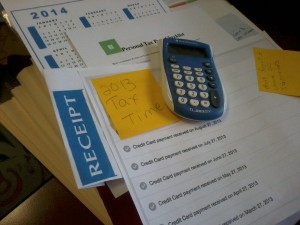
No matter when your tax deadlines are, it’s always good practice to have your records in order so that you won’t have to do last minute scrambling looking for the documents needed tax time preparation. Indexing your paper files in Paper Tiger Filing System Software for document management is ideal to ensure you are able to find your files when you need them.
It is estimated that people waste 150 hours per year searching for lost information. How much of your time is wasted strictly around tax time? Everyone needs a system of sorts to help them organize, and Paper Tiger is the perfect tool to use as a year-round filing system. Retrieving documents to prepare for filing your taxes does not have to be an ordeal.
Where should you start when organizing for preparing your taxes?
Click here to see a tax prep checklist from H&R Block, which would be a great place to start. You need to know what types of documents you will need whether you are preparing to file your taxes for yourself or if you will have a tax professional prepare them for you.
If you already have your files set up the way you want them and you have them indexed into your Paper Tiger database already, you can transfer those files out of the current Paper Tiger and physical location to an archived location. See Archiving Old Files section below.
If not, then you’ll need to decide what hanging file folders you need for each of these categories based on your situation so that you can proactively prepare for filing this year’s documents. While you’re going through documents for preparing your taxes, it is a good time to think about what file folders you’ll need for your current year. For each hanging file folder, create an item in your Paper Tiger database so that you can index the keywords that relate to the documents in the folder. When you need to retrieve a file, you simply search in Paper Tiger by the keyword and you’ll be able to find the file quickly.
To start with Paper Tiger Document Management Software, you would first set up all hanging file folders in your file cabinets coinciding with each ‘Location‘ in your Paper Tiger database at one time using the numbered tabs that you print out from the software and they never change. You type in information relating to each document in the item name and keyword section of Paper Tiger’s database digital file location. You can give the document any name you want without any worry about finding it later. This is because the system will allow you to tag keywords that describe all documents that you put into your hanging file folders. For documents that you want to add to the same file, simply edit the Item in the database and add additional keywords necessary for the new document(s). When your physical files have been indexed into the database, the easy-to-use search engine virtually eliminates lost information in your office, as well as eliminating filing the same subject matter under different names because you’ve forgotten what you filed it under previously.
Because the hanging file folders are already set up and waiting for your information, you also eliminate the time-consuming hassle of having to find and create a file folder tab each time you want to file something.
Whether filing away tax documents or other important files, be sure to file those documents immediately and in the correct location. Paper Tiger will keep them organized, but you have to take that first step towards getting your files in the right places. It’s especially important that you make sure your tax documents have a “home” and that you index them into your Paper Tiger database.
Here is an interesting fact that you should know: while most people assume that they can throw away or destroy their tax papers and other documents after a few years, that is not always true. In some cases, you might be legally required to hold onto all or some of these documents forever.
Because you are supposed to keep your personal past taxes on record for at least seven years, it can be easy to lose track of your archived files … which box in the garage or attic did you file previous year’s tax documents? For businesses, it is important to keep your records even longer. Isn’t it worthwhile to have them filed correctly for the time period you have to keep them? Using Paper Tiger filing system, this does not need to be a burdensome task.
How to archive old files is simple with Paper Tiger. Decide where your physical archived location should be. (wherever you keep the files that you don’t need in your main filing cabinet) Whether the best place is in boxes in the garage or a filing cabinet in the attic, simply create a location in Paper Tiger named “Archives”, and conduct a Transfer, Move function of the file or files being moved to the Archive Location within your database. Paper Tiger will assign a file number in your Archives file to move the file to in the physical location, where you will set up hanging file folders accordingly.
Alternately, if you need the same hanging file folders under the same name for the current year’s files, instead of a Transfer, Move function, you could conduct a Transfer, Duplicate to duplicate these files to Archives. Then you would simply change the date of the original files (both in the database and in the physical file location for the current year, as necessary) to be able to have a location for your current year’s files. The item name and keywords will most likely be the same in this case, but you can update your item and keywords in Paper Tiger, as necessary.
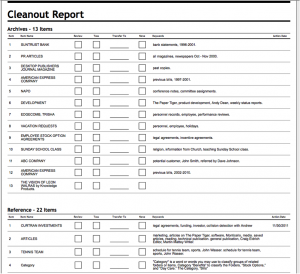
You will be rotating papers in and out of your system every single year. Taking the time to get organized now can save you years of grief as well as possible legal issues. Paper Tiger Document Management Software can help you get organized and stay organized. And don’t forget about Paper Tiger’s File Cleanout report that can be used to help you decide which items need to be moved, duplicated, or tossed/shredded.
During an audit, you might be asked to provide documentation that goes back many years. The IRS will not care that you don’t have your papers in a file nor will they give you benefit of the doubt if you say you cannot “find” something. That is not their problem, and they may penalize you further for everything that you do not produce when asked; making it absolutely vital that you keep the files and papers organized and easy to find.
We have several articles under the Retention Guidelines: How Long Should I Keep Records? category that you might find helpful.
If you have papers you need to keep for taxes, but also need them in other files, it can be confusing when you need to retrieve them for tax time. For instance, you need to keep track of a medical bill you are paying off in “Bills” file, but also need it for your “Taxes” file to find at the end of the year. With a traditional filing system, you would have to choose which file to put it in knowing it will be hard to find it later because you may not remember which file you put it in.
In Paper Tiger, the Item Name would be “Bills to Pay”and you might have several bills in that folder. You would simply edit that item, then type the keywords “hospital bill” and “medical” in the item’s keyword section when adding the medical bill to the Bills to Pay file. Then just like when you use any other search engine, you would search for any one of those keywords when you need to retrieve the documents, and Paper Tiger does the work. The results will come back letting you know which file it is in so you can retrieve it. All you have to do is make sure you type in as many possible keywords you can think of when filing the documents, and you will never have a problem again tracking down a document for any purpose.
Never scramble for documents around tax season again. Use Paper Tiger Filing System Software for Document Management all year to organize all important documents so that tax time won’t be quite so dreaded.
Are you having a hard time parting with your clutter? Do you get an overwhelming feeling of dread when you think about starting to organize? If you feel like you are indecisive or simply just a hoarder, these questions will be helpful during organizing. Because Paper Tiger Filing System Software for Document Management is not just for filing paper, using the software will also help you stay clutter free. You can ask yourself the following questions before you file with Paper Tiger.
Use these questions to help you figure out what you should keep or toss. Afterwards, use Paper Tiger Filing System Software for Document Management to further organize by indexing the items so you can find what you need when you need it.
Using a Paper Tiger-Digital Tiger Filing System Software for Document Management to organize an entire office or workspace in one place is the ultimate solution to document management. Of course, that also means you can get organized in your personal life, too. You can manage your digital and paper files in one place. It can be practically paperless, too. These two systems enable you to file and store both paper files and PDF files.
And, for those paper files you do need to keep, you can index those paper files and locate them while the same search will find your digital files. It really is the simplest digital filing system in the world. This is a revolutionary time saving, space saving, life changing organizational approach to document management.
The online filing system software takes less than 60 seconds to sign up for and less than 30 minutes to learn. You will have access to videos, knowledge base and FAQs (frequently asked questions) to make the process of understanding and getting started as simple as could be. The thing is, these types of paperless or limited paper filing system software help you organize things other than paper. Any physical item that you can put a number onto and index or catalog it, you can file or organize and keep track of it by using these applications.
Advantages of a Document Management System
You can gain control of your life, not to mention, find your desk again. Never before has it been possible to be this organized. Once the system is in place, you can organize your office and everything in your life.
It also means you have a secure filing system and document management system that doesn’t collapse each time you have staff turnover. It unifies team members by making data sharing easy, as well as so much faster than could have ever been done before using previous methods. In fact, users of the software save around 150 hours each year by using this approach to tracking down exactly what they are looking for right when they need it.
And not only for staff turnover, but families can benefit as well. When you implement filing system software in your home, anyone in the family can conduct a search in the database and find what is needed quickly without scrambling all over the house for the needed item.
Who Can? You Can!
The question really should be – who can’t benefit from using a filing system or document managing program? People such as teachers, homemakers and auto dealers all find this system works. Police departments, dental offices and even students have put this document management system to good use. And, funeral homes, electricians and home offices are just a few more of the many types of companies and organizations able to change their lives by getting organized with this filing system software. This includes companies, corporations, non-profits, government agencies, professionals and individuals.
So, maybe it really is your personal life you want to get organized. Or, maybe you would just like to live in an almost paperless world. You could declutter your life while recycling your old papers and being more environmentally friendly. More than likely though, you will find that using these approaches by implementing Paper Tiger-Digital Tiger Filing System Software for Document Management will make sense in both your personal and professional lifestyles.

How to Clear Your Desk Without Clearing Out Your Wallet!
Why we choose Google Docs to help you go paperless.
This is an interview with James D. Grady, President and CEO of The Monticello Corporation. In this interview Jim tells us why Monticello waited to bring out its new Digital Tiger product, what things needed to be in place and at what cost to customers and why the company choose Google Docs as its storage engine. Digital Tiger, powered by Google Docs, is designed to allow its customers to better manage their digital files, digital paper management and document management (PDFs, Word, Excel, PowerPoint, etc.). Listen and/or read the full interview below.
Digital Tiger, powered by Google!
Beta testing to begin soon.
Hi, I’m Janet Baker with The Monticello Corporation, makers of Paper Tiger Filing System Software for Document Management. I have the pleasure today to interview my boss, President and CEO, James Grady. Better known to us here in the office as Jim. Jim, thank you for taking time out with us today to allow me to introduce you to our audience.
JIM: Hi, Janet. I’m glad to be here and glad to answer some questions about Digital Tiger.
JANET: I’m going to jump right in and ask you what is Digital Tiger?
JIM: We started out many years ago, launched Paper Tiger in the market 1998 and since that time have added tens of thousands of customers all over the world using our indexing system for physical paper including physical items that you might store in a storage bin and so forth, but mainly focused on helping people organize their physical hanging files and that’s where we started many years ago. And what has become obvious over the last 5-7 years that more and more people have gotten comfortable with .pdf files and comfortable with the internet and comfortable with the larger hard drives, is that you could take your paper and now digitize at least some or all of your paper in the office which would give you portability, it reduces the office space required for file cabinets and allows you to have better access in many ways than paper. So after looking at this for a long time and really trying to consider what our customers might want, we really started working on this idea of Digital Tiger and we have taken a lot of different directions with it and thought about it really hard about how we might approach the problem and help people in an economical and simple way manage the physical files in their office in a different way using .pdf, so that is when we came up with Digital Tiger. What we have really come down to now is that Digital Tiger is going to be powered by the Google engine. We looked at all different options out there from everything that you can possibly power the back end of this with and we really settled on Google and that is what we came down to. So let me just tell you a little about what Digital Tiger does. Digital Tiger does all the customary functions of online document management storage, and it does it in a very economical and simple way. Really here’s the kind of things we went after when we did Digital Tiger. We wanted it to be cheap, we wanted it to be stable, we wanted it to have multiple scanner support, We wanted it to be shareable so you can share the files with people in the office easily, We wanted it to be scalable so you could add digital storage to the system in an economical way, we wanted you to have one place to put all of your files. We wanted you to be able to manipulate those files in that same place. In other words, have the ability to actually work on your Word files or work on your Excel files or work on your .pdf’s or your presentations, which is what Google Docs does and then we wanted you to be able to back that up in a different way so rather than just being tied into Google which is a fantastic company and very profitable and should be around a long time, we wanted you to be able to back that up on a different place and that’s what you have with Google. And then really we wanted you to be able to have the future of what Google can provide with their Eco System. The Google system really provides tremendous value today and it’s just getting better all of the time especially with the tie-in now with the Android phones. So that’s kind of what Digital Tiger is and what we were going after when we actually developed it.
JANET: Wow! That’s a lot of information in one aspect of everything so you’ve covered the whole scope of it without breaking the bank.
JIM: Right, and that was our whole intention is that it is really designed for people who want to simply get their paper files into a stable, reliable, inexpensive storage system that they can easily search their files, they can share, they can manipulate their files all in one place, and that is what we were really going after.
JANET: What is the difference between Digital Tiger and other online document management systems?
JIM: It’s very confusing when you start looking at the document management, paper management, digital paper management, online storage bucket systems out there. It becomes a mishmash in your head in trying to figure out the differences are and what you really need and what would suit the purposes for doing what we call digital paper management which is what most people really want to do. It becomes very confusing, so the main difference from what we’re offering and what’s out there is if you start getting into document management, which it’s very hard to tell what the differences even are now between document management and digital management or digital content management, but if you start getting into it, you find out the cost is very high. Per month/per year, very high and you start really analyzing what they give you, what is it that you need, you find out that a lot of it or most of it, you can get with Google. So when we designed Digital Tiger, we really went after that. Simple. Inexpensive. It allows you to do things that I mentioned. And there are other systems out there that do content management. There’s Dropbox and SugarSync and there’s a whole host of products like that, but they really can’t do what you need to at least today for managing .pdf files, making them indexable, searchable and that’s not really designed for that. They’re really designed for a different purpose and it’s not designed for actually doing what most people consider digital paper management. They are not good tools for that. So that’s kind of the difference between what we see out there now and a lot of our customers, knowing that all of these systems are available, have not done anything yet. They’re waiting until they get the right tool at the right price and that’s what we think we have now.
JANET: Why did you and your management team choose Google as the engine and storage system for Digital Tiger?
JIM: We did an exhaustive, exhaustive search on this and actually developed part of this on our own first before we decided to actually go with Google and the more we developed, and the more we looked at it, and the more we looked around, the more we decided that really there’s going to be two major players in this online document management systems that allow you to, and when I say online, Google will soon be able to actually allow you to look at your files locally as well and sync to the cloud. So you’ll have the benefits of both worlds – a local file storage and you’ll have it synced to the cloud so when you need it in the cloud. So there will be two players. There will be Google and Microsoft. Microsoft is coming out with their version of this shortly. It’s in beta right now. And so with the Google system is open, it’s inexpensive, you can manage all of your file types there and basically manipulate your files using a form of Word or Excel or Powerpoint or whatever you need to do. It actually indexes your files for you, makes them searchable in .pdf, for now at least for the first 10 pages or you can index them locally and put them up there. So it is just an all-around great system. You have your calendar, your contacts, you have your music, you have your photos, you have your news reader, and you have everything in one place and you are able to share your storage so when you buy storage, you are able to share it across the host of all the applications using Google. And they’re just becoming more and more every day. And then that’s before you actually get into the more mobile aspects of Google. So that’s why we chose Google as our engine and as the back end for what we’re doing and tying Paper Tiger into a digital system and we’re very excited about it.
JANET: So tell me what problems will people encounter when converting their paper-based information to digital?
JIM: So there are really two major types of .pdf files. You have a digital .pdf which means you actually have it in .pdf form like from your bank and documents that you see in .pdf form, your credit cards, etc. and you can take those straight into your Google engine and they don’t need converting to be searchable because; they are searchable. The other way is taking physical paper, which is what we deal with a lot and having customers that have banks and banks and banks of file cabinets, and they’ve decided to take some, part, all of their paper information and put it into a searchable .pdf and that becomes mechanical and somewhat cumbersome depending on what kind of equipment that you have. So some people take a printer that can be a scanner and they try to do it that way, which is fine. It’s a little slower and it can be little bit cumbersome or they can take a high-speed scanner, which the price has dropped on those dramatically and some of the software that’s built in actually converts the files very quickly, and does not jam the paper, and converts those into a searchable .pdf. And many of them now, amazingly so, because Google has such a presence; they have tens of millions of users with Google Docs. They actually convert those files into a searchable .pdf and load them directly into Google Docs in one step. So it’s just an amazing tool. You can save the information right into Google Docs, and soon you’ll be able to save them locally and they will go into Google Docs or you can save it into the cloud directly. And so they are all starting to interface into Google Docs and so again another benefit. But some of the problems people have is getting their information converted and getting it done in a speed that makes it plausible and then when they get it in there, it’s how they organize it. Again Google is an amazing tool for this. They use a system, not of folders, so you don’t wind up with a hierarchy of one folder has some files, but you want to share it with two different folders, but you can’t. They use what they call collections, so you’re able to take your file and show it in different Collections within your Google world and that makes it useful so when you have an example where you need a file that multiple people need to see and multiple environments and multiple Collections or Folders in there, so you can do that easily with Google, so it’s not an idea of folder system but a collection system and they use this also for Gmail. So it’s just amazing, amazing tool and it eliminates a lot of the problems that people have up front. So that’s some of the things I have seen as I was working through with this problem.
JANET: What equipment does one need to actually do the job?
JIM: If you’re going to convert physical paper into digital format, you want the right scanner. It’s very important. There are a number of them out there, and some are better than others, but you really want the right equipment. And that equipment has to have the right software that does those things I mentioned about imaging and then also converting the image and also being able to upload the image. And it’s also better if the software is designed and written by the scanner manufacturer because they know the equipment very well. And then you’re going to want to have the right tool for storage and you’re going to want to have the right tool if you’re doing paper management, in our case, Paper Tiger Online. You want to have the right tool for that so that if you’re doing paper and digital together, that the system will work together. And that’s what we have tried to build. Then on the back-side, if you’re going to convert your own files, fine, but if not, you might want to look at having a service do it for you. Then one other recommendation is, because most people know the security issues, and they are aware that anyone can get into trouble with this, and our recommendation is to have your information backed up to a totally separate system either locally on your hard-drive or to a third party that allows you to recover in case there were any problems in anybody’s cloud storage. So that is kind of what I think you need to do the job.
JANET: In your opinion, what is the future of digital filing and/or document management? What is the future for paper-based information?
JIM: Well, let me start with paper-based. We think that the world has existed on paper for a long, long time. There are millions of file cabinets in the world, and paper is not going away. Paper still continues to come and we think that indexing paper using a method similar to Paper Tiger is a great way to do that. Some people want to digitize all of their information and they are willing to get rid of their paper altogether. So for them, that’s fine, they can do that. Using this system, they can easily digitize all their information, put it up in the cloud, store it locally if they want, back it up, and have their information available to them. Some people want to have all their information in the cloud or stored in .pdf format, but they want the hard copy in case something goes wrong or in case they need it or in case they get audited or need some other way to get at it. The other thing is that some people might use a hybrid, where they have some information in paper and some information in digital form depending on what the paper is…if it’s a bound document or original signature or something they want to keep in it’s current form. So indexing is great for that. You can use this information, you can use the world of paper versus digital in any way that suits your purposes if you’ve got the right tools. Both of them have a place. What we’ve attempted to do with Digital Tiger and Paper Tiger is make it so that you can search one place for everything, and that’s what we’re trying bring to the market. So as far as we know, it’s really one of the best total systems out there and certainly the best low-cost way to get their information up there. So let me answer the question of the future. You will be able to put your hands on your information, whatever form that takes, virtually anywhere you are on any device, whether it be a tablet or phone, an Android phone, iPhone, whatever, you’ll be able to look at it, get the information you need quickly and easily. You’ll be able to share that information and collaborate that information. So that’s all the digital side, and we are already starting to see that, and that’s what Google brings to the table naturally. There are no extra things required. And then the paper-based information will be the things that you keep potentially back at your office that you need to get your hands on there. That’s kind of the future as we see it evolving and everybody is seeing that with the devices coming out.
JANET: Right. So can you tell me why should I put my information in the cloud? Can I keep my information on my local computer as well, either laptop or desktop?
JIM: Well I’ve probably already answered this as I’ve talked but the answer is yes, you can keep it locally. Google is working on the local sync as we speak today. They had it, they’re changing it to a new format that’s more robust and it is imminent that it will be out. A lot of people want that. They want to be able to see it locally or manipulate locally or offline, and that is certainly coming. The reason you keep stuff in the cloud is because it is ubiquitous. You can find it anywhere and it is backed up and very, very securely, very redundantly on a multitude of servers. Google has servers world-wide and they are fully redundant. So if one goes down, you still have access to your information. They have 99.9% plus uptime. So they are virtually down never. So it’s a great way to store your information, it’s a great way to collaborate on your information with other co-workers, and it’s a great way to share information with other people. It’s a one-place to keep your information.
JANET: What is the future for Digital Tiger development? And I know one question that I get asked a lot, will Digital Tiger work with Google’s mobile or Android apps?
JIM: The answer is, we’re not sure about Digital Tiger and where we will go with it. We can only see so far, and what we can see right now, based on our surveys of our customers, is that people the things we talked about, inexpensive, very robust, really oriented toward the future, meaning the developments are really rapid place to store their digital information. They want that to work seamlessly with how they store their paper-based information so there is one search, you find everything in my world. One of the things we will most likely add is the ability to search not only your digital files, not only your paper files, but also your email, so that you’ll even be able to pull that, and we may even look at going into other things, photos and so forth, because there are cases where people have all that information and they’d like to find it across all their Google apps which includes photos and their bookmarks and their calendar and so forth. We’re not there on the first development, but we can certainly see that coming. Then the mobile apps, all of this same functionality would be available to you on mobile, at least for Android and maybe for the IOS or Apple platform.
JANET: Wonderful. I think you’ve already answered the question as far as how secure our data is at Google, but what can you offer for additional backups?
JIM: Everybody gets concerned about their data in the cloud and want to make sure it’s secure and safe and backed up and so forth. The reality is, for almost everyone, your data is much safer in the cloud than it is on any local computer that you may have. So if you take some precaution in the sense of, in our opinion, get a back up of that data in the cloud locally, pull it down locally or put it to a third party. There are services out there that we recommend and that you have a full redundancy of the systems. So the chances of data loss then are even further out the statistical curve, so your chances are that you’re going to keep your data in those cases. So that’s what we see. I think the cloud is very safe at this point and not without mishap, but in general a very secure way to store your data, especially if you’re dealing with someone as robust as the big players out there.
JANET: So what if we need help getting our system setup and/or my data converted. What can Monticello do to help me?
JIM: Our commitment was this, on the Digital Tiger, when we brought it out, what we were trying to do is to offer one-stop shop for people that don’t have the time, they didn’t want to break the bank, they were worried about putting their data with unknown company that they don’t know if they’re going out of business tomorrow. In this case, the data is stored with Google, your data is all at Google. So that’s a reasonably good bet. They don’t have time to do the research all the systems that are out there and keep up with all that stuff. They want to make sure their data is backed up. They want to make sure they have someone to call; someone to keep them abreast of what’s going on in the market. As Google brings out new features, they want the company to interpret that for them and tell them this is how they can use it; here’s how you can use it; here’s how it will help you, because there is a lot of new stuff coming from Google. So that’s what we’re really trying to do with Digital Tiger, and that’s why we locked into Google as our engine and our back end, because what we can provide is help on understanding what to do and how to do it. As you have turnover in your organization, we can help the new people understand how this works. We can help you get your data converted; bringing it into Google. We can help you with training of the staff. We can also help you think about how you want to set up your data. So kind of an overall planning of this is how we are going to use it, this is how we should divide it, this is how we should put it up there and this is our workflow. Again, all of this we tried to make this very, very inexpensive on a yearly/monthly basis, so that people could have a partner in this at a very reasonable price point. And the price point for Google storage is just exceptionally low. In many cases, 1/48th of the cost of some of the systems out there. Almost 1/50th of the cost, not half (1/2), but 1/50th so you can afford to put your stuff, all your things, your digital files into Google, and then have Monticello, the makers of Paper Tiger and Digital Tiger as your partner in getting all your data converted and getting it in there and having us to help support you and back you up. So that’s really what we can do at this point to help people actually make the conversion or start the conversion over to the digital world and/or organize their paper information at the same time, so they have one place for everything.
JANET: Jim, you keep saying paper, but I know from experience that we also index more than just paper. Can you touch just a little bit on what else can possibly be indexed with Paper Tiger with Digital Tiger combined.
JIM: On paper files alone, there’s three parts of the life-cycle. There’s actionable files that are in the proximity of your desk usually. There are reference files, which are usually located in filing cabinets in your office. Then there are archived files, which are usually located off-site or in a storage room. So we index all of that and we can move paper through it’s life-cycle, and we will be able to do that with digital too in this case with Digital Tiger now. But what a lot of people end up with are other physical items, and those can take the form of storage bins that have things in them for personal use or for business. It can take the form of books, or can take the form of any physical item that you want to index. Any modern warehouse today, a computer has indexed everything in it and knows exactly where those things. So you can use Paper Tiger, which is kind of a misnomer, and maybe should be ‘Physical Tiger’, but you can use Paper Tiger to index virtually anything. Our customers do; and we see them all the time responding to surveys about all the different things that you can index with Paper Tiger. We actually have a blog post about it that one of our Paper Tiger Experts, Stephanie Calahan, wrote up that’s really well done that talks about 17 or 18 different things that people are organizing with Paper Tiger. So it’s not just about paper. It’s really about anything physical and it really saves a tremendous amount of time when you go looking for those items to find them index on your computer.
JANET: Sure. That blog post that you’re referring to written by Stephanie for us is actually now a webpage on our website, which can be found on our Why Paper Tiger tab, and over to the left, you’ll see Not Just For Filing Paper.
JIM: Right, www.thepapertiger.com
JANET: Absolutely. Well thanks Jim. We appreciate your time today. Awesome information. We look forward to everything Digital Tiger will offer everyone. So thanks again!
JIM: You’re welcome and we look forward to answering questions from everybody. This is a journey we’re all actually embarking on this digital world. The cloud has become very topical now, so this is going to be very interesting, but I think there will be a lot of productivity gains and cost reduction and cost savings for business owners out there and I think it’s ready for primetime. It’s going to be an amazing tool for helping people get organized and streamline their business and reduce the cost.
Office Meltdown
In today’s business environment, your staff (or you individually) must be very productive and not waste time on such things as looking for files. Disorganization is a major cause of stress in offices. Being really organized and streamlined is no longer an option, but rather a requirement for business survival. In addition, if you have staff turnover and lose your administrator – who would really know how everything is filed?
Imagine that you are a busy executive with an office staff of around twenty people. Of those, three people are in total control of the entire filing system, handling all of the paper that comes in and out of the office. These three people all work well as a team, but there are some issues with others in the office. Interoffice politics are starting to come into play. One of the three people has decided that she is not appreciated and she leaves without any kind of warning. There are now only two people who are handling the filing system for the office.
One week later, one of the remaining two people announces that she has a family emergency to take care of and goes out on an immediate and potentially long-term leave. The remaining person is given one person to train, which means that while there were once three people doing this job, there is now only one; and in addition, she gets the extra work of training someone.
This is where Paper Tiger Filing System Software for Document Management comes in. This filing system would not leave you relying on just one person or even a team of people for your filing or retrieval needs. Everyone can have access to the same database of indexed files from anywhere that they have internet service. Working with this type of office filing system means that you can have access to all of the “papers” (including books, contracts and other items that may be more difficult to deal with because Paper Tiger does not require scanning) and files that you need and that you can give all of your team members the same advantage as well. You can access the database and know exactly where the item you are looking for is located.
People are not the only cause of filing system break downs, though. Duplicating files is common when you’re not indexing your paper files in filing system software. People in an office environment can file things in very different ways. Actually, the same person can file things in a different way on different days – depending on how they are thinking and feeling that day.
Also the more you have to shuffle through your hanging folders, the more likely there will be to have some damage to those files that will require replacement, therefore costing additional expense. Instead of doing the dig and shuffle, you will know exactly where your item is with a simple Google-like search in the software’s database.
You can save as much as 150 hours of time each year, and that alone should be worth the consideration. Every minute that you save can be as much as a dollar earned by you, so always do whatever you can to get organized and declutter and prevent office disasters. Your office will be less stressful, and so much more productive.
By using Paper Tiger Filing System Software for Document Management, your business will have an index of all your paper document resources, just like you have a chart of accounts for your accounting. This will allow you and your staff to focus your time on more productive efforts and greatly reduce stress in the office!
~~~~~~~~~~~~~~~~~~~~~~~~~~~~~~~~~~~~~~~~~~~~~~~~~~~~~~~~~~~~~~~~~~~~~~~~~~~~~~~~~
~~~~~~~~~~~~~~~~~~~~~~~~~~~~~~~~~~~~~~~~~~~~~~~~~~~~~~~~~~~~~~~~~~~~~~~~~~~~~~~~~
This article by Stephanie Calahan, of Calahan Solutions and a Paper Tiger Expert provides a sure-fire decision ‘system’ in making decisions about dealing with the mountain of paper files that come through your office or home. Stephanie recognizes, as we do, that different people need different tools to help with their daily lives. She helps implement Paper Tiger Document Management Software and Filing System, which she recommends based on her clients’ needs and the way that they work. She understands that every person is different and requires systems that work for them.

So, do you experience this….
You walk into your office and you say to yourself, “Today is the day!” You are excited and you say, “I am going to get this place organized and I’m not leaving until it is done!”
Then… you pick up the first piece of paper, look at it, say, “Hmm, well… I’ll look at that later.” and you put it down. You pick up the second piece of paper, look at it, say, “Oh good grief!” and you put it down. The next thing you know, everything from the right side of your office has been moved to the left side of your office and you are tired and call it quits.
Paper can be overwhelming, but it does not have to be! I have worked with a number of people that think that they will never be able to get through their piles. Fortunately, it was not as horrible as they thought! They were able to get through their piles by changing the way that they looked at the piles.
Clutter represents decisions that you are putting off! So, why do we do that? Well, part of the reason is that when we pick up a piece of paper, we try to make too many decisions at once.
What is this? Where does it go? Do I have a file for this?
Where did I put the file tabs? And the list goes on…
Then we default to – keep it.
Then, we give up and make no decision.
Instead, use the D.A.R.T. system and you’ll hit your target every time. Download Stephanie’s DART System
The D in DART is for Decision. You have to make a decision about the items in the piles that you have.
The A in DART is for Action. There are different types of action, but no system works unless you ACT!
The R in DART is for Reference. We all have items that we keep for reference. There are specific tools that you use to keep those items where you can remember them. (see the DART system download above for more on that.)
The T in DART is for Toss. Now, toss does not necessarily mean throw away. I can mean recycle, shred, sell, does not belong in this room, etc…
8 Questions to Use as You are Making Your Decisions
Here are some questions you can ask yourself to make the decision process process easier:
Does it require any action by me/us?
If an item requires action (a phone call to make, a report to write, a bill to pay, an outfit that requires altering) then it is an “ACT.” Keep everything that requires action in one location, so that when you have time, you will be able to go through and check the items off of the list! This is the A in DART — for action.
For a detailed look at how that might work for you, check out the video I did on YouTube a while back – Creating an Action Filing System for the Way You Work.
Are there tax or legal implications?
Have you talked to your council about the information you keep and how long you keep it? If not, you might want to consider doing so. Each industry has different documents that should be retained as does residential paperwork. If you answer “yes” put in your Reference system; if not Toss.
Is it recent enough to be useful?
Is the address book that has not been updated in 3 years really current? Just like food has an expiration date so do the things in your life. If you are keeping things that are no longer current, you are not allowing yourself the space for new and better things to start. If you answer “yes” put in your Reference system; if not Toss.
Is it difficult to obtain again?
Birth certificates, legal documentation, marriage licenses, company incorporation papers, the list goes on and on. If there are items that are difficult to find or obtain again, you may want to consider keeping the item in a container designated for that type of item. If you answer “yes” put in your Reference system; if not Toss.
Is it beautiful, useful or loved?
Are you keeping something that you think is hideous because it was a gift to you from someone special? Don’t. Only surround yourself with things that bring you joy. Most likely, the person that gave you the gift would not want you to keep it if they knew you did not like it. If you answer “yes” put in your Reference system; if not Toss.
Can I identify specific use?
Do you keep things because you might “need them someday?” That is fine if you #1, have the space to keep the items and #2 know what you are going to do with the item. If you are keeping something for the express purpose of keeping it, consider that item a little harder. If you answer “yes” put in your Reference system; if not Toss.
Does it reflect the person I was or the person I am now?
Are you keeping things that were important to you in the past, but really do not have the same meaning anymore? Does your space reflect who you are or who you were? Get rid of things that no longer hold meaning for you. If you answer “am” put in your Reference system; if “was” then Toss.
What is the worst possible thing that could happen if I get rid of this?
This one is one of my favorite questions! If you can ask yourself this question and find that you can live with the answer, then it can make it easier to let go.
Let me know how these questions work for you. Do you have questions that work for you that are not listed above? Tell me those too! Just comment below in the comment box or connect with me on one of my networking sites!
About the Author:
Stephanie Calahan is The Business Vision Catalyst and founder of Calahan Solutions, Inc. She works with purpose-driven entrepreneurs, visionaries, coaches, consultants, health practitioners, authors, speakers and all sorts of remarkable service professionals who are experts in their field, to help them embrace their brilliance, leverage their business and get their message out with power, ease and joy; so that they can make a powerfully positive difference in the world, exponentially grow their income and enjoy a highly-successful and meaningful business… while working less. Learn how you can have more freedom in your life! http://www.StephanieCalahan.com
~~~~~~~~~~~~~~~~~~~~~~~~~~~~~~~~~~~~~~~~~~~~~~~~~~~~~~~~~~~~

~~~~~~~~~~~~~~~~~~~~~~~~~~~~~~~~~~~~~~~~~~~~~~~~~~~~~~~~~~~~
Do you hate your alarm clock in the morning? There are a lot of reasons that you might dread going to work, but one of the reasons might be because your desk is overflowing with paperwork. If so, then you need to know the secret to happy filing so your day isn’t so dreadful.
People spend a lot of time at work. In most jobs, there’s some form of filing system and very often that’s what makes the difference between happy and unhappy staff. It’s also a major factor in the overall success of the business when you and your staff can find what is needed, when it’s needed, instead of wasting a lot of time searching through stacks.
Paper is a challenge that everyone faces at work and people constantly seek better alternatives so they can be more efficient with their time. Regardless of the size of your company, there are only five different choices when it comes to dealing with paperwork.

This one is a favorite for many overworked staff members who toss everything they can into the trash. We suggest recycling or shredding as appropriate.
Unfortunately, you simply can’t get away with throwing out everything because so much of this paper contains valuable information and is needed, either now or in the future. This means that you must find another way to file these papers.

This is a great option if you have very little paper to deal with everyday, but when stacks of paper start to appear on your desk. Then more stacks appear on the floor, chairs, shelves and any other flat surface you can use, you have a surmountable problem.
If you have your own office, then it will inevitably become very cramped. If you decide to use this rather disorganized system, you’ll waste countless hours searching through the stacks to find specific files or documents that you need to work on. Experts estimate that 150 hours are wasted each year searching for lost items. There must be a better way.

This type of document management system has been used for a long time as it doesn’t require the use of computers. A filing cabinet or set of drop files is the popular way to store files. However there are problems with this type filing system.
Different people may use varying titles and so file duplication can occur. As your company grows, so does the number of filing cabinets or shelves. Then it becomes increasingly difficult to file new material and locate previously filed documents. If a drawer gets too full, everything needs to be moved so that the alphabetical system remains in order. This can be a very tedious task. Lots of time and money get wasted on such an unproductive part of people’s jobs.

Scanning can be a great way to reduce the amount of paper you use. The office doesn’t need as much storage for files because your filing can be more streamlined. This is a great method of filing IF you’re prepared to tolerate the poor quality of some documents and the fact that there are many types of items that can’t be scanned, such as bound documents, contracts that need to be kept in original paper form, etc. Of course, it also takes time to remove staples in a stapled file, and if you miss any, there will be a jam in the scanner to deal with.
Many people keep the originals in case the scanned documents create problems, thus causing double handling to occur and defeating the whole purpose of trying to streamline your filing system. Some have also said that they wind up reprinting more than they would have if they had just left their files in paper form.
In addition, good quality scanning equipment isn’t cheap and can also be expensive to maintain, not to mention storage of scanned documents. Such equipment can break down easily and cause havoc if there isn’t another option to use for your filing.
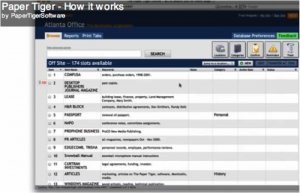
It’s the 21st century, afterall. Why should you use methods that are cumbersome and costly in terms of time and money? Indexing is the answer!
No longer will you have to waste hours looking for or recreating that lost document. You can simply conduct a search in the software’s database and instantly you know exactly where the searched file is located.
There are many advantages to an indexing system software:
Indexing is the best choice and the secret to a better and more efficient filing system. Try Paper Tiger Filing System Software for Document Management today!
~~~~~~~~~~~~~~~~~~~~~~~~~~~~~~~~~~~~~~~~~~~~~~~~~~~~~~~~~~~~~~~~~~~~~~~~~~~~~~~~~
~~~~~~~~~~~~~~~~~~~~~~~~~~~~~~~~~~~~~~~~~~~~~~~~~~~~~~~~~~~~~~~~~~~~~~~~~~~~~~~~~
This article by Stephanie Calahan, of Calahan Solutions and a Paper Tiger Expert provides us with numerous tips to get organized and get our life in order. I’m sure this will give you a clue as to the caliber of life coaching that Stephanie provides her clients. These tips include paper filing systems, getting organized in every area of your life, financial management, and getting your health in order. Stephanie recognizes, as we do, that different people need different tools to help with their daily lives. She lists different paper filing systems below, including Paper Tiger Filing System and Document Management Software, which she recommends based on her clients’ needs and the way that they work. She understands that every person is different and requires systems that work for them.
It is interesting to me that many entrepreneurs and business owners spend the majority of their time completely consumed by their business and totally neglect their personal affairs.
Many of my clients contact me to get their business organized, yet when we talk, they often admit that their personal affairs are as much of a “mess” or more than their business. They do not have systems for handling their most important areas of life. Their household papers are everywhere…piled in various corners and flat surfaces around the house. They are not sure where their hard-earned money is spent and they don’t have solid plans for the future.
Its true that they are busy. VERY BUSY! However, sometimes they are so busy that they lose focus as to why they started their business, doing what they do, in the first place. When I ask “Why did you start your business?” I generally hear it is because they wanted more freedom to live a life they define. They wanted to make more money so that they have the ability to have more choice in life.
If you do not have your personal life in order, you may not be getting all of the benefits from your hard work! Now is the time! Now is the time to let go of the excuses that you don’t have time, are too tired or don’t know how. Here are a few tips to get started:
Your paperwork likely consists of three types of paper: 1) stuff you need to take action on 2) stuff you are saving for reference and 3) stuff that you should have tossed a long time ago, but haven’t.
This is the system that manages all of the papers that are on your counters and other spaces that you have out in the open and in piles because you don’t want to forget to do something. Then use the system. Read, sort and process your email and snail mail daily. Avoid backlog. Also, when you come across papers that are date driven, make sure to add an entry to your calendar/planner to remind you to do things. This system is the perfect location to store all of the bills you have yet to pay.
Did you know that the average person wastes 150 hours a year just looking for things? Imagine what you could do if you weren’t searching! An effective reference system is one that you use consistently because you trust it. You trust it because it is easy to use and you can find information with ease when you need it. Different systems are going to work better for different people, so make sure you set up something that works for you. This system is a great place to store all of the bills you have paid. Here are a few for you to consider:
If you would like to go paperless with your home filing, this is definitely the tool to consider! I have the honor of being on the advisory board of AboutOne and I love how this company really listens to your needs. AboutOne was designed by moms and dads for moms and dads to make managing all that household information fast, fun, and easy. With just a few clicks, your information is stored with bank-level security, and all your posts can then be combined or mixed together in new ways, saving you time on everyday chores like creating family newsletters, scrapbooks, hardcover photo albums, and creating and mailing holiday cards, or completing school forms, college applications, caregiver instructions, and tax returns. I personally LOVE how easy it is to manage all of the complex medical information we have in our family. AboutOne.com’s patent-pending service takes just seconds of your time and helps you save time, save money, and be prepared. You can sign up for a trial account here: http://www.aboutone.com/.
I have been a happy Paper Tiger user for years. If you don’t want to go paperless, but you want an easy way to find anything in 5 seconds or less, then this is the tool. The tool gives you a powerful index search — like how you would search on Google — that allows you to find your information fast. However, you can use this tool for much more than filing paper! Anything that you can number you can put into the system. At home, we have “paper tigered” books, CDs, DVDs, binders, storage bins, and more. We love this tool because it does not matter how different my husband and I might reference information (for example, I might say Insurance-Car and he might say Country Insurance) we can find things with ease using the fast find button. Your information is secure and backed up too. You can sign up for a free Paper Tiger Online account at Paper Tiger’s website.
If you like the idea of a color coded system, then you might consider the FileSolutions Home Filing System. The Home Filing System includes a booklet to guide you through the filing process by helping you select the appropriate files for your home. You can build 80-100 files for your home & family items using the pre-printed, color-coded labels for both vertical files and 1/3 cut file folders. The categories include: Personal, Financial, Taxes/Insurance, and Lifestyle. In addition, file your important papers & find them again using FileIndexTM. With this unique system, you can index over 350 items. It will be the first and last place you look when you (or another family member) need to find something. Note, folders & hanging files not included. This tool is great for simple household filing. Consider one of these great paper systems from OrganizedAtoZ.
80 percent of what we keep, we never reference again. I see that theme repeat itself over and over again when I work with clients and help them through their decisions. If you have a hard time figuring out what to let go, consider using the DART system. If you would like a summary of what to keep and what to let go of for your home, get our Residential Record Retention guide.
If you are looking for a simple money management system, consider www.mint.com . This tool is very user friendly and allows you to know exactly what is going on with your finances. You can set budgets and alerts that email you when you are off track. You can also get very user friendly graphics to show you where your dollars are going.
If you have an iPhone, you will also love this app http://itunes.apple.com/us/app/mint-com-personal-finance/id300238550?mt=8
It goes without saying that debt can be a weight that drags you down for the length of time you have it. For some, they spend more time thinking about the mounting debt than time on getting things done. Eliminate your debt. The most popular method for revolving debt is the debt snowball method. There are many sites and smartphone apps that can help you with this. Many of them let you prioritize debts and see estimated times left to pay off each debt. They let you plan payments and view progress as you shrink what is owed. Many will also estimate the date you will be debt-free, so that you can see the light at the end of the tunnel. I was reading an article on Mashable.com the other day that suggested this one was one of the better ones on the iPhone.
Most banks now have the ability to set up automatic bill paying. Consider setting up automatic payments for all of your regular bills. Your bills will be paid on time and you will save loads of time.
By reviewing your situation on a regular basis, you are able to stay on top of any problem areas and make strategic decisions quickly.
There are a number of outstanding professionals in your local area or on the internet that share helpful information on wealth creation. Attend classes or read books. Become informed. The better knowledge you have, the easier it will be for you to make decisions and have confidence to take action. Here is a great article on CBS about Organizing Your Finances in 5 Days: How to Quickly Get Your Financial House in Order in 2011.
We hear this all of the time, but it still holds true. Do you have some medical concerns that you have been ignoring? Find a professional that can help you get better. Need to eat better or exercise more? Create a system to make it happen. The healthier you are, the easier it is to manage every day activities. The longer you let “small” medical concerns slide, the faster they can become “big” medical things that tax you, your family, and your finances.
“The foundation of success in life is good health: that is the substratum fortune; it is also the basis of happiness. A person cannot accumulate a fortune very well when he is sick.” ~ P.T. Barnum in The Art of Money Getting
There are a number of sites that are all over the net to help you and a nutrition/exercize coach can also make a huge impact. Here are a few iPhone apps that could be of benefit too: Get in Shape: iPersonal Trainer or FitnessFree or CrunchFu. If you would like to quit smoking try: Quitter or MyQuitCoach.
If you take control of your personal concerns, you will have more confidence and peace of mind that the right things are happening. It is important to learn how to manage your time effectively and get organized so that you can focus on the most important things in your life. If you don’t, you will not be any further ahead next year.
One of the sayings that floats around frequently are:
Some people make things happen
Others watch things happen
Still others say “what happened”?
Who do you choose to be?
If you’re not sure how to get your business or life organized so that you free up your time, make more money and experience life, I encourage you to take action and contact us for a telephone strategy session. Why be time-pressed and struggle when you can easily get more done with less stress?
About the Author:
Stephanie Calahan is The Business Vision Catalyst and founder of Calahan Solutions, Inc. She works with purpose-driven entrepreneurs, visionaries, coaches, consultants, health practitioners, authors, speakers and all sorts of remarkable service professionals who are experts in their field, to help them embrace their brilliance, leverage their business and get their message out with power, ease and joy; so that they can make a powerfully positive difference in the world, exponentially grow their income and enjoy a highly-successful and meaningful business… while working less. Learn how you can have more freedom in your life! http://www.StephanieCalahan.com

Many people think that all that teachers do is teach our kids the things they need to know in order to be able to graduate and go on to college, or get jobs. They do not realize all of the little things that teachers do in order to be able to teach their classes. After all, lesson plans don’t just appear out of thin air, and tests don’t make themselves up. Teachers have to create their own lesson plans, create tests and exams, grade tests and other assignments and keep track of those grades, and so much more. Often, you will find quite a few filing cabinets in a typical classroom, and these are filled to capacity with all of the things that teachers have to deal with every single day. This is a really good reason why teachers should switch to a much easier form of paper management, such as that offered by Paper Tiger Filing System Software for Document Management.
If you are a teacher, you know all too well how much paperwork accumulates on your desk in the course of a day, and at the end of a week, you may even be buried under all of the paper files that you know needs to be filed away, but how to file for easy retrieval is mind-boggling. You may think that a file management system such as indexing software for filing is something that is just for businesses, but it is something that can really make your job a whole lot easier and free up a lot of your time. You can eliminate a lot of the clutter from your classroom, and your mind, so you are free to do what you really want to do: teach.
Some of the things that you can use this system for include:
Paper Tiger Filing System Software is an excellent tool for teachers and professors who want to free up their time and space. Because this is an indexing system and not a scanning system, you will still be able to keep all of your original paper files. You can keep what you need, and toss what you don’t. This filing system software is designed to save you time and effort when you are ready to either file or retrieve your paper files. You simply indicate where that item is stored and assign it a series of relevant keywords. Then you never need worry about misplacing a file again. When you need to find something in a hurry, you won’t have stacks of paper files to go through or have to remember what name you put on the hanging file folder tab, because you can find it with just a few keystrokes on your computer.
The next time you are trying to find something in a pile of papers, perhaps a test that you want to hand out to your students the next day, and are ready to give up and make a new one because you have so much to go through that it is overwhelming, consider implementing a different sort of paper filing system that will save you a lot of time. If you’re filing the old-fashioned, alphabetic way without Paper Tiger Filing System Software for document management, you’re working too hard!
Learn what Paper Tiger can do for you, and how it can make your life a whole lot easier.

Document Management – How Long Do I Have To Keep My Paper Files?
by Ramona Creel
At work, at home, no matter who you are or what you do — we are all bombarded with paper. Some days, as I help clients sort through their mail, I’m amazed that we have any trees left on this planet at all! Junk mail, bills, magazines, newspapers, memos, reports — it’s an endless source of stress. Things have gotten so bad that we’re developing a new fear in our society — “paperphobia,” the fear of having to deal with that stack that’s been sitting there for a week. But a good document management system is the key to overcoming your paper-induced worries!
Thinning The Herd
Remember the first rule of clutter — “the less you have, the easier it is to organize.” The paperless office is still a long way off — I can’t guarantee that you will ever be able to eliminate paper from your life completely, but you can certainly reduce the size of the piles. Let’s start by going through your old files and doing some cleaning out. I believe strongly that if you don’t have a good reason for keeping it, get rid of it — but a lot of folks are afraid to ever throw a document away because they might need it again “someday.” How do you define “someday?” I suggest that my clients ask themselves some basic questions about why they are keeping their paper:
That last question leads us to the subject of purging financial and legal records. This is a sensitive (and somewhat scary) issue, because there could be some harsh consequences if you throw something out too soon. I agree that it’s better to be safe than sorry, but fear is a poor organizing guide. If you simply take the time to educate yourself about how long you are legally required to retain each document, you’ll never go wrong. Effective document management is all about having the right information and acting on that knowledge.
Records Retention Guidelines
In recent years, an entirely new field of study called “records management” has arisen — dedicated to helping people understand how long they must keep certain documents. Based on the information gathered by this industry, I have compiled standard schedule for purging your files. But please understand that this is a complicated issue (especially in today’s litigious society), and each situation is unique. Many professions set their own legal guidelines for records retention, and you may have some unusual or extenuating circumstance in your life — so check with your accountant or attorney before pitching out any important legal, business, or financial paperwork.
You must keep the following documents forever (yes, forever!):
Businesses are held accountable to a much stricter set of rules than individuals. In addition, specific industries set their own legal standards, including but not limited to healthcare, insurance, law, etc. In addition to the items listed above, all companies should create permanent files for the following, but be sure to ask your professional association for any additional policies for record management and retention.
Hold onto the following paperwork for six years. The IRS may go back 6 years to audit your tax returns for errors or incorrectly claimed deductions, so it’s important to keep all tax-related documents.
Keep these records for three years:
You should retain these records according to the following guidelines:
Safely Disposing Of Paper
Just because you cleaned it out, does not mean that it goes in the trash! Did you realize that once you put something in a garbage can at the curb, it becomes public property? And reports of identity theft are increasing every day. When someone else gains access to your personal records (social security number, tax id, drivers license number, address, bank account information) and pretends to be you, the results can be disastrous. Using your identifying information, this person can take out loans, run up credit card bills, and run up a tremendous amount of debt — all in your name. And most times, you never know until you get the collection letter. It can take years to clear up the legal and financial problems this causes you, and it can temporarily ruin your credit. Proper document management is synonymous with safety.
So to protect yourself from this threat, be sure to dispose of your important records properly. Any piece of paper that contains account numbers, your social security number, or any other sensitive information should be shredded. If you only have a small amount of paper to destroy, consider visiting your local office supply store to pick up a personal shredder — they run as little at $20 or $30. If you generate a large quantity of “shredable” paper, or just don’t want to sit there feeding in one page at a time, think about using a mobile shredding service. These companies will come to your home or office and shred your documents on-site for a fee. Just be sure that you choose a reputable company that provides you with a certificate or letter guaranteeing that your paper has been shredded unrecognizable.
Welcome To The Digital Age
In order for your filing system to be truly effective, it should really have two components — a paper side combined with electronic document management software. Software such as Paper Tiger Filing System Software for Document Management is designed to save you time and effort when you are ready to either file or retrieve your paper files. You simply indicate where that item is stored and assign it a series of relevant keywords. Then you never need worry about misplacing a file again. Simply search by the name of the document or one of the keywords and voila! If you’re filing the old-fashioned way without document management software, you’re working too hard!
About the Author
Ramona Creel is Professional Organizer, NAPO Golden Circle Member, and the original founder of OnlineOrganizing. A former Social Worker, she has always enjoyed helping people find the resources and solutions they need to improve their lives. Ramona now travels the country as a full-time RVer, sharing her story of simplicity with everyone she meets. She leads by example — having worked for more than 10 years as a Professional Organizer, and having radically downsized and simplified her own life as a full-time RVer. Ramona now considers herself a “Renaissance Woman” — bringing all of her passions together into one satisfying career. As a “Virtual Organizer”, she can create a customized organizing plan for your home or office. As a “Simplicity and Accountability Coach “, Ramona provides a proven program for making every area of your life a little bit easier — perfect for those who want to make the time and space to focus on their true priorities. As a Professional Photographer, Ramona captures powerful images of places and people as she travels. And as a freelance writer and blogger, she shares organizing techniques, travel tips, and social commentary with others. You can see all these sides of Ramona — read her articles, browse through her photographs, and even hire her to help get your life in order — at www.RamonaCreel.com. You can also follow her on Twitter, check out her Facebook profile, and subscribe to her blog feeds.
Read this article by Stephanie Calahan of Calahan Solutions and a Paper Tiger Expert for statistics regarding how much misfiled and lost paper files cost you. Stephanie also recommends Paper Tiger Filing System and Document Management Software in her Office Miracle to be able to find your files when you need them!
~~~~~~~~~~~~~~~~~~~~~~
The other day I was doing my file clean-out, (yes you really should go through and see what is still relevant!), and I came across some statistics that I thought you might be interested in. Implications could make or break your business!
Companies typically misfile 2 – 20 % of their records. (Source: ARMA International)
Large organizations lose a document every 12 seconds. On average 7.5 of the documents are lost forever! (source: ARMA International)
90% of all workplace docs are still on paper; 30% of the average workday is spent searching for that info! (source: Assoc for Info & Image Mgt)
The average office spends $20 on labor for filing each document & $120 searching for every misfiled document! (source: Coopers & Lybrand study in Inc Mag)
The average office loses 1 out of 20 office documents & spends $250 on document re-creation! (source: Coopers & Lybrand study in Inc Mag)
Wow! Do you have processes in your business to make sure that these statistics are not representing you too?
Also see this article “Did You Know Paper and Other Things in Your Office Hold Emotion?” by Stephanie that you should find helpful when deciding what to file or not.
About the Author:
Stephanie Calahan is The Business Vision Catalyst and founder of Calahan Solutions, Inc. She works with purpose-driven entrepreneurs, visionaries, coaches, consultants, health practitioners, authors, speakers and all sorts of remarkable service professionals who are experts in their field, to help them embrace their brilliance, leverage their business and get their message out with power, ease and joy; so that they can make a powerfully positive difference in the world, exponentially grow their income and enjoy a highly-successful and meaningful business… while working less. Learn how you can have more freedom in your life! http://www.StephanieCalahan.com
~~~~~~~~~~~~~~~~~~~~~~~~~~~~~~~~~~~~~~~~~~~~~~~~~~~~~~~~~~~~~~~~~~~~
~~~~~~~~~~~~~~~~~~~~~~~~~~~~~~~~~~~~~~~~~~~~~~~~~~~~~~~~~~~~~~~~~~~~
Do you have trouble keeping things organized, especially all of the paper files for your small business? Is this problem flowing over into your everyday life because you just can’t seem to get organized at all, and it is starting to affect your life and your business?
Well, maybe you should look into getting professional help. No, we are not talking about psychological help, but help getting all of your business paperwork organized so you can find anything you need whenever you need it, quickly and easily. This is a great way to declutter your office, and in a way, your life as well. Because, if your work life is cluttered, you will probably bring this clutter home with you (at least in your mind, because you are worried about finding things), so your life may end up becoming quite cluttered, also.
A lot of business owners rely on using the traditional method of alphabetical filing for all of their paper files. This is okay, to a degree, but it does require quite a bit of maintenance, and it is not a job that you can always find people to do willingly. After all, filing it is pretty boring. Also, people tend to think differently about files from one day to the next, so it is common to have to look in different places in your filing cabinet to find the right title in which you filed it previously. So, instead of drudging through files all the time, or making one of your employees suffer through the task, why not consider going to a different method of document management, such as indexing using Paper Tiger Filing System Software for Document Management. This software is easy to learn how to use, so you should have no problem learning everything you need to know in half an hour or less.
Another bonus to using the Paper Tiger is for archiving old files. For instance, if you do like to clean out your hanging file folders every so often and get rid of old things you do not need or send them to a storage facility for those you have to keep for a certain length of time, how to archive using this paper management system is simple, and you’ll be able to track where they are in the event you ever need them again. You can even set an Action Date to remind you when to toss them or take additional action on them.
You can also use this filing system software for managing things other than your paper files. If you have books, binders, CDs, DVDs, items in storage containers or a storage facility, or any kind of collectors items or inventory, they can also be cataloged using this filing system.
When you sign up to use Paper Tiger Online Filing System Software, you will be ready to start using the software in under a minute. If you ever have any questions, there are videos, online help, frequently asked questions and the Paper Tiger Knowledge Base, so you are never without resources for learning. There is also online chat available, so you can have your questions answered within minutes.
It is estimated that people waste 150 hours per year looking for lost items. Indexing your paper files and all your other physical items will save you a lot of time and money that can be used for other areas of your business. De-clutter your business and your life when you take advantage of all that Paper Tiger Filing System Software and Document Management has to offer.
By Denise Landers
Key Organization Systems, Inc.

If you do not have vacation time blocked off on the company schedule now for the end of the year, do not despair. It seems everyone wants to have the holidays off, yet when we submit our annual vacation request, we may be turned down. If you are glum over the prospect of limited holiday time off, console yourself with what you will actually be facing:
Throughout the year, it is easy to be swept up by the crisis du jour. You may be responding to constant interruptions, multitasking all the time. There is often no opportunity to pause for thinking and planning. More involved projects get set aside for a “better” time when you can concentrate. Many times these delayed activities are the most “important” projects, the ones that will actually make a difference. However since they did not have a deadline or an “Urgent” tag attached to them, they were shuffled aside.
Here is your chance to catch up. Rather than joining the throngs at the airports, jostling through overcrowded stores, or fighting for a spot on the lift line, enjoy the opportunity that is presented to you in the office.
What can you do that would make you feel energized for the new year? After catching up on key projects, look around and see where organizing could help you be even more productive. Areas to examine:
Daily Systems: Do you have an effective system for handling all of your daily incoming items? A good system will allow you to easily prioritize each day and ensures that you will never overlook and opportunity or miss a deadline.
Desk: Only what you use on a regular basis needs to be close to you. Remove the accumulation from the past year.
Email: When was the last time you zeroed out your inbox? Set up folders both for daily action items and for reference files.
Filing: Are your file folders stuffed and drawers overflowing? Clean out unused, unneeded items. Do you hesitate to file anything because you will never find it again? A good program to help with that is the Paper Tiger Filing System Software for Document Management.
When you find yourself at the office during those holiday lulls, enjoy the peace and look forward to another time when you really need a break. Hopefully it can be a time without peak fares, overbooked resorts, crowded slopes, and too many obligations. Meanwhile you are organized and ready for a productive new year!
Denise Landers is the author of Destination: Organization, A Week by Week Journey and the owner of Key Organization Systems, Inc. As a national speaker, trainer, consultant, and writer she provides clients and audiences with the time management training tools and techniques that improve daily work flow and increase productivity.
www.twitter.com/@timetrainer
Corporate Training: workshops and consulting to increase daily work flow and reduce stress
Individual Assistance: our onsite and virtual office organizing to bring about changes quickly
On Your Own: books and CDs to work at your own pace



