Based on a past American Express survey of small business owners, “getting organized” ranked among the top three priorities for new years resolution plans. Let’s face it, getting organized is one thing, but staying organized all throughout the year is another.
So if “getting organized” is such a priority for people, why do so many people struggle with this? We’re all flooded daily with information coming at us from many different directions. We save much of it because we believe we need it to do our jobs better or to respond to our customers more effectively or we might possibly need it again later. Having the information on hand is of little value, though, if you can’t find what you need when you need it. Getting organized and improving the functionality in how you work can start with Paper Tiger’s simple indexing system. Organizing information in such a way that can be found in seconds is liberating, and frees us to do other things.
The Internet has done wonders for improving our ability to find information. By doing a search of a few key words, we can instantly receive suggestions on where to find web sites containing the information we’re looking for. That’s fine if all you need is information from the Web. But what about the paper, books, articles, CDs and other information sources in your office that you’ve collected over the years? Wouldn’t it be great if you could find them as quickly as an Internet search engine can find web sites?
Actually you can! You can clear stacks of paper files and other clutter without worrying if you will ever find it again when you put it out of sight. Paper Tiger Filing System software is a great solution for managing information, and enables you to file and retrieve hard copy documents, books, CDs, and other items – literally anything that you can put a number on – by using key words. And because you have an index to search, you’ll be able to return the item where it belongs as quickly as you retrieve the item.
With traditional filing systems, you only have the one or two keywords on the file folder tab. But with Paper Tiger, you can input as many keywords as the file or item could be called or relates to, so you’re not limited to what fits on the tab.
As you create a new file, you simply type in one or more key words, (as many key words as you like), that come to mind regarding that file. The item number in your Paper Tiger database will match the number you place on the hanging file folder. (Or book, CD, box, or other physical item you’re indexing.) When you want to find it again, type in any of the key words associated with that file in the search box, and within SECONDS, your search tells you exactly where the item is located. Very similar to a Google search, except this search is your own personal indexing system.
Items you want to track can be divided into several locations – or groups of similar things – such as Action (your current project files or most active reference files), Reference (your less active reference files), Archive (your seldom used reference files that you need to keep for legal or historical reasons), Books, Magazines, Videos, CDs – whatever items you choose to store together.
Since Paper Tiger doesn’t rely on filing alphabetically, new items are indexed into the first available open file folder. For example, you toss documents from one file folder, that file is open for the next new document or set of documents.
Once you’ve indexed all the information by item name and keywords that you’ve input relating to each file or physical item, you can easily search and find. That makes it feasible to keep archived records off-site, perhaps in a storage facility, yet still know what’s in each container at all times.
When files need to be moved to archives, it’s a simple matter of transferring the items in the database to the new ‘location’ and then moving the physical files to the archives location.
Everyone including new hires with access to your database can conduct a quick keyword search, retrieve and return items – no worry – no hassle. You don’t have to rely on one single person to know where everything is, because the system can do the remembering for everyone, which saves time and keeps your business running much more smoothly and efficiently. Of course, this can also be applied to your home and family, as well.
Paper Tiger can also generate a file index so you can print out a list of all your files by name and keywords. The printed back-up allows for quick reference when the computer isn’t on.
Whatever your motivation for getting organized – whether it’s to save time, eliminate clutter, increase productivity, or just find a better way to retrieve information – Paper Tiger Filing System software is a great tool. Get organized today, and you will truly notice the benefits.

During this webinar, Nancy Hagan of Effective Day demonstrated how to get started with Paper Tiger Online. In addition to demonstrating examples requested during webinar registrations, Nancy demonstrated work-flow examples by filing items from her inbox to help you use Paper Tiger Filing System Software for document management more effectively to get organized and be more productive.
Nancy also presented how to organize things other than paper files, such as books, bank box, and storage boxes. She also demonstrated how the search from Paper Tiger Online works with the Digital Tiger function activated.
Please visit www.effectiveday.com to learn more about Nancy and the services she provides, and click here see her Productivity Coaching special. You can contact Nancy at 513 899-9949 or email at nancy@effectiveday.com
To learn more about Paper Tiger and Digital Tiger, visit www.thepapertiger.com
Q: How many separate locations can I have in each database and how many databases can I create?
A: if you have the free or Basic plan, you are limited to how many, but if you have the Pro plan or one of the multi-user plans, you are basically unlimited as to locations within a database and how many databases you can have.
However, you would only want multiple databases if you do not want to search across them because Paper Tiger only searches within the database that you’re in. It does not search across databases. Having different databases is only advantageous if you want to keep different filing systems separate and do not want to search for all files in all databases at one time. For example, if you have an Office database and a Home database, you do not want items to pop up from your Office database when conducting a search for an item in your Home database.
Q: Please explain what Categories are for.
A: “Category” is a word or words you may use to classify groups of related folders or items. Paper Tiger allows you to file information physically one way, but easily organize files virtually in a totally different way using Categories.
For example, you may use the Category “Benefits” to classify the folders relating to “Stock Options,” and “Day Care.” The Category, “Bills” may include “Utility bills”, “Car repair bills” e.t.c. The Category “Self-Help” might include all your books that relate to self-help or motivation.
Q: So when I assign Categories to files, the files become searchable by Category and keywords?
A: The category title you assign is not searchable, but there is a button for Category (beside the Location button) that you can click on and Paper Tiger brings up a list of your Categories similar to your Locations list. You can then choose the category you want to see all the items that you’ve assigned to that one.
Q: Oh also when you are in the Categories list, and you click on the category that you want to see all the items, can you search within that?
A: No, when you search from the search bar, Paper Tiger searches all of the database, not just within the category you’ve chosen. However, once search results come up, you can sort by the Category column.
Q: After you set up a Location, you say you might add 200 items. I would assume those items are files in the drawer. Can you branch off one of those items to say in this item there are these files? I’m confused as to after you add the 200 items or hanging folders, how do you say what is in the hanging folder if there is say 10 different papers in the folder that deals with that hanging folder.
A: The 200 items would coincide with the hanging file folders in your drawers. You can add keywords for each item in Paper Tiger that relates to as many documents that you have in a single hanging file folder. So if you have 10 different papers in a single hanging file folder, you would input as many keywords as necessary relating to the 10 different papers. That being said, if your hanging file folder contains your monthly cable bills, you would only need keywords for the entire folder not necessarily for each monthly bill unless there is something that you want to remember about a specific bill.
Q: What if in the hanging folder there are 2 manila folders that deal with the one hanging folder, but are separate from each other. Is the only way to say what is in the hanging folder in the keywords or can you have a tree that has a title for each manila folder, then you can say what is in each manila folder so you know they are in the same hanging folder, but separate from each other?
A: What I do in this instance, is number each manilla folder, and then when inputting keywords for each, I would for example, Item Name might be Paper Tiger Training and manilla folders would be numbered to coincide with the number I input into the keywords section, i.e.: 1. Paper Tiger single user instructions, 2. multi-user instructions, 3. database information, 4. etc.
Q: How does Paper Tiger compare to Evernote?
A: Evernote is a different kind of tool in which you can save notes, ideas, things you like, hear, see and other things that you want to remember or have in one place.
Q: Would the digital files feature work with Microsoft Live accounts (SkyDrive)?
A: No, our Digital Tiger function connects Paper Tiger Online to Google Docs or Google Drive through a Google app or Gmail account. Click here to go to our blog post for how to get started with Digital Tiger, where you can view 2 screen casts that show how Digital Tiger works and a demonstration of using the Fujitsu ScanSnap 1500.
Q: What is the name of the scanner you mentioned?
A: Fujitsu ScanSnap 1500
Q: Do I need to hit save after I edit something and if so, where is the save button?
A: In the Edit box, you do need to save your changes. You should see Save Changes button in the lower left corner of the Edit box.
************************
Nancy Hagan of Effective Day, works with business people who want to be more effective and productive, focus on their highest priorities and be free to do what they do best! Effective Day provides Organizing and Productivity Coaching, Consulting, Workshops and Products for busy people who want to make the most of their day and enjoy their life.


If you have your own business, you realize how difficult it can be to keep things organized and in order. Paperwork alone can be a real nightmare, but Paper Tiger Filing System Software for document management, not only can you finally get all your paper files in order, but anyone in the office can find them.
Using Paper Tiger, you never have to worry about whether to file a paper under “Smith’s dog care,” or “Fido dog walking schedule” again, and solves the many problems with filing such as:
The best thing to consider is using document management software as your ultimate tool for a filing system. The great news is that Paper Tiger can be used for more than just your paper files, but start with the paperwork part of your business. This is often the most important aspect of your business because it affects you, your clients and even how you get organized and prepare for tax time reporting.
Consider how the alphabetical method filing system would work. You would have to make sure everyone who might need access to the document would be in agreement with the labeling system and then make sure you had everything in the right alphabetical order. One simple slip and you could spend a lot of time searching every file of every drawer in all of your filing cabinets looking for one single piece of paper.
You can index the document into Paper Tiger’s database with any item name you want without any worry about finding it later, because the system will allow you to add as many keywords as you want to describe all documents that you put in your hanging file folders. For documents that you want to add to the same file, simply edit the Item and add additional keywords necessary for the new document(s).
Because the hanging file folders are already set up numerically and waiting for your documents, you eliminate the time-consuming hassle of having to find and create a file folder each time you want to file something.
When you’ve indexed your paper files or other physical items into Paper Tiger, and you need to find an item, you simply conduct a Google-like search in the database and Paper Tiger will let you know where the needed item is located, then no matter what someone types in to search for the Fido Smith dog care and walking schedule, the answer will appear based on the keywords entered previously. Find that file number and you have your paper without even having to think about putting it in alphabetical order, or what you would have put on the file tab.
So after you have your papers in order, you realize that you and your staff waste a lot of time finding things you need relating to the business, such as inventory or office supplies. Now you can use your document management software to keep track of the bin number you keep extra flea collars in, the box number where your back stock for leashes is and even if you have those personalized dog beds in your business, home or at some offsite storage unit.

Below is another example of how to use Paper Tiger to index and organize your CD’s, and can be used to implement the same concept to index your office supplies or inventory or your books or any other physical item that you can put a number onto:
1. Name a Location CDs, with capacity of 100 (you can increase this later if you need to) Then print labels for the 100 items ready to affix onto each CD as you index it.
2. Begin indexing your CDs individually by adding a new item in this Location. I would name the item by the name of the movie or topic or singer of the CD, and continue with something like the following:
-Item Name: (name of the movie or topic or singer of the CD)
-Keywords: (actors/speakers, length, rating, brief description)
-If you have Professional or Pro edition, you will be able to apply a Category to the item. If so, add new category for either drama, fiction, comedy, historical, etc. (as info, the Basic edition does not have the Category function) If you have Basic, then you can add the category to the keywords section as well, then when you search for a specific category, Paper Tiger will bring up all of the CDs that you’ve indexed with that category, which is basically the same thing that would happen if you were to select the Category drop down box in Professional or Pro.
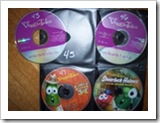
3. As you index each CD, affix the corresponding label to it and store in your new place. As you’ll see in this picture below, both the CD and the CD jacket are numbered so when you search Paper Tiger, you can go to the corresponding CD jacket number, and you’ll also know to match the numbers when replacing the CD.
The bottom line is that if you can put a number onto an item, you can index it into Paper Tiger… then whether the physical items are paper files, boxes, bins or books, etc., type in a keyword for an item the same way you do with an online search engine, you can find it. Start making your organization system work for you and your entire office by using Paper Tiger Filing System Software for document management and get organized today!

This year, stick to the resolution to declutter your life by getting truly organized. It’s probably a task you have been putting off for ages because it seems like such an overwhelming task, yet can be such a simple thing to accomplish. It’s all about taking the first steps to get started. The first step is making the commitment to clear the clutter in your home, office or personal space, so that your life will begin to be less stressful and productive. Before you know it, you’ll actually have more time for yourself.
Eliminate the frustration you experience every time you try to locate an important document and cannot find it amidst the disorganized mess acting as your “filing system.” We receive calls and emails all the time from people telling us that they have stacks and stacks of files that is causing more stress than it’s worth and need help getting organized. Paper Tiger Filing System software helps companies, non-profits, government agencies, professionals and individuals all over the world get control of something they hate…filing the paper on their desk & in their office, and can help with the life-cycle of document management, but it’s Not Just For Filing Paper.
Reduce the stress and anxiety you are probably feeling without even realizing it from having your home or office in disarray. Make this year the year you completely organize your life.
To stop the overwhelming feeling of getting started with a serious organizational system, start by making a plan of action — a step-by-step list of what to do and how to do it. Set goal dates for each step of your organizing process, and schedule time on your calendar for each step.
Working with paper files, documents and other items that traditionally get put into a filing system, you can start by going through one stack at a time, and decide what needs to be kept, which of these files are actionable and which ones just need to be filed for future reference, and which items should be tossed. Then index the paper files by typing in any possible keywords that could be used for each file so you can retrieve the item when needed by conducting a Google-like search in the database. Paper Tiger will assign a file number for each hanging file folder to match the item number in the database. You can add to those items in the database by simply editing the item and adding any new keywords relating to the new document being filed, and place it in the correlating file folder.
Of course for some people, the only way to make it happen is scheduling the time on the calendar, and simply diving in and getting the job done.
Whatever approach works for you is the best way to start, but just make sure to actually get started. By making and committing to a plan, you ensure that you will stick to your resolution. Please also take a look at our article Customize Your Filing System with Paper Tiger’s Indexing Method to help you see the filing system possibilities.
Using a document management system is the best way to get and stay organized. The great thing is, you can use this same type of organizational system for things other than paper filing. Typically, you use an indexing system to control your document management system, but this same method can be used for almost anything causing clutter in your home or office. If it can be cataloged and numbered, it can be organized by using Paper Tiger’s indexing system.
If you want to organize other items in addition to paper files, you can start by separating these things into boxes or bins, whatever is appropriate for the types of things that you’re organizing. Using the same approach as with your paper files … go through the items and decide what needs to be kept and which items should be tossed, given away, or collected in a box for a yard sale.
Whether it is your DVD collection, books, even your seasonal decorations, you should use this opportunity to get rid of or sell the ones you no longer need.
From here, you use the indexing system to type in any possible keywords that could be used for each physical item you’re indexing so you can retrieve the item when needed by conducting a Google-like search in the database. You would affix an item number label to the item or box to match the item number in the database.
With Paper Tiger Filing System software, you have a document management system that will enable you to finally declutter and live an organized life. You will be able to find what you need, when you need it and be more productive, less stressed and have more time for yourself in no time!
It is that time of year again to get ready to clean out and dispose of those files and records you no longer need. Document management is an important tool for getting and staying organized, and keeps your filing cabinets from getting too full and over-flowing. Of course, much of it depends on whether you are cleaning out your filing system for your personal life or professional one. Either way, using an indexing filing system like Paper Tiger Filing System Software for document management, will help make your document review, tracking and disposal that much easier.
The important thing is to realize what documents you should keep and which ones you can dispose of. Income tax statements for example, should be kept forever. While you should keep supporting documents like receipts in case of an audit, for a minimum of seven years, the actual filings should be kept for good. Other records to keep indefinitely include anything of a legal nature and for businesses, all of your financial records.
There are some things you should keep for around three to five years. See articles at Records Retention: How long should you keep records? to assist you in making your personal records retention policy. Getting your paper files in order for proper document management is an ongoing process, but setting up your filing system so that it is easy to maintain will help you carry forward your momentum.
In order to keep your paper files in order, you of course need to file them first so that you can find them later, because retrieval when you need a file is most important, but you should know when you will be cleaning out your filing system as well. If it is only once a year, mark that date on your calendar so you have a goal date to start and to complete this task. It is a good idea however, to make sorting through your documentation on a more regular basis than annually or set action dates in Paper Tiger for when specific files should be tossed or archived at certain times throughout the year. Disposing of records, making sure they are in the right place or making sure paper files added are indexed into the filing system software database should be done on an as needed basis.
Sure, you may know what a filing system is, but you may not be familiar with an indexing system. This is a way for you to keep track of what records you have and where you can find them. No more confusing file names or forgetting which topic you filed your papers under. When you receive a new document, you type the name and keywords of what it could be filed under into the filing system software database. For example, instead of just “car repair bill” as a file name, you may also put automobile maintenance, vehicle work or Audi repairs as keywords. If it is the result of an insurance claim, you may even use that and the word accident as keywords, too.
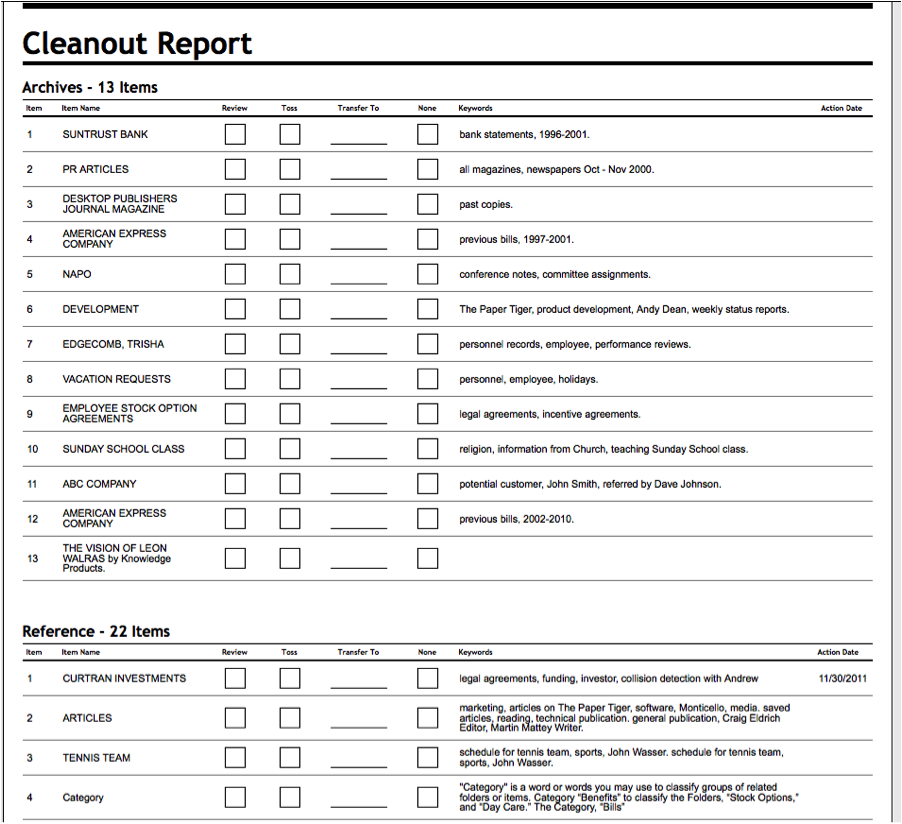
Once you enter the data, you put the paper in the corresponding numbered file in your filing cabinet. When you’ve converted your filing system to Paper Tiger, and you need to find a file later, you simply conduct a Google-like search in the database for whatever keyword you’re thinking on that day to find where your file is located. This also makes disposing of papers from your document management system easy. Instead of pulling out each file and shuffling through each paper to see if you need it, you can read the list of which papers you have and decide from your computer screen which to keep. Or you can print a File Cleanout Report from Paper Tiger to make the decisions ahead of time or for an assistant to complete.
Implementing Paper Tiger Filing System Software for document management will help put a stop to over-flowing filing cabinets, so you’ll be better organized and more productive.
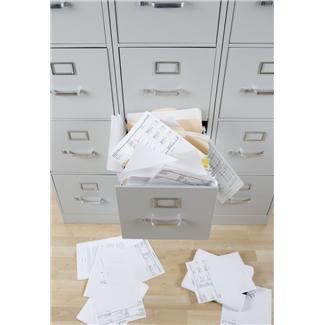
If you are one of those people who dreads tax time each year because of the hassle of getting your records together, it is time to put an end to that. It may not be tax time yet, but this is now the time to prepare and get ready for it. This year, make getting those tax records and other documentation a priority as well as a goal, and one you will accomplish. You make getting your records in order and keeping it that way by using a proper, efficient and effective filing system. Implementing Paper Tiger Filing System Software for document management will help you can carry the momentum forward once set up so that it will be easy to maintain your document management as well as be able to find anything in your office in 5 seconds or less.
Too many people keep their documents stacked up and unorganized which makes it difficult to make sense of or find the files when the need arises. For taxes and legal documentation, it is vital to keep these records well organized. Not only does it help for upcoming filings, it is essential in times of audits. Keep your past, present and future documents, receipts, and other crucial records so that you can file taxes, deal with audits or be prepared for subpoenas. The more organized your records, the easier this will be.
The best thing you can do for yourself is set up an effective indexing filing system. A traditional alphabetical filing system alone will still leave you frazzled and feeling overwhelmed. A lot of paper files are miscellaneous and difficult to think of that one or two word file name to put on the hanging file folder tab, so you’re afraid you won’t find it again if you file it. And the stacks just get larger. Or you forget that you’ve filed a similar document under one file name and so you create a duplicate hanging file under a different name. But once you set up your indexing system, your filing system method will be that much easier to use.
Indexing systems enable you to find all your records in a matter of seconds, saving you so much time and effort. You would first set up all hanging file folders in your file cabinets at one time using the numbered tabs that you print out from the software and they never change. You type in information relating to each document in the Paper Tiger’s database file location. Paper Tiger assigns the file number to the document or set of relating documents that you want to put in the same hanging file folder. You can give the document any name you want without any worry about finding it later. This is because the system will allow you to tag keywords that describe all documents that you put in your hanging file folders. For documents that you want to add to the same file, simply edit the Item and add additional keywords necessary for the new document(s).
When you’ve converted your filing system to Paper Tiger’s indexing method, and you need to find a file later, you simply conduct a Google-like search in the database for whatever keyword you’re thinking on that day to find where your file is located.
One thing very few people realize is how long they should keep certain records. Be it documentation for your personal life or professional life, you have to keep some of those records around. Of course, by using an indexing filing system, you can make a plan for how long your records should be kept, and when you know when the paper files can be tossed, it will be easier to declutter your life. There are certain documents you must keep and others which are optional and certainly up to what you want to keep and for how long. So when you know when a file could or should be tossed, then it will save you time in the long run.
Income tax returns and payment checks for example, should be kept, always. You should also plan on keeping stock records, retirement and pension records, as well as legal documents forever, just to name a few. Some records that you should hold on to for a minimum of six years are purchase records, supporting documents for tax returns such as receipts, and accident reports and claims. Again, this is just a short list from a wide range of documents you should keep filed away for at least six years.
For a three-year period, some records you may want to keep include credit card statements, medical bills and any expired insurance policies. Other records you should check on before disposing of. Of course you may also have documents you want to keep. Car records, for example, you would keep until you sell or get rid of the automobile. Also, things like property records should be kept, even for a period following the sale of the land or property.
See our other articles with specific lists for what you should keep and for how long under Retention Guidelines: How long should you keep records?
The bottom line is, when you get organized it makes it that much easier to stay organized. Declutter your life with Paper Tiger Filing System Software for document management to help make sense of it all. Don’t put it off any longer – simplify your life and organize your home or office by getting started on this project right away.

You may be starting your own new business, moving your office into your home or just ready to stop having to look through stacks of papers everywhere to find that one file you need. Whatever the reason, getting a filing system in place is a good idea. It will help you to get and stay organized. Whether you want a document management system for your personal or professional life, getting your papers in order can help you manage your life better and be more productive.
Getting Your Things in Order
More than likely, you want to declutter your home or personal workspace and get all those papers in files to make sense of it all. Most people still prefer the hanging files to use for document management. Depending on how many paper files, records and other types of documents you have will help you determine how many filing cabinets or drawers in your filing cabinets you will need.
Sort through all the papers you have and group them into different categories, to make it easier. While doing this you can also decide if there are any papers or records you can dispose of. When in doubt, it is always a good idea to keep a paper or document if you are not sure. Then, you are ready to file your papers. The best thing you can do is use an indexing system to do so, like Paper Tiger Filing System Software for document management.
By using an indexing system, you wouldn’t even necessarily have to divide your papers into different categories, unless you just wanted to.
You would first set up all hanging file folders in your file cabinets at one time using the numbered tabs that you print out from the software and they never change. You type in information relating to each document in the Paper Tiger’s database file location. Paper Tiger assigns the file number to the document or set of relating documents that you want to put in the same hanging file folder. You can give the document any name you want without any worry about finding it later. This is because the system will allow you to tag keywords that describe all documents that you put in your hanging file folders. For documents that you want to add to the same file, simply edit the Item and add additional keywords necessary for the new document(s).
For example, if you run a business, accounting records for a client, could be called “Bob’s finances,” “Bob Jones accounting records” or “work for client number 1234.” By doing this, you make it easier for you or anyone who may access your filing system to find what is you are looking for that much easier. If you forget you called the records “Bob’s finances” and are looking under your “J” files for Jones, it just takes longer to find your papers. Or, if someone who works for you is seeking those records, they may not have any idea what you called the records.
Whatever keyword you use to look for it, once you have it located on your computer screen you will know which file number to look in to retrieve it. When you’ve converted your filing system to Paper Tiger, and you need to find a file later, you simply conduct a Google-like search in the database for whatever keyword you’re thinking on that day to find where your file is located. So, instead of searching for hours through the alphabetized files or through stacks on your desk trying to remember where you put something, you look it up on your computer and simply grab that number file.
In addition, because the hanging file folders are already setup and waiting for your information, you eliminate the time-consuming hassle of having to find and create a file folder and tab each time you want to file something. Again, the software will assign an index number to each file you add to be put in the first available empty hanging folder.
If you are trying to get ready for tax time, you know how frustrating it can be to try to locate each receipt and slip of paper you need for filing. This is especially true if you are filing for both personal taxes and for a small business. Keep your accounting and financial records in order, for either your home or business. Getting a filing system in place and one that includes an indexing system means that employees or family members can also gain access to use the system.
Implementing Paper Tiger Filing System Software for document management will save you and/or your staff time because you eliminate the wasted time looking for information.
 or like this?
  Getting your filing system organized will benefit everyone in the office!
Have you ever been on the road traveling for business and discovered you needed a file from your office? If you have your own ‘unique’ file system, it could be a challenge to send someone to your office to look for what you need or try to tell your assistant where something is. Or even worse, your assistant is out sick or on vacation and no one else in the office knows where or how things are filed.
If you used an indexing system such as Paper Tiger Filing System Software for document management, you wouldn’t have this problem. You could give your assistant the information needed to quickly and easily find the documents you need, saving you not only time, but money as well.
Worldwide, thousands of businesses, government agencies, non-profits and individuals use The Paper Tiger software to manage their filing. They have discovered a filing system that uses the power of their computer to solve their problems with paper once and for all!
These organizations and individuals have found Paper Tiger software to be an invaluable tool to help them better manage their office and get organized to stay on top of the virtual mountain of paperwork that they must deal with each day. It is simply the best filing system available. You get all the power of the computer without the risks and time commitment of paper scanning!
An indexing system for your document management saves a company money and it saves time every year because you won’t have to waste a lot of time searching for files you need. Just think how productive your staff can be. It’s like having more hours in the day to accomplish necessary tasks.
Some managers want to ensure Paper Tiger document management software and filing system is the right program for their offices, and others want to be sure the money they spend is worth the investment. Let’s alleviate some of these concerns.
One question we’re asked often is what happens if my computer crashes or goes down. What will I do since all of the information is stored on the computer (for the desktop version)? There are a couple of ways to handle this. One suggestion is to print out a File Index report with all of the information that you’ve indexed into the database.
Another option is to do a back up of your entire computer and save it at another location. An external hard drive works well for this, and backing up your computer is always good practice.
For the online version of Paper Tiger, it is best practice to print out a file index report of your database in case your Internet connection is down for any reason. As far as your database is concerned, it is housed on our secure servers hosted by Amazon Web Services and backups are performed nightly.
For some, if not all companies, security and privacy is a huge issue. When your file folders are arranged by contact name, company name, or other pertinent information, it’s easier for someone to look in those files and access confidential information. When you use an indexing system that uses numbers, it isn’t nearly as easy for someone to locate sensitive data.
Training is another big issue for some companies. They need to make the most of their time and money. The Paper Tiger indexing system is easy to learn and it’s easy to train others to use. The more you use the system, the easier it becomes.
We’re also asked how we can say that Paper Tiger saves 150 hours a year when it takes so long to create the index? When you consider using an indexing system, you need to look at the entire picture. Yes, it will take time to create your index, but compared to the time spent searching for files, it takes much less time in the long run. And you’ll really be surprised at how little time it does take to implement Paper Tiger in your office. Start slow and work your way up to larger quantities of files. Before you know it, your entire office will be indexed and neatly filed in the filing cabinets instead of stacks and stacks of files on top of everyone’s desks! And your office will look more organized with less clutter.
An indexing system for document management is worth every second of investment and time spent setting it up. You’ll see the difference almost immediately. Once they get in the habit of indexing new files that come into the office, they won’t mind filing since they will know they will be able to find the file again with a quick search in the database and without a lengthy search through stacks of paper files on their desk.
You won’t have to worry about staff turnover or the one person in the office who does the filing being the only person who knows where everything is. A quick search in the database by anyone in the office will reveal where the file is located no matter who filed it under what item name.
After just a few days of using Paper Tiger, you’ll feel comfortable with it and you’ll wonder how you survived without it. You’ll feel better about your document management system and you’ll know you made a smart choice. Your employees will be more productive, you’ll spend less time searching for files, and you’ll spend even less time filing new documents or re-filing documents you’ve pulled, simply because you chose to implement Paper Tiger Filing System Software for document management.

Whether it is your home, home office, work space or personal gathering of collectible memorabilia, getting organized will reduce stress in your life and help you be more productive. An effective filing system method, like Paper Tiger Filing System Software for document management can help get your life in order, for both personal and professional. The problem often is, once you have a disorganized system, it can be difficult to get out from under it. Many people claim to have a “method to their madness” or that the filing system they have in place, with random papers stacked on every flat surface of a room, “works for them.” Truth be told, though, this probably isn’t true and they waste a lot of time searching to find what they need.
It takes more effort to deal with clutter and spending time trying to find documents and other physical items than it would if you had a system in place. Besides, if someone else had to work with that same system, he or she may not be as able to adjust to the madness. Also consider the stress having this type of home or office causes. Even if it is subconscious, people who live with clutter in their home or office life are reported to feel stressed out, depressed and generally overwhelmed all of the time.
So, let’s take an office filing cabinet system as an example. It’s already obvious the loose paper strewn around the room does not represent what a proper or useful filing system looks like. It is easier to start off organized, but even if you have already started to live in or work in a world of paper chaos, you can still change things and turn it around. Keep in mind, though, if possible, starting off being organized from the beginning will always make your life easier, as well as make it simpler to get an organizational system into place and then maintained.
Even if the office example has a fine set of filing cabinets with all the papers put where they are supposed to be, this can be a non-functional system. If you have filed papers under “auto” records but someone else is looking for “car” records or even “vehicle” records, it almost doesn’t matter how pretty the system in place is. When you use a document management software program, you can use keywords so that any one of these terms could be typed in to search for the location of a document. In a matter of speaking, it keeps everyone who has access to the filing cabinets and the filing system software on the same page.
If it can be numbered or indexed, it can become part of a filing system. This very same program you use to get your papers in your home or office in order can be used in your home to keep your storage shed in order as part of your effort to get organized. Imagine a life free of clutter and finally making sense when it comes to how things are organized. So, you keep tools in the garage, basement, the backyard shed and an offsite storage rental unit. Because of that, how will you have any idea of where to find what? By using a filing system like what is mentioned here, that’s how!
No more lost items! Doesn’t that sound good? All you do is take the time to enter the item names and keywords relating to the items you are organizing; indexing them into Paper Tiger’s database, whether it be paper, books, CDs, DVDs, collectors’ items or tools, or anything else you can put a number onto. Then when you need an item, you can conduct a quick Google-like search in the software database and find any of your belongings at the time you need them instead of having a time-consuming search from room to room. Implement Paper Tiger Filing System Software for document management and see for yourself how quickly you can get organized!

From the average household to a home based business to the person who is part or sole owner in a business outside of the home, we all generate tons of paper every year, building up in piles and stacks on our desks, in our file cabinet drawers and on top of various surfaces throughout the home or office. Things accidentally get thrown away because they just were not where they needed to be. Or, things get moved by one family or staff member while they are searching for their missing item causing someone else to have to go on their own seek and destroy mission when they need something that had originally been in that pile.
The need to manage paper documents is one that is more than just about organization, however. Paper can be a major problem in many households and offices because there are so many questions about it. What papers can be thrown out and which ones must be saved? How long do you have to save these papers? And worst case scenario, what will happen on the day you find out that you absolutely need one of those papers and you just cannot find it at all? Does ‘going paperless’ mean that you will get rid of all the paper in your life?
There are several different ways to manage and organize those paper documents. You can try to work out your own system, praying that you won’t forget your cross referencing system in the meantime. Or you can implement Paper Tiger Filing System Software for document management and get organized in every area of your life — not just paper!
Now there are other products that claim they will get you organized fast and easy, eliminating all of that paper mess in the process. Some of them rely on a scanner. But, what do you do with the papers once you scan them? Do you want to throw them away or shred them? They are organized, technically because everything is neatly scanned in and digitally stored on the disc or hard-drive or in the cloud app, but what happens if you need one of those documents for a tax audit or to file an insurance claim? Is your disc or digital storage space searchable? Would you be able to quickly find what you’ve scanned?
There is also a product that has several pockets and files so that you can hold the papers that you generate for a week, but what happens at the end of the month when you move the old out and bring the new in?
Thankfully, there is a better organizing tool that allows you to file all of your papers and other documents in one easy to manage and easy to update paper filing system. Organization in the home, the office or the home office does not mean just papers all of the time – in fact, you can use this same system for other items, items that are just too big or bulky to be included in the other types of systems that require scanning.
The system does not rely on scanning or trying to consolidate all of your items into a small disc. You can keep some paper files and scan what you don’t need to keep in physical format. You know where things are by conducting a Google-like search based on your input and referencing it in the system database. It is important that your paper files that you keep in hard copy format, and other physical items, be indexed into the filing system, so that anything you want to find later can be retrieved quickly with a simple Google-like search in the database. Paper Tiger Filing System Software for document management can help you get organized so that you can find what you need, when you need it – quickly!
And even better, Paper Tiger Online will soon be able to connect Digital Tiger to Google Docs which will allow you to search for both your physical paper that you’ve indexed and your digital files that you’ve scanned, uploaded or created in Google Docs! Yes, we recommend Google Docs for your cloud storage because it is the least expensive digital filing storage that you’ll find anywhere. You’ll be able to search for both physical items and scanned or digital files from one search. This will make your time management and productivity even easier to maintain!

From the average household to a home based business to the person who is part or sole owner in a business outside of the home, we generate tons of paper every year, building up in piles and stacks on our desks, in our drawers and on top of various surfaces throughout the home or office. Things accidentally get thrown away because they just were not where they needed to be. Or, things get moved by one family or staff member while they are searching for their missing item causing another person to have to go on their own seek and destroy mission when they need something that had originally been in that pile.
The need to manage paper documents is one that is more than just about getting organized, however. Paper can be a major problem in many households and offices because there are so many questions about what to do with all the paper that comes in. What papers can be thrown out and which ones must be saved? How long do you have to save these papers? And worst case scenario, what will happen to you on the day that you find out that you absolutely need one of those papers and you just cannot find it at all?
There are several different ways to manage and organize those paper documents. You can try to work out your own system, praying that you won’t forget your cross referencing system in the meantime.
There are other products that claim they will get you organized fast and easy, eliminating all of that paper mess in the process. Some of them rely on a scanner, sending all of your papers to a little computer disc. But, what do you do with the papers once you scan them? Do you want to shred them or throw them away or do you need to keep some just in case you need the hard copy again? They are organized, technically because everything is neatly on the disc, but what happens if you need one of those documents for a tax audit or to file an insurance claim? There is also a product that has several pockets and dividers that can hold the papers that you generate for a week or month, but what happens at the end of the month when you move the old out and bring the new in?
Thankfully, there is a better organizing tool, Paper Tiger, that allows you to file all of your papers and other documents in one easy to manage and easy to update filing system. Organization in the home, the office or the home office does not mean just papers all of the time – in fact, you can use this same system to get organized in other areas, such as items that are just too big or bulky to be included in the other types of systems that require scanning. The system does not rely on scanning or trying to consolidate all of your items into a small disc or having to keep purchasing other digital storage, such as external harddrives or cloud storage.
It is important that your paper files that you keep in hard copy format, and other physical items, be indexed into the filing system, so that anything you want to find later can be retrieved quickly with a simple Google-like search in the database. Paper Tiger Filing System Software for document management can help you get organized so that you can find what you need, when you need it – quickly! And even better, Paper Tiger Online will soon be able to connect Digital Tiger to Google Docs which will allow you to search for both your physical paper that you’ve indexed and your digital files that you’ve scanned, uploaded or created in Google Docs! Yes, we recommend Google Docs for your cloud storage because it is the least expensive digital filing storage that you’ll find anywhere. You’ll be able to search for both physical items and scanned or digital files from one search. This will make your time management and productivity even easier to maintain!

Organizing home libraries is a great way to display what you want, store the rest, but keep track of everything you own in your home library. Much of how you get organized for this area of your home depends on how much space you have for your books. Maybe you have just acquired or inherited a sizable amount of books or moved to a smaller space and have less to work with. It could even just be that you have stacks of books that are still unpacked from the last move and you are ready to get proactive in your organized living. Whatever the reason, it is time to sort through those books and make sure they are organized to prolong their shelf life, as well as your sanity, and Paper Tiger Filing System Software for document management can help you get your home library organized.
Why get organized when it comes to your book collection? Well, for one thing, it is easy to lose track of exactly what you have in your book collection. If you need to reference that home repair book but don’t know where it is, you may end up having to buy another copy.
Another reason to establish an organization system for your books is for your peace of mind. Clutter can be a real cause of the added stress you feel. Getting your life in order and making sure your collection is stored in a manner that will prevent damage, in addition to being able to actually find the book you need without having to search in different places can set your mind at ease.
Don’t forget also, your book collection can become a family heirloom, a collection of literary treasures to hand down to the next generation. Should something happen to you, it is good for your family to be able to have an understanding of the filing system you implement for organizing your home libraries.
To get organized when it comes to your book collection, the first thing to do may be to determine what you would like to keep on display among the shelves, and which books you might want in other rooms. For some people, this is a stock of books they refer to a lot, plan to reread or just like to have on display. This inventory of display items can also be rotated or changed on a regular basis, if desired. Or, when a new book comes in, it may be time to retire an older one to storage or another room in the home.
After you have decided what to display and what to file away, it is time to box up the rest or keep it filed in another part of the home. To keep track of what books go where, it is a good idea to use a filing system or document management software in which you can index your books based on the location you are displaying them. This will enable you to get organized enough to be able to easily look up which of your favorite reads are located on shelves in the home, which have been boxed up and put in a closet and even those books being stored outside the home or borrowed by someone.
After you have divided your books and decided where each stack will go, you can then start a location in the software database to match the physical location where each set of books will be located. Once you have named the first location, you can begin to index each book, similar to how you might file paper files, with the book title as the item name. Then add keywords with the author’s name and maybe some information about each book, and the shelf number or box number where you’re going to place the book. For each book you add to the respective location, the software will assign an item number to that book. You would then affix a label or mark the number on the book itself to match the assigned item number.
You can categorize your books in the software by book type, such as Cookbooks, Home Repair, Photo Albums, Marketing, Finance, Business, etc. When you’ve indexed all of your books, you will be able to conduct a Google-like search in the filing system database, and the software will tell you exactly where the book is located.
You can also print out an item list report with your list of books and where they are located, either by item number or alphabetically by book name.
Paper Tiger Filing System Software for document management can help you get organized so that you can find the book you need, when you need it – quickly!
This article by Denise Landers, founder and CEO of Key Organization Systems Inc. and Paper Tiger Expert, will help encourage and empower you to do something about the piles on your desk and get organized! Denise also recommends Paper Tiger Filing System Software and Document Management to help with your filing system and actually be able to find what you need, when you need it.

“Don’t touch my piles! I know where everything is.”
Do you have someone in your business who is accountable to you and who says that? If you do, you should be concerned. Chances are good this person is not nearly as productive as he or she could be because the piles have to keep shifting to locate information. However, there is another factor impacting business accountability. When the only person in a company who can find something needed is that person whose office it is buried in, there is no accountability within a department.
No one ever likes to foresee emergencies and extended absences. Even short, unplanned absences can be problems. While you probably know the general projects a colleague is working on, would you be able to easily fill in during two weeks of unplanned absences, knowing who they needed to call each day, and where they had left off on the current project? Would you be able to find important contracts and reports within seconds, not minutes?
If you are working with someone who looks disorganized to others, but who guards his or her piles of papers with the explanation that he or she knows where everything is, that person may simply have no knowledge of how to create an effective system for handling daily work flow. On another level, it can represent an effort to retain control and maintain job security because no one could take over amid the disorder.
Almost everyone today is working at full capacity in struggling to manage time effectively and get more done. Having to fill in for an employee who is absent without advance planning adds to the strain on colleagues as they strive to cover for that team member.
The next time you hear someone say that he is not disorganized, but that he can find anything amid the stacks in his office, consider the bottom line for your business’ accountability. That disorganization not only slows down an individual’s personal daily productivity, but can directly impact the company’s production efforts.
To achieve accountability, give your staff the training that will develop company-wide processes for handling work flow. While everyone has different duties, creating effective systems and then tailoring them for the individual job functions will allow you to cover for each other as well as increase personal effectiveness.
If you could use ideas on how to create effective systems for your office, our training CDs, The Productivity Series can guide you in setting up easy-to-implement systems for managing time, paper, and email.
Denise Landers @timetrainer
Key Organization Systems, Inc.
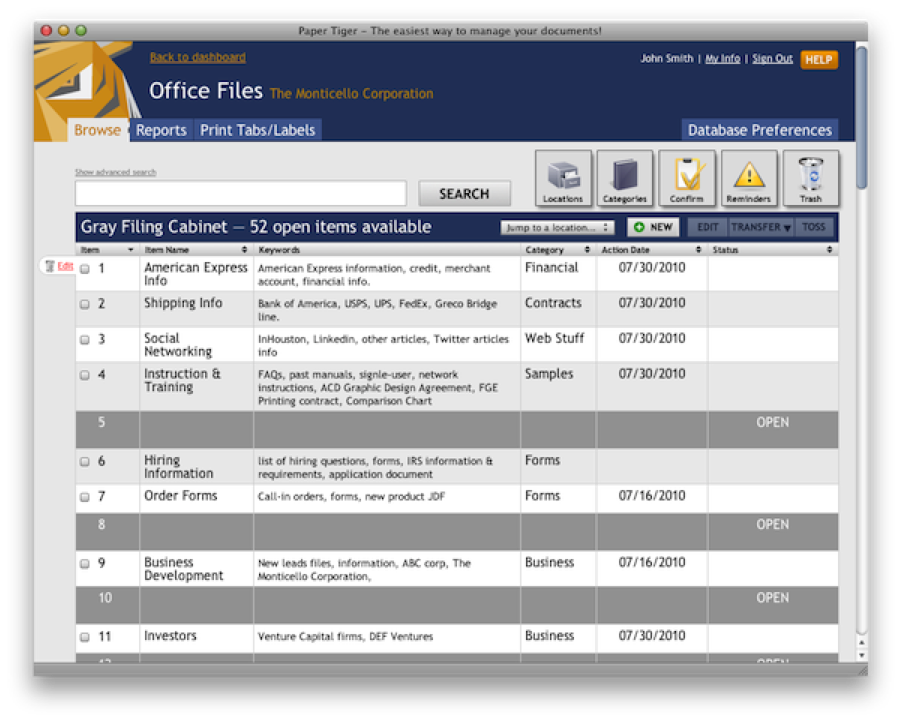
In 1998, we revolutionized the way the world files and manages paper by introducing Paper Tiger Desktop. The first product was based on a simple concept…enlist the computer to create an easy-to-use index of the paper in your life (or your organization) so that you can Find Anything in Your Office in 5 Seconds or Less…Guaranteed!
The first product allowed people to:
* Clear their desk.
* Stop trying to remember where they filed things.
* Easily share information with others in the office.
* Make it possible for the office manager to actually take a vacation knowing that everyone will use Paper Tiger to find what they need.
Paper Tiger customers could move beyond the piles everywhere or a broken, non-functional alphabetic method to using a computer to better manage their ever-increasing flow of paper. All of this without the cost, hassles (very time consuming), and risks associated with using a scanner to digitize their paper files.
Forget About Backups, Operating Systems, and Your IT Department!
So, now in 2010, as the world of technology has evolved, we are very happy to announce Paper Tiger Online! This product is amazing. Using Paper Tiger Online, you will be able to access your information from anywhere with an Internet connection. You will no longer have to worry about what computer you are using (Windows, Mac, Linux, etc.) or if you have backed up your data (we automatically do it for you!) You can even see your Paper Tiger information on the Apple iPad, Apple iPod Touch, Apple iPhone, Android phones and most other web-enabled devices. The new software works with almost any Internet browser (Internet Explorer, Firefox, Safari, Chrome, etc.) To add an additional member of your team to Paper Tiger Online is so easy, it just takes a minute and there are no networking/technical hassles!
If you are currently a Paper Tiger Desktop customer, your database can be imported to the new Paper Tiger Online. The entire process should take you about 10 minutes. If you have any issues, we will prepare your database for you to import!
The Paper Tiger Online application and your data are hosted at the industry-leading, IT hosting provider Rackspace. Rackspace is a publicly traded company that has over 80,000 cloud hosting clients such as Paper Tiger Online. We have taken every step possible to guarantee 100% application uptime and maximum security of your data.
Looking Ahead with Paper Tiger Online
The future of computing belongs to the Internet. We have grand plans for Paper Tiger Online. As people in business struggle to manage both their paper and digital worlds, there is a need for a 21st century filing system that is adept at both paper and digital, and this information needs to be available on any device. You can let your imagination run with what we are building! As a Paper Tiger Online customer, you will be able to take advantage of the new features, as they become available.
Best of all, the cost to use Paper Tiger Online is very modest and will fit almost any budget. There is a wide range of PLANS/PRICING available – there is even a limited FREE FOREVER account for the modest user that allows up to 100 Items (hanging file folders).
Special Pricing for Our Loyal Customers
As a current Paper Tiger customer, by ordering now and paying for a Paper Tiger Pro yearly plan, you will receive a 30% discount over the regular monthly price. The great news is that by subscribing to Paper Tiger Online during the launch period, you are locking in this price permanently. That’s right, for as long as you have your Paper Tiger Online account, your cost will remain at the discounted price that you paid when you signed up. If you are a current Paper Tiger desktop user, contact sales@thepapertiger.com and ask how to get the special price. This offer ends at midnight Tuesday, September 7, 2010.
Order with confidence, there is no contract and you can cancel whenever you wish. You can even export your data at any time for safekeeping or if you decide to cancel.
We hope you will join us by subscribing to Paper Tiger Online. We look forward to your feedback and suggestions.
Sincerely,
The Paper Tiger Team
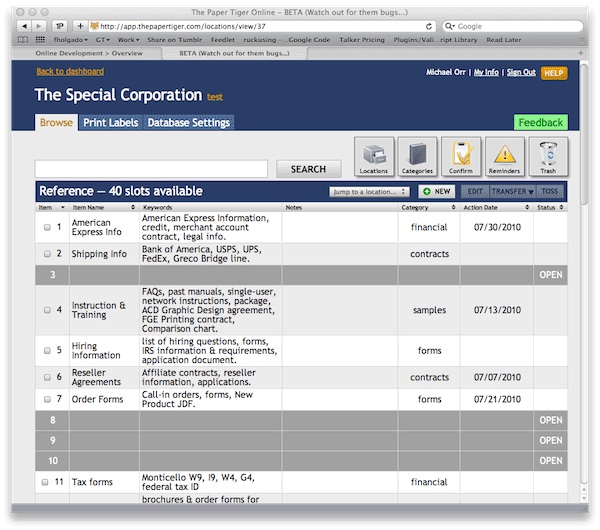
In 1998, The Paper Tiger software was released to the market and has since become the #1 Paper Management software product in the world! Tens of thousands of companies – large and small, non-profits, government agencies & professional firms, rely on it each day to “Find Anything in Their Office in 5 Seconds or Less…Guaranteed!”
The full functionality of The Paper Tiger Windows-based software will soon be found in your Internet browser (Microsoft Explorer, Firefox, Safari, Chrome, etc.) – very easy to setup and to use. If you like the Windows version of The Paper Tiger software, you will love the Internet version!
And, you Mac folks out there…your day has come! You can now enjoy the full functionality of The Paper Tiger in the Online Edition. Everyone who signs up for the Beta program will be automatically entered into the April 3rd, 2010 drawing for a NEW APPLE iPad in your honor!
The Beta version of the Web-based product is soon to be released. The number of Beta testers is going to be very limited – if you are interested in testing the new version, simply add your name and email to the Beta list. We will notify you shortly if you are selected to participate in the Beta. Beta testers will have direct feedback into the new product. If you don’t make the first Beta release, stay tuned because we will be adding people continuously during the Beta period.