Read this article by Stephanie Calahan of Calahan Solutions and a Paper Tiger Expert for statistics regarding how much misfiled and lost paper files cost you. Stephanie also recommends Paper Tiger Filing System and Document Management Software in her Office Miracle to be able to find your files when you need them!
~~~~~~~~~~~~~~~~~~~~~~
The other day I was doing my file clean-out, (yes you really should go through and see what is still relevant!), and I came across some statistics that I thought you might be interested in. Implications could make or break your business!
Companies typically misfile 2 – 20 % of their records. (Source: ARMA International)
Large organizations lose a document every 12 seconds. On average 7.5 of the documents are lost forever! (source: ARMA International)
90% of all workplace docs are still on paper; 30% of the average workday is spent searching for that info! (source: Assoc for Info & Image Mgt)
The average office spends $20 on labor for filing each document & $120 searching for every misfiled document! (source: Coopers & Lybrand study in Inc Mag)
The average office loses 1 out of 20 office documents & spends $250 on document re-creation! (source: Coopers & Lybrand study in Inc Mag)
Wow! Do you have processes in your business to make sure that these statistics are not representing you too?
Also see this article “Did You Know Paper and Other Things in Your Office Hold Emotion?” by Stephanie that you should find helpful when deciding what to file or not.
About the Author:
Stephanie Calahan is The Business Vision Catalyst and founder of Calahan Solutions, Inc. She works with purpose-driven entrepreneurs, visionaries, coaches, consultants, health practitioners, authors, speakers and all sorts of remarkable service professionals who are experts in their field, to help them embrace their brilliance, leverage their business and get their message out with power, ease and joy; so that they can make a powerfully positive difference in the world, exponentially grow their income and enjoy a highly-successful and meaningful business… while working less. Learn how you can have more freedom in your life! http://www.StephanieCalahan.com
~~~~~~~~~~~~~~~~~~~~~~~~~~~~~~~~~~~~~~~~~~~~~~~~~~~~~~~~~~~~~~~~~~~~

~~~~~~~~~~~~~~~~~~~~~~~~~~~~~~~~~~~~~~~~~~~~~~~~~~~~~~~~~~~~~~~~~~~~

Do you have trouble keeping things organized, especially all of the paper files for your small business? Is this problem flowing over into your everyday life because you just can’t seem to get organized at all, and it is starting to affect your life and your business?
Well, maybe you should look into getting professional help. No, we are not talking about psychological help, but help getting all of your business paperwork organized so you can find anything you need whenever you need it, quickly and easily. This is a great way to declutter your office, and in a way, your life as well. Because, if your work life is cluttered, you will probably bring this clutter home with you (at least in your mind, because you are worried about finding things), so your life may end up becoming quite cluttered, also.
A lot of business owners rely on using the traditional method of alphabetical filing for all of their paper files. This is okay, to a degree, but it does require quite a bit of maintenance, and it is not a job that you can always find people to do willingly. After all, filing it is pretty boring. Also, people tend to think differently about files from one day to the next, so it is common to have to look in different places in your filing cabinet to find the right title in which you filed it previously. So, instead of drudging through files all the time, or making one of your employees suffer through the task, why not consider going to a different method of document management, such as indexing using Paper Tiger Filing System Software for Document Management. This software is easy to learn how to use, so you should have no problem learning everything you need to know in half an hour or less.
Another bonus to using the Paper Tiger is for archiving old files. For instance, if you do like to clean out your hanging file folders every so often and get rid of old things you do not need or send them to a storage facility for those you have to keep for a certain length of time, how to archive using this paper management system is simple, and you’ll be able to track where they are in the event you ever need them again. You can even set an Action Date to remind you when to toss them or take additional action on them.
You can also use this filing system software for managing things other than your paper files. If you have books, binders, CDs, DVDs, items in storage containers or a storage facility, or any kind of collectors items or inventory, they can also be cataloged using this filing system.
When you sign up to use Paper Tiger Online Filing System Software, you will be ready to start using the software in under a minute. If you ever have any questions, there are videos, online help, frequently asked questions and the Paper Tiger Knowledge Base, so you are never without resources for learning. There is also online chat available, so you can have your questions answered within minutes.
It is estimated that people waste 150 hours per year looking for lost items. Indexing your paper files and all your other physical items will save you a lot of time and money that can be used for other areas of your business. De-clutter your business and your life when you take advantage of all that Paper Tiger Filing System Software and Document Management has to offer.
In every organization both large and small, there is a demand for optimum efficiency and a productive work-flow. The fact is, no matter how much business you conduct or how busy your personal life is, we still have to deal with actual pieces of paper. Luckily, Paper Tiger Filing System Software for Document Management makes it almost fun to organize and track your documents.
Paper Tiger makes filing-as-you-go a breeze. Use Paper Tiger on your Ipad, Iphone, or your personal computer network. Today I’ll provide 3 excellent tips on how Paper Tiger can turn your office from a zoo to a state of the art file repository system.

One of the biggest headaches with file management is clutter control
Your goal is easy retrieval, and if you can’t find a file, you might as well not have that file at all. In Paper Tiger, the user has the option to assign reminders and action dates. Assigning toss out dates for replaceable files can become prudent to decluttering a disorganized office. If you never throw anything away, you’ll make the filing cabinet manufacturer very happy, and waste time trying to find anything. You simply don’t have to keep every scrap of paper forever. But keep in mind that some documents, for legal or financial reasons, must be kept a specified length of time. See our Retention Guidelines blog posts that you might find helpful.
Organize by Categories
Make files easier to find by creating a list of detailed categories in every database, and try to place every file you have within a specific category. For instance, Star Wars, Star Trek, and Avatar would all reside within the same category of “Science Fiction” within your “DVD” database, though they may be in entirely separate locations. Having a relational organization system will limit office redundancy by a ton. Whatever method you choose, make sure your system is obvious and consistent throughout your files to make retrieving paperwork as simple and thoughtless as possible.
Back up your files regularly
Whether you’re backing up files for an office move, or to reorganize your filing cabinets, it’s important to follow a regular back up regimen. Archiving business data is more than a matter of good housekeeping; it could be a matter of your business’s survival. There are two steps to archiving business information for successful backup. Identifying the critical data that needs to be archived, and abiding by a regular schedule. Backing up your actual files may seem like a daunting task for any secretary or file administrator, but this is another hurdle which the Paper Tiger is able to leap. With Paper Tiger, you can also print out a hard copy of your database so that you can find your files in the event your computer or the internet is down.
By Denise Landers
Key Organization Systems, Inc.

If you do not have vacation time blocked off on the company schedule now for the end of the year, do not despair. It seems everyone wants to have the holidays off, yet when we submit our annual vacation request, we may be turned down. If you are glum over the prospect of limited holiday time off, console yourself with what you will actually be facing:
Throughout the year, it is easy to be swept up by the crisis du jour. You may be responding to constant interruptions, multitasking all the time. There is often no opportunity to pause for thinking and planning. More involved projects get set aside for a “better” time when you can concentrate. Many times these delayed activities are the most “important” projects, the ones that will actually make a difference. However since they did not have a deadline or an “Urgent” tag attached to them, they were shuffled aside.
Here is your chance to catch up. Rather than joining the throngs at the airports, jostling through overcrowded stores, or fighting for a spot on the lift line, enjoy the opportunity that is presented to you in the office.
What can you do that would make you feel energized for the new year? After catching up on key projects, look around and see where organizing could help you be even more productive. Areas to examine:
Daily Systems: Do you have an effective system for handling all of your daily incoming items? A good system will allow you to easily prioritize each day and ensures that you will never overlook and opportunity or miss a deadline.
Desk: Only what you use on a regular basis needs to be close to you. Remove the accumulation from the past year.
Email: When was the last time you zeroed out your inbox? Set up folders both for daily action items and for reference files.
Filing: Are your file folders stuffed and drawers overflowing? Clean out unused, unneeded items. Do you hesitate to file anything because you will never find it again? A good program to help with that is the Paper Tiger Filing System Software for Document Management.
When you find yourself at the office during those holiday lulls, enjoy the peace and look forward to another time when you really need a break. Hopefully it can be a time without peak fares, overbooked resorts, crowded slopes, and too many obligations. Meanwhile you are organized and ready for a productive new year!
Denise Landers is the author of Destination: Organization, A Week by Week Journey and the owner of Key Organization Systems, Inc. As a national speaker, trainer, consultant, and writer she provides clients and audiences with the time management training tools and techniques that improve daily work flow and increase productivity.
www.twitter.com/@timetrainer
Corporate Training: workshops and consulting to increase daily work flow and reduce stress
Individual Assistance: our onsite and virtual office organizing to bring about changes quickly
On Your Own: books and CDs to work at your own pace
By Bonnie Joy Dewkett
The Joyful Organizer®

Paper is one of the biggest problems we have as a society. Here are ten quick tips to get you organized and keep you that way!
Along with these tips, ask yourself the following questions:
Bonnie Joy Dewkett, CPO® is an organizing expert, author, and motivational speaker. Her company, The Joyful Organizer®, creates and implements organizational systems for the home or office. These changes allow her Customers to create calm from chaos at work and at home. Bonnie has achieved the prestigious designation of Certified Professional Organizer, CPO®, from The Board of Certification for Professional Organizers. She is a member of The National Association of Professional Organizers (NAPO) and has published The Joyful Organizer’s Guide to a Joyful Move which is available on her website http://www.thejoyfulorganizer.com.
Phone: 203-731-4651
Email: Bonnie@thejoyfulorganizer.com
Twitter: @thejoyfulorg

Zoos can be a terrific place to visit. Millions of people visit zoos all around the world every year. The range of creatures in captivity is enormous and caring for the animals is top priority. Zoos need a proper filing system, Paper Tiger Filing System Software for Document Management, to help improve efficiency and enable staff to spend more time with the animals.
Zoos have always been popular with tourists as the types of animals kept in each zoo vary from country to country. It also means that the overall care and maintenance of the zoos and their animals has to be different as well.
In 1994, the Born Free Foundation (BFF) and the World Society for the Protection of Animals (WSPA) created what is now called “The Zoo Enquiry.” It was a significant file that recommended certain standards in terms of animal welfare and how zoos were to be involved in conservation.
World-wide legislation was created to cover every aspect of the overall health and well-being of all creatures in captivity. This covered everything including: nutrition and hygiene, condition of the animal accommodations, veterinary care and codes of practice to enable self-regulation of the industry.
There are lots of different records that need to be kept. They include: budgets, food and nutritional orders, other requisitions, rostering of staff, feeding time rosters, maintenance of individual habitats, cleaning of the public areas, veterinary visits and health checks and individual records relating to every single creature in the entire zoo.
Record-keeping is an integral part of running a zoo. Because there are so many different factors to contend with, outdated paper-based document management systems are no longer capable of coping with the amount of information needing to be kept.
Therefore, a more sophisticated system must be put in place that will reduce the amount of time wasted on filing and retrieval of documents. This means that staff will be able to spend more of their valuable time caring for the needs of the creatures in their zoo.
A zoo really needs to use document management software that can be tailor-made to the specific needs of the individual zoo. Different countries would have varying needs. A filing system can be created with titles that are relevant to their unique, yet specific, requirements. These titles would be used by all staff and will make it easier to access the location of files and documents within them at any given time.
If staff can file and retrieve documents fast and efficiently, they are free to focus on their other duties and this means that more work can be done in less time, which is a positive thing when it comes to analyzing the zoo’s budgetary requirements. It also means that if they have a fixed amount of money, more can be used for the animals themselves.
If zoos have better record-keeping methods, it will be easier for them to share knowledge with other zoos pertaining to such matters as diseases, differences in behavior when an animal’s habitat has changed, mating issues, family lineage and numerous other pertinent facts that may need to be accessed quickly. It’s vital that accurate records are kept so that zoos can share this valuable information.
The inhabitants of the zoos are constantly being studied to better understand how to care for them in captivity. The actual habitat is analyzed and altered sometimes. They keep a few animals in the one area, either the same species or sometimes they mix them to see how they cope.
They change the way the animals are fed and some also promote closer animal-keeper interactions by instigating different training exercises to see how the animals react. Complete and accurate files have to be kept on everything that occurs within the zoo.
Zoos need Paper Tiger Filing System Software for Document Management to help improve efficiency because they’re not what you would call a “typical business” and therefore their requirements have to be completely tailor-made. That’s why they need an intelligent, flexible document management software program. Then they can keep up with everything and not spend too much time away from their main job of caring for the animals.

The bottom line for me as an entrepreneur is that using the Paper Tiger Filing System Software significantly reduces the amount of stress and anxiety in my life. When I discovered Paper Tiger, I discovered what it was that prevented me from filing papers away in a timely manner. You see, I’m a perfectionist, and every time I would sit down to do some filing, I was faced with the prospect of having to come up with the “right” way to label a file folder. Let’s say I wanted to file sales literature about a CRM company called Salesforce.com. Should I file it under the name of the company? Should I file it under CRM (Customer Relationship Management), which is the category name for this product, as a subject file? Should I file it under Sales and Marketing for my company, which is what I would use the product for, as a subject file? And where was the other information I had collected about this company? Because the real goal of filing is fast retrieval, I worried that the label name I came up with would not be the label name I remembered when it came time to pull this information out of the file to review it. That made me anxious, and it made me dread filing, so I rarely did it. And I lived in the midst of stacks of paper, unable to find what I needed when I needed it. Oh, the time I wasted looking for stuff I needed at the last minute!
Now I don’t feel any pressure to come up with the perfect name for my paper files. First, I can quickly and easily find out if there is any similar information I’ve already filed by using the search bar to look for CRM, Salesforce.com, Sales, Marketing, or other related terms. If there are already files I’d like to file it with, I can quickly do so by entering the any additional keywords relating to the new document going into the file, and then placing it into the hanging folder. If not, all I have to do is create a new file–perhaps with a general term like CRM–and add all of the keywords that I think I’d use to refer to it later, and I’m done. This little software program has had a profound impact on the quality of my life.
Michele Engel
President & CEO
Insightrak
Whether you’re a small business or a huge multinational corporation, you can’t afford not to be using a smart document management system, like Paper Tiger Filing System Software and Document Management, unless you’re happy throwing away your profits. Did you know that experts estimate that people waste 150 hours per year looking for lost information?

Technology is really streamlining the way that business is being conducted. Gone are the antiquated days of dusty basements filled with shelves and wall units crammed full of paper-based files. The days of tediously trawling through mountains of files to find a single document with that vital piece of information for that urgent board meeting are also gone.
What you really need is a document management system that will save you money and time, and increase your profits while decreasing expenditure. The great news is that the solution already exists. Just decide to make the change.
Instead of the archaic filing system you currently tolerate, your new filing system will be easy to learn and implement. It will be user-friendly for everyone from the CEO right down to the staff in the data processing centers.
All files will use a standardized naming system so that duplication is virtually eliminated. Documents in all formats will be easily stored in the same file. This avoids unnecessary duplication of documents. Desks won’t be overflowing with files and papers all the time and staff will be more productive when they can find what they need when they need it.
Information can easily be shared within departments, no matter where they’re located. Documents can be filed easily and files can be retrieved as fast as necessary because your computer software will tell you the location instantly.
Your board members will be ecstatic when you tell them that your ideal system will help staff provide better service to your clientele because information is more readily accessible. A happy customer is a repeat customer and it’s easier to keep customers than to try and get new ones.
When you think about the return on investment for such a filing system software, that will save you and your staff 150 hours each every year, you can’t afford not to be using a smart document management system.
Try Paper Tiger Filing System Software and Document Management today and see how efficient and organized you and your staff can be in no time!
Paper Tiger Tech Support Portal is Now Live!
by Andrew Solomon of Paper Tiger Tech Support Team
The Paper Tiger Filing System Software technical support team has been in the midst of creating an interactive support page, to assist customers in Paper Tiger technical issues. This new Paper Tiger tech support portal is now live and we believe that the functionality will improve our customers’ experience in resolving questions or issues they have with Paper Tiger Filing System Software.
The support site is divided into two main sections, Paper Tiger Desktop and Paper Tiger Online. So if a Paper Tiger user has a question or an issue with their Paper Tiger Desktop application, he/she would enter the Paper Tiger Desktop portal. Each portal is customized to assist users in troubleshooting issues depending upon the platform of their software. By searching our frequently asked questions knowledge base section on our site, the customer will be provided an immediate answer and most issues can be solved without opening a support request ticket. The Paper Tiger Support FAQ is not just your average list of commonly asked questions. The functionality has been optimized by our very own Paper Tiger Software engineers to present the user with the most relevant and common troubleshooting issues and articles in order to get to resolution faster.
Search and See as You Type
We wanted to build a support page where users can get what they need in a fast and efficient way. The Paper Tiger Support portal is built with a powerful live search engine, which is able to scrub our entire knowledge database and return the most accurate search results with easy to see keyword-highlighting. Please give our support portal a try the next time you have any Paper Tiger questions or issues.
Open a Ticket:
Paper Tiger Support team guarantees that our well developed support articles will ratify 95% of your Paper Tiger issues, but in rare cases when our support pages are unable to assist you, don’t hesitate to open a ticket with our technical support gurus. After completing and submitting a short form, a Paper Tiger technician will be able to process your request, and handle your situation appropriately. This will give our technicians a greater understanding of exactly what the client needs, and will enable us to deliver the best customer service possible and in a more efficient manner. Users can also attach as many databases and screen shots as they may need to any support ticket filled to assist our tech support reps in responding to issues more efficiently and effectively.
Thank you for using Paper Tiger Filing System Software for Document Management!

Did you know? In the typical ‘In Box’ …
* 40% can be tossed or recycled;
* 40% can be filed, and
* only 20% require action
Let Paper Tiger Filing System Software and Document Management help you keep track of the 60% that you need to keep for various reasons! Also for those files that can be archived out of your frequently referenced filing cabinet, how to archive is simple with Paper Tiger.
For many years I have struggled with keeping my desk cleaned off. Not only was this a chore that never seemed to go away, but I would often feel overwhelm just by the idea of having to get out the label maker, figure out what to call the file, and then have to thumb through the alphabetical files in order to get the new file where it belonged. Because it was often too great a chore for me to engage in, I often put it off until I couldn’t handle the site of my desk or “organized piles.” Moreover, the old system worked fine for annual bills and such, but miscellaneous papers would forever be filed into a state of “organized lostness” somewhere within the confines of the file cabinets; never to be seen or heard of again.

Then I discovered Paper Tiger Filing System Software for document management! It did not take me long looking over the website before I realized that this was “must have” software. I ordered the desktop version and shortly thereafter discovered that Paper Tiger Online was in Beta, and that I could sign up to test the software for free! This was exactly what I needed as I have computers in multiple locations in the home (my home office, my wife’s desk upstairs, and a laptop that floats throughout the house), and having the ability to access Paper Tiger from anywhere was a huge bonus.
We set up the database with several locations. My wife has her lateral file close to her desk that we called “Mum’s” location. Then I created an “Action” location close to where I work most. I use one location for “admin” documents in another lateral file, and I have a “reference” location that I use to archive anything and everything that comes across my desk. Although the numbering system seems awkward at first, it is actually incredibly useful and fast. Essentially Paper Tiger acts as a powerful index system that tells you what numbered file is empty and available for a document, or it will let you know if there is a match somewhere that would fit the type of document that is being filed. Since the index numbers are set up ahead of time on the hanging folders in the filing cabinets, it becomes a breeze to file papers as they come in.
For the sake of efficiency (or at least what works best for me), is that I take the document, look up the index file location (by utilizing the search feature), or I set up a new index number for item if I need to. Once I know where the document is going, I write the file number on it, and I place it in my Action drawer in a file called “to file.” If my wife has something that needs to go down stairs in one of the files in my office, she “Paper Tigers” it, and she will put a yellow sticky on the page with the file number and put it in my inbox. This too will make it into my little “to file” file. Then once a week or so (or when I’m feeling disengaged from my work), I will take out the “to file” file and in about 10 minutes or less have all the papers in that file put away where they belong!
One last use we have for Paper Tiger at the moment is that we have taken all our DVD’s and put them in a big leather binder and have thrown the cases away. Each slot in the binder that has a DVD has a number assigned to it, and we wrote the corresponding number with an indelible marker on the actual DVD. Once this was done we cataloged all the DVD’s in Paper Tiger. This has been a great tool since our kids will often get out a bunch of movies all at once and we can easily find out where they go by the number. Also, if we want to watch something, all we have to do is search for it in Paper Tiger, find out the reference number and easily turn to it in the DVD binder.
Well, we may not be “singing” Paper Tiger praises, but my wife and I are constantly commenting on how immensely useful and efficient it is. Thanks to Paper Tiger, our desks are cleaner, our work is less stressful, and things don’t get lost in file cabinet. Thank you Paper Tiger! We look forward to many happy years as customers.
Kevin McAllister
Lead Pastor of Family Worship Center (www.afamily.cc)
http://www.namelounge.com
Augusta, ME

Running a home office can be very trying no matter whether you are using it to keep track of the family’s finances or running a small business there. If you don’t keep track of your papers and other items in a manner that makes sense, you will never be able to find things as you need them. Bills may not get paid on time, incurring late charges and other penalties simply because they were buried under other items. There are a number of systems that you can use to make your home office that much more efficient but there are a number of drawbacks to consider with them.
Systems that Require Scanners or Labelers
Some document management systems require that all your paper files be scanned and then formatted to a disk drive for “filing.” There are often many things that cannot be scanned and there are issues with the scanner itself. If you don’t have a scanner, this type filing system would suggest that you buy one. And this document management system may not be ideal because once you have scanned everything and put it on the computer, what if that system crashes or you are not near your computer for that moment?
With a scanning document management system, labeling everything does not always work either, especially since it does nothing to get everything organized. Sure, you know that those are all the home bills sitting there in the nicely labeled file folder, but they get moved from place to place because they have no real designated spot and they end up buried once again.
A Hybrid, Better Solution
The Paper Tiger Filing System Software and Document Management is a hybrid of traditional filing and computer search ingenuity with the ability to help you streamline your filing system and find your items without having to run out and buy expensive equipment. You don’t scan your items so you can use the same filing system software to organize books and other items that would not be able to be scanned. (See our Not Just for Filing Paper webpage) Your files are set up in index numbered, hanging files with labels that you print from the Paper Tiger Software. These file numbers never change, but the information that is stored in them can: It is all taken care of by the filing system itself. After everything is where it needs to be, and item names and keywords relating to the items being indexed entered into the software’s database, the information is converted to searchable files. All you need to do is access a computer and conduct a google-like search to find exactly what you are looking for.
Your home office is now organized like a miniature databank, like your own personal version of the World Wide Web. All of your files are right there to be accessed by a quick search. The computer will generate a search result, showing you exactly which hanging file folder the requested information is in and where to access it. There is no searching through several different files to find an item because of differing thought processes of filing from day to day.
Tame your paper files (and other items) with Paper Tiger and get organized today!
While setting up and running a small electrical contracting firm, based in a home office, I tried three, separate and distinctly different filing systems. The third system was “Paper Tiger – Professional version”. That was over 2 years ago and it has only gotten better.
When combined with Barbara Hemphill’s teaching on “FAT” (File, Act, Toss), and the six questions of “Wastebasketry”, which I now have framed on the wall for easy reference, I haven’t looked back. (See Paper Tiger Filing System Tutorials)
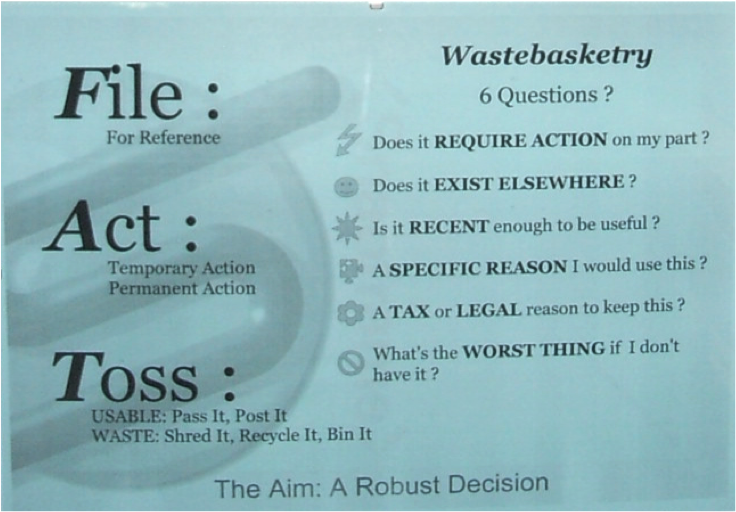
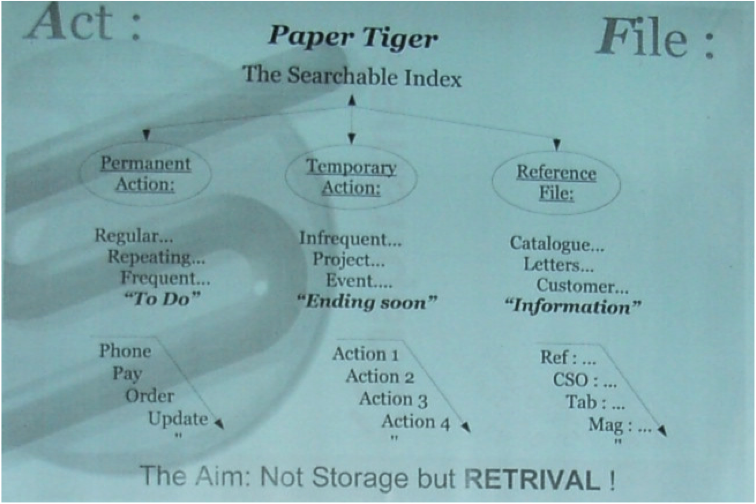
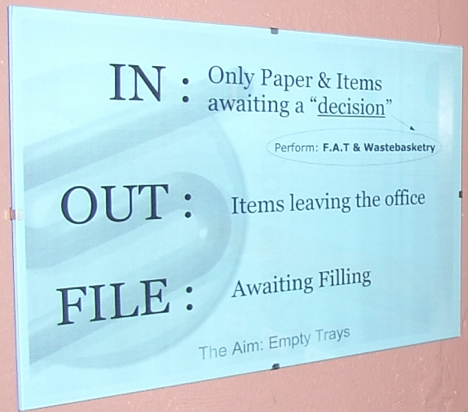
I am now able to sort, search and track over 1000 individual locations with confidence. Not to mention how it has helped clear my desk space and helped me focus.
After some experimentation, my locations have developed to suit three requirements:
Requirement One the physical thickness of items I need to file.
Anything from that proverbial single sheet of paper through to some quite thick and bulky brochures and technical specifications.
Requirement Two control over the sensitivity of a file’s contents.
Be that due to tax, financial or customer information. These files are simply more “mission critical” than the latest plumbing magazine or scribbled notes of meetings.
Requirement Three retaining conveniently short memorable names.
Short also means larger, clearer text printed on the physical hanging file “tab” or label.
It also uses up less space on screen for the location column, which means more space for keywords.
Thus the names and types of storage have become:
ACT & REF for my “Action” and “Reference” files.
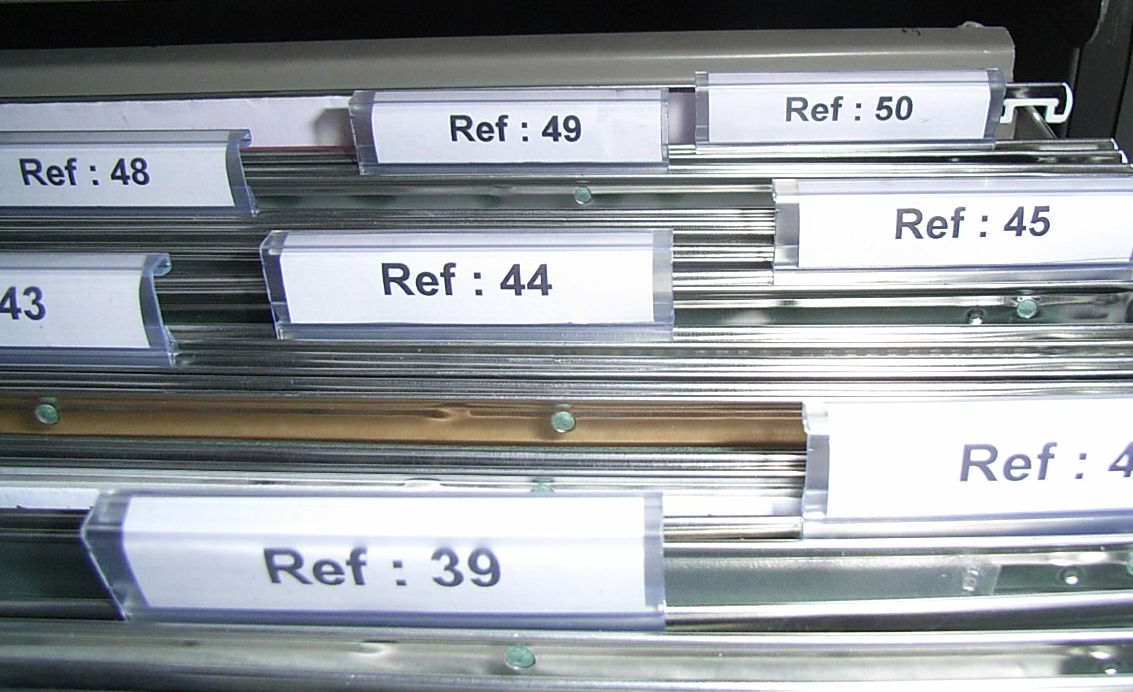
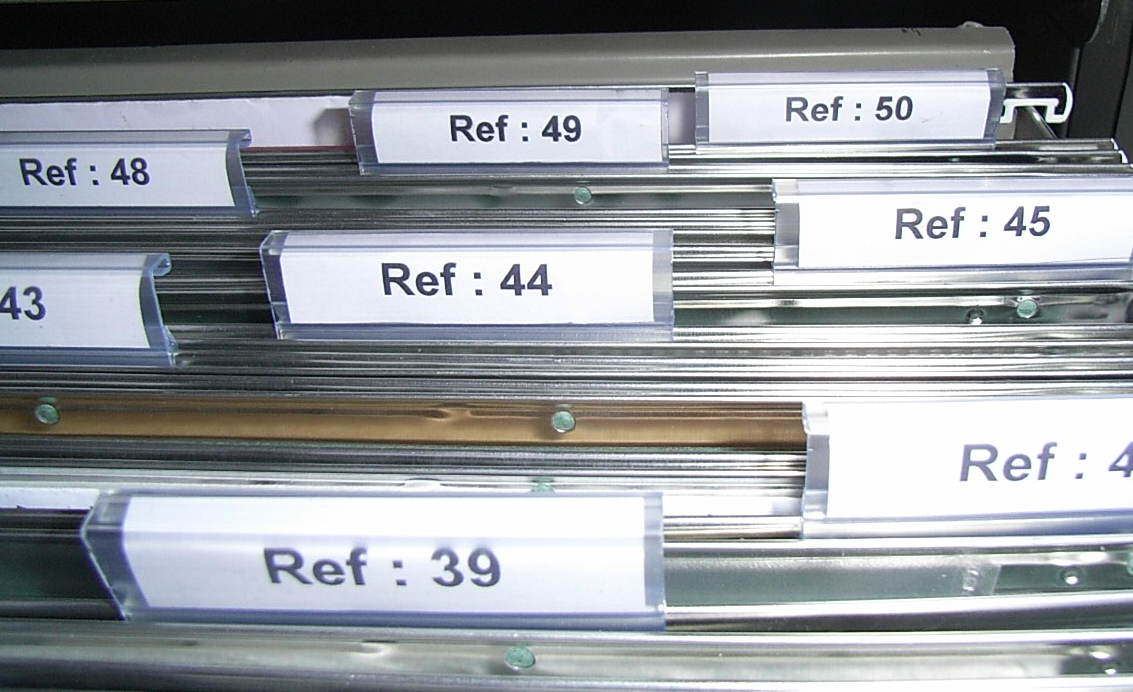
CSO is my “Customer, Supplier, Organisation” cabinet. The sensitive files and mission critical files that are conveniently located close by and under lock and key.
All three sections use standard hanging files in metal filing cabinets.
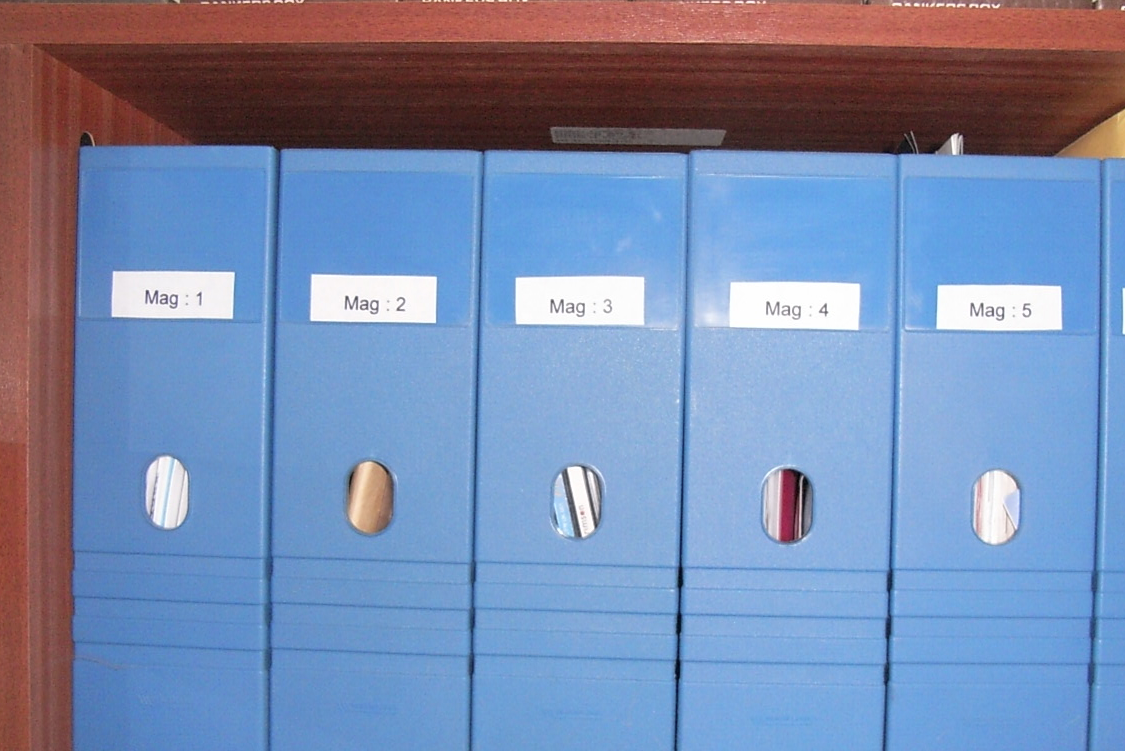
MAG = Side open plastic magazine holders on book shelves. Great for bulky catalogues.
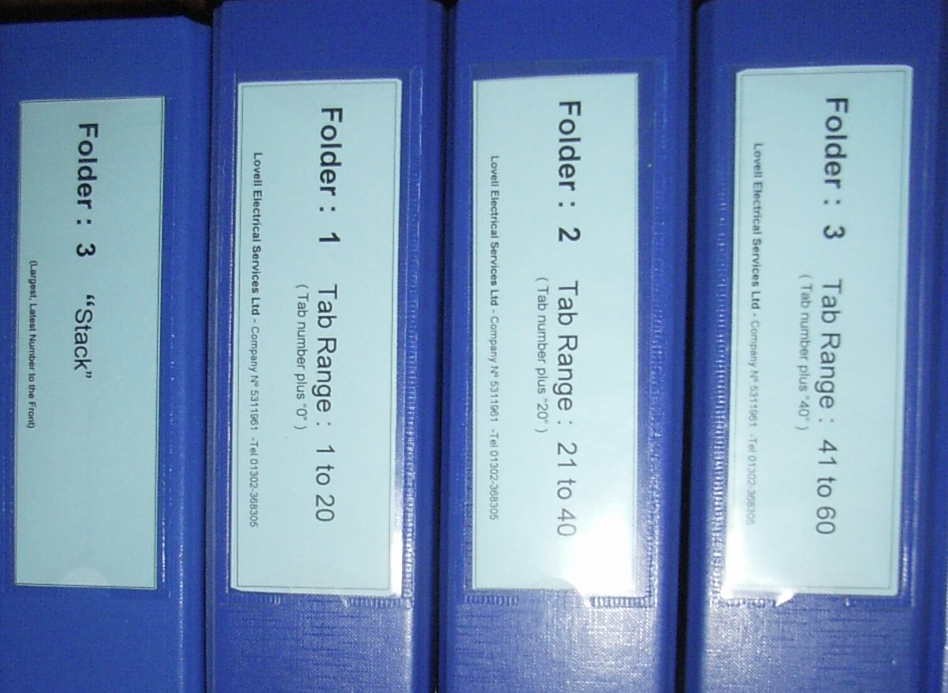
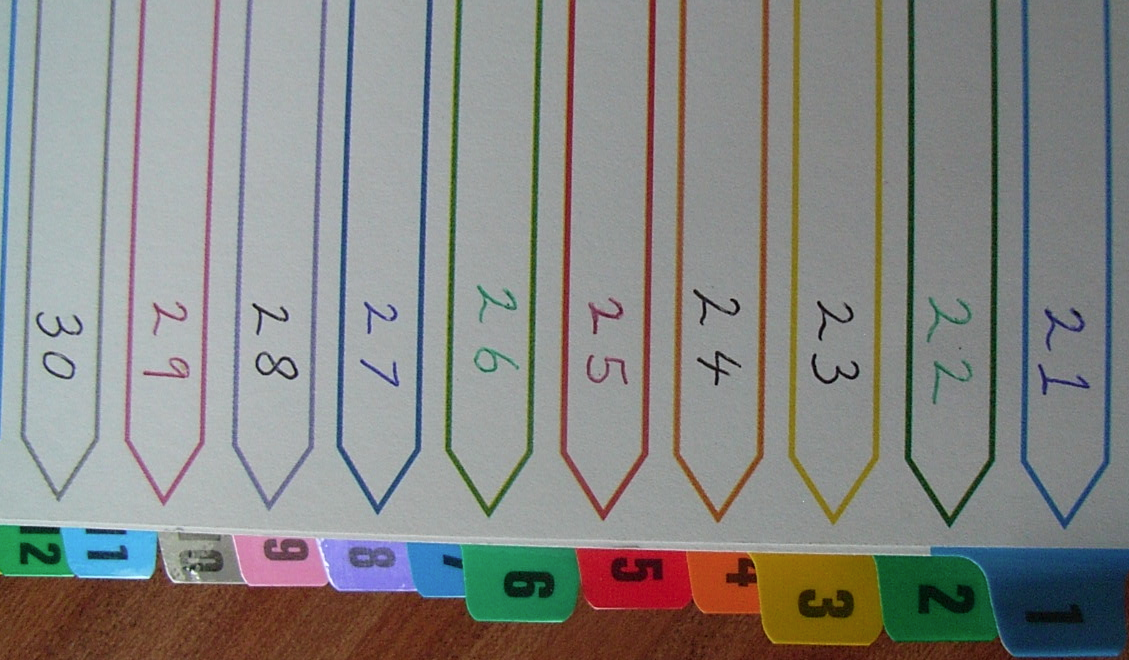
TAB = Leaver arch folders with 20 way dividers. TAB is short for “Tabs”. These are good to collect together product data sheets from different manufacturers, while retaining a traditional “book” format. 20 also means the folders number up easily; 20,40,60 etc.
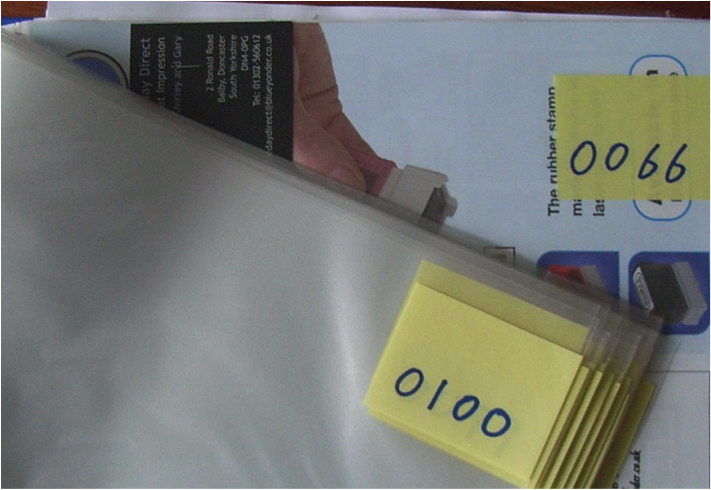
STA = Think “Stack”. Also Leaver Arch folders, but each holding around 100 individual papers, as I like many others, like to cut out and save news articles and magazine pages for reference. These are placed in thin pre-punched plastic files with the corner clearly numbered.
ARC = Archives. Traditional box files stored in the loft for those historic records.
Finally, again thanks to Barbara’s idea,
INF = Information. Not a physical storage location, but a place that exists only inside the Paper Tiger database. A great place to “retrieve” those little notes, ideas and other miscellaneous items.
A word on filing cabinets. At the outset, I chose to invest in full size office grade cabinets, albeit second hand, and foolscap hanging files rather than the slightly smaller “A4” size that are available for home use. It was a case that these work well for the rigours of a business and are readily available and are unlikely to be a passing fad.
One key tip I have is that I found 50 hanging files per filing cabinet drawer is a great number for both drawer labeling and practical daily use. It is easy to count in “50′s per drawer.”
Finally, when explaining the system to others, I have my own slant on Barbara’s example of the car insurance certificate.
I ask people to imagine the image of a “common four wheel motorised transport device, sat on the driveway outside.” I then ask what they would file the “legal” paperwork under? Usually they reply with something basic like “car insurance” or “insurance certificate”. However I then say, “No… its not a car its a go-cart” and then explain, isn’t the Paper Tiger keyword approach better because we can add search words like:
The vehicle type:
“go-cart, quad-bike, car, van (important to our trade).
The vehicle make model
Ford, Courier
The document Type
insurance, certificate, policy, schedule
Or the common terms people use.
“Dad’s Taxi”
This last one comes more into its own when people are using the special “lingo” and abbreviations of their own industry, e.g. Medical, Education, Engineering etc.
With a cluster of strongly related words, it doesn’t matter how people search, they soon find it even when their thought processes of filing can be quite different. Which is significant in this household.
I now “file” with confidence because I can “retrieve” with confidence.
Paper Tiger – I’d be lost without it.
By Nigel Lovell
Lovell Electrical Services Ltd.
England
The following is an interview we conducted with Anne McGurty, a Paper Tiger Expert of Strategize and Organize, as she talks about how she along with Paper Tiger Filing System Software has helped her clients get organized. Anne implements Paper Tiger in her “Miracle in a Day” to transform her client’s offices.
In this interview, Anne tells us the ways Paper Tiger helps people to delegate, and it helps them to have more time and energy to work on their business or get out of the office earlier and do other things that they enjoy other than paper work.

Hi I’m Janet Baker, office manager of The Monticello Corporation, makers of Paper Tiger Filing System Software. We have with us today, Anne McGurty speaker, productivity expert, and author. Anne is the president and CEO of Strategize and Organize, a Denver-based training and consulting firm specializing in helping people perfect their environments and make better use of their resources – time, paper, and all forms of information management. As a productivity expert, Anne provides extensive customized services including business consulting, productivity training, process implementation, and time management seminars. She works with small business owners, large corporations, staff, and individual executives on their personal productivity. Anne is a member of the Colorado Chapter of National Speakers Association and is a past president of the Colorado Chapter of the National Association of Professional Organizers. In recognition of her expertise, Anne was nominated for small businessperson of the year 2004 by the Colorado Women’s Chamber of Commerce. Strategize and Organize is a certified Women’s Business Enterprise Company through WBENC.
We also have with us today, assisting with this interview, Captain Terry Clark of SailwithTerry.com. Capt. Terry sails the Mañana Maybe and provides custom sailing vacations in the British Virgin Islands. He partnered with The Monticello Corporation in one of our contests for a free sailing vacation. We welcome both of you on behalf of the Paper Tiger team.
Terry: Thank you Janet, How are you today Anne?
Anne: Hey, I am great Captain, How are you?
Terry: I am doing great. Well, we are going to got through a few questions here and if you are ready to start, I’ll start asking the questions.
Anne: Thanks for the lovely introduction, Janet
Terry: Yeah that’s a hard act to follow, Anne. Well, we are going to talk about Paper Tiger now and some of its capabilities. Anne, what is your favorite thing in your use of Paper Tiger and what it fixes?
Anne: Wow, that’s a really tough question to answer because it fixes so much. I’ve got to say my favorite thing about Paper Tiger was initially when I discovered it. I have been using the Paper Tiger since 2002. I will just give some quick background; I had been in corporate America for 20 years and being a busy executive, I always relied on administrative staff to help me. But as times changed over the 80’s and 90’s, we had less and less staff and today it’s getting to be where everyone is handling two or three jobs and they have to find all their information for themselves. So when I discovered the Paper Tiger I was finally able to be an individual who can find everything on their own and the opportunity to delegate my paper work to others.
The fact is, when you have Paper Tiger, you can create a file with the name you are thinking of today. Let’s use the example, I have a medical bill that I have just received, I have paid it; I want to keep the physical piece of paper. So I file it; I don’t know where I file it. Do I file it under medical? Do I file it under taxes 2010, or, do I file it under insurance?
Well…with the Paper Tiger, it doesn’t matter because I can set up a file name and add medical, insurance, personal and health, all as keywords. So six months from now when I go to look for it, all I have to do is hit one of those keywords and it will direct me to which file it is in. So I would say the favorite thing of the Paper Tiger, is the freedom of changing my mind when I am looking for a file and being able to find it no matter where my head is at and what words I am thinking.
Terry: OK wonderful, what are the problems that a majority of clients have to solve when they use Paper Tiger.
Anne: You know the problems that I hear from clients are: I am out of control, my office is a mess, I am really embarrassed when people show up, nobody can find anything.
So what I do is I work with them by looking at all those papers that are on their desk and figure out a system for them so that they can find them. The best way to do that is to prompt them to figure out the keywords of each piece of paper.
I have to sit with them side by side to ask them these questions, because I don’t necessarily know what is going through their mind when looking at a piece of paper.
A lot of times people have piles on their desk because they are thinking that some day maybe I will need this and I have to have it quickly at hand. So it really is a fear that they are not going to be able to find it if they put it in a file, but with the Paper Tiger, they do not have to have that fear anymore because we will have lots of keywords tagged to that file for them to find it.
Terry: OK, Do you find that Paper Tiger is used mainly by administrators or managers. Or do you find that it is a mix of the two?
Anne: You know, that’s a good question because people are saying: “Well I’ve got staff, I’ll just hire somebody to come and organize me. But the reality is, it is a little bit of everybody. I find that entrepreneurs often will need it because they are so busy with their work that they never thought about a filing system, and the Paper Tiger answers that problem for them.
I find that administrative assistants who file for their boss and their boss is constantly referring to the file by a different name, they really benefit from it.
For example, I have a secretary, administrative assistant, she still goes by the name of a secretary, and she has been working for the same man for 30 years and he doesn’t like computers. So he always has piles and piles of papers on his desk, and once a month, she gets completely overwhelmed and has to go into his office when he is out of town for the day and we go in there and pull all the paper off his desk and input them into the Paper Tiger system.
At the end of our day, we print out a list in alphabetical order for him, so he can refer to his files. That way she can control all his piles; he doesn’t feel like he can’t find his files anymore and everyone is happy. That’s where a team could work.
Individual professionals who do not have an administrative support like myself finally have the opportunity to manage their paper by using the Paper Tiger.
Many people who are creative, project managers or in the client services position. They might use the Paper Tiger because they are so busy working on their jobs that they do not understand that they do not have the time or energy to file and the Paper Tiger allows them to have a simple system to manage all their paper.
Terry: OK. Thank you. How do you go about implementing Paper Tiger in your client’s offices most effectively? And when you are doing that how long does it usually take to implement Paper Tiger.
Anne: That’s a good question. The time factor is really always a big surprise to people. I will give you an example. Let’s start with looking at what the client has; they may have piles and piles of paper and say I do not know where to start, and they ask, ‘how long is this going to take?’ And usually for a really disorganized office with piles and piles of paper, I can go in with them, and in a day its accomplished.
Now I am saying myself a lot, but people can do this individually, as well. It just might take them a little bit more time, because people, when they are working by themselves, get a little bit distracted and working with a productivity expert allows them to be focused and encouraged to make decisions on the spot.
So when I have that commitment to work with somebody, I will work with them side-by-side and having them focused on each piece of paper and making a decision of what they are thinking of; those keywords to put it into the system. Also we are looking for other issues that may be affecting their productivity, because sometimes there may be other issues other than filling that may be affecting their productivity. I like to listen for that.
Back to the time, I often tell people, let’s just go in for a day and I have what we call a “Miracle in a Day”, and I will help them get organized in that eight hours.
What that means is that, we will spend the day getting all the paper off their desk and attack what is on the floor and enter it into the Paper Tiger system. At the end of the day, they will have a basic system in the Paper Tiger setup so they can continue with all the back log and enter it into the system on their own. Sometimes people are really too busy because they are very successful people and are just going, going, going, and they are not able to maintain the system. That is a critical part where they need to invest the time to maintain their filing system.
I use the example you wouldn’t go out to Saks Fifth Avenue and buy a beautiful suit and never maintain it. You do not come home from work and crumble it on the floor. You take a couple of minutes at the end of the day and hang it up. And every month or so, depending on how much you wear that suit, you are going to have to take it to the dry cleaners and get it cleaned. Same kind of thought pattern with your filling, you maintain a little bit each day, and depending on how much usage you have, you’re going to need a good clean out and get everything taken care of so that is the investment.
Terry: All right Anne. So what do your clients have to say when you have helped them get their office organized versus what they would have been able to do without your help?
Anne: You know, gosh, I am almost embarrassed to say and I get humbled every time I work with a client, because 95% of the time people will come back and say, “Anne, you absolutely changed my life.” And I know it’s the software, it’s the system that just really changes the way people work in a way they never thought about.
This software helps significantly with helping people make decisions that they never knew how to make decisions before. With the Paper Tiger, they are prompted to go forward with their filing, make decisions and have a system to follow up. I also know with clients, I feel that they can teach other people how to work with them so they do not feel like they are the only ones who have to do all the filing.
It helps them to delegate, and it helps them to have more time and energy to work on their business or get out of the office earlier and do other things that they enjoy other than paper work.
Janet: Anne and Terry, we appreciate your time today and believe this will be very helpful to our Paper Tiger users. I can’t tell you how much we appreciate you being with us today.
Anne: You’re welcome Janet. Thank you so much, it’s been great to be part of the Paper Tiger Team.
About Anne McGurty
Anne McGurty is CEO of Strategize & Organize, a company devoted to training individual’s to be more effective with the tools and resources to be productive in their work environment.
If you like this issue, you’ll love Anne’s transforming productivity training and organizing products to help you organize your business — and yourself — ranging from productivity consulting for individuals and executives to small business coaching programs to keynote speaking and corporate training programs to improve efficiencies in the workplace and improve productivity.
While Anne is best known for her expertise in productivity and expert office organizing, her clients share that her biggest impact comes from her philosophy of “personalizing her programs to fit the needs of her clients so they can streamline more efficiently with existing processes” – ensuring to create a sustainable work environment. This, Anne says, is the most important key to bringing an individual to personal freedom with time and organization.
You can learn more about Anne at www.StrategizeAndOrganize.com.
You can contact Anne at amcgurty@strategizeandorganize.com or by phone at 303 881-0174.
You can also follow Anne on Facebook:
http://www.facebook.com/strategizeandorganize
Technology has come a long way in such a short time, revolutionizing how modern day businesses are run. Local businesses have become global players through the Internet, communication has become instantaneous thanks to email, and companies have become more efficient and competitive with the help of various Information systems.
One of the few things that technology had not been able to unanimously streamline and do away with has been document management. The word “Document” is merely an alternative way of referring to predisposed and definite paper, which contains vital information and records on a specific subject. A tax form or document is paper with information regarding……..? You guessed it “taxes”. A contract is that important legal document buried somewhere between all your other documents with information that the CEO needed yesterday.
Anyone who has a home, a family, or works in an office can attest, that paper is ubiquitous. While buried under piles of memos, reports, to-do lists, books, receipts, shopping lists, mail, order forms, school reports or staff manuals, paper’s services seem indispensable yet the paper or documents themselves seem to be a greater burden. Quite frankly, both impressions seem to be universally true.
Whether you call it document management, paper management, or filing, it all boils down to the same thing; keeping track of your documents and being able to efficiently find what you need when you need it. The solution might be a “do it all” document management system that is efficient, easy, and all muscle with none of the fluff and pretty trinkets, which not only helps you keep track of your documents but also trains your mind to be more organized and conscious of your filing and paper guardianship.
A system that incorporates great technology with simple and proven techniques that will help turn your company into a lean, mean efficiency machine, for a fraction of the price that some companies invest in document management. A tool that will transform you into the office fairy or wizard with a magic wand, for with a few strikes of the keyboard you have the exact location of all documents at your finger tips with important descriptions, categories, reminders on important dates, and multi-user capabilities that allows the information to be shared and easily accessed across your organization. A document management system that Bob can use, Susan loves and Granddaddy Earl says is simple.
Be the first to introduce the idea of efficient document management to your company, and win all the accolades from the bosses and the accountant. It will save the company lots of money by saving many lost man-hours, not to mention all the paper that gets used when printing and re-printing documents across the company. So the next time you hear that colleague ask, “Where’s the monthly report?” or your spouse ask, “Honey, where is last year’s tax return?”, tell them to ask the Paper Tiger Filing System Software.

Paper Tiger Filing System and Document Management software is a very powerful but simple indexing system that will totally revolutionize the relationship you have with your filing cabinet, your office, home, or storage location. It is a great, easy to use software that helps you find what you need, FAST! Paper Tiger is like a Google search engine for your physical items, whether it be for your paper files, your books, CD & DVD collections, storage, etc. You would simply input the information into the database relating to your physical items, i.e., Item Name, Keywords, Notes.
It does not involve scanning, which can be very time-consuming! Paper Tiger is great for documents that you have to keep in their original paper form, and eliminates the time you waste looking for important information! Experts estimate that over 150 hours per year per person are wasted just looking for lost information.
For paper filing, you would first set up all hanging file folders in your file cabinets at one time using the numbered tabs that you print out from the software and they never change.
Because the hanging file folders are already set up and waiting for your information, you eliminate the time-consuming hassle of having to find and create a file folder each time you want to file something.
When you’ve converted your files to Paper Tiger, and you need to find a file, you simply conduct a google-like search in the database to find where your file is located. You don’t have to try and remember what name you filed something under because you’ve done the work up-front by inputting the keywords relating to the file in the database.
Welcome to a new level of organization and efficiency!