Using a Paper Tiger-Digital Tiger Filing System Software for Document Management to organize an entire office or workspace in one place is the ultimate solution to document management. Of course, that also means you can get organized in your personal life, too. You can manage your digital and paper files in one place. It can be practically paperless, too. These two systems enable you to file and store both paper files and PDF files.
And, for those paper files you do need to keep, you can index those paper files and locate them while the same search will find your digital files. It really is the simplest digital filing system in the world. This is a revolutionary time saving, space saving, life changing organizational approach to document management.
The online filing system software takes less than 60 seconds to sign up for and less than 30 minutes to learn. You will have access to videos, knowledge base and FAQs (frequently asked questions) to make the process of understanding and getting started as simple as could be. The thing is, these types of paperless or limited paper filing system software help you organize things other than paper. Any physical item that you can put a number onto and index or catalog it, you can file or organize and keep track of it by using these applications.
Advantages of a Document Management System
You can gain control of your life, not to mention, find your desk again. Never before has it been possible to be this organized. Once the system is in place, you can organize your office and everything in your life.
It also means you have a secure filing system and document management system that doesn’t collapse each time you have staff turnover. It unifies team members by making data sharing easy, as well as so much faster than could have ever been done before using previous methods. In fact, users of the software save around 150 hours each year by using this approach to tracking down exactly what they are looking for right when they need it.
And not only for staff turnover, but families can benefit as well. When you implement filing system software in your home, anyone in the family can conduct a search in the database and find what is needed quickly without scrambling all over the house for the needed item.
Who Can? You Can!
The question really should be – who can’t benefit from using a filing system or document managing program? People such as teachers, homemakers and auto dealers all find this system works. Police departments, dental offices and even students have put this document management system to good use. And, funeral homes, electricians and home offices are just a few more of the many types of companies and organizations able to change their lives by getting organized with this filing system software. This includes companies, corporations, non-profits, government agencies, professionals and individuals.
So, maybe it really is your personal life you want to get organized. Or, maybe you would just like to live in an almost paperless world. You could declutter your life while recycling your old papers and being more environmentally friendly. More than likely though, you will find that using these approaches by implementing Paper Tiger-Digital Tiger Filing System Software for Document Management will make sense in both your personal and professional lifestyles.

Click below to listen to interview with Sherry Borsheim. Play
JANET: Hi, I’m Janet Baker, office manager of The Monticello Corporation, makers of Paper Tiger Filing System Software for document management. We have with us today, Sherry Borsheim of Simply Productive. Sherry is also the founder and past chair of Professional Organizers of Canada, British Columbia Chapter and she’s also an authorized consultant and trainer for Paper Tiger Software System. She is a certified productivity training authorized consultant and as a speaker, trainer and coach, Sherri shares proven strategies and solutions that work in the real world and can be customized to fit with her clients then motivates the audience to take specific action steps. They will leave feeling informed, motivated, and energized. Her clients are individuals whose demanding roles require that they perform at peak efficiency. From corporations to small businesses and homeowners, Sherry’s clients have received maximum results in paper, space, e-mail, and time management. Sherry’s unique approach to organizing provides a seamless integration between technology and the working environment. With a number of unique software programs and her personal touch to organization, Sherry has assisted many in finding what they need, when they need it. Her mission is to streamline and simplify!
Sherry is the author of the books, Conquer Your Chaos, Fast Forward to Office Efficiency and Conquer Your E-Mail Chaos. She has also been a guest on local radio and television programs, including the Makeover Wish on HGTV and The Xpress on Shaw TV.
Sherry, wow that’s some bio you have there! Welcome!
SHERRY: Thanks but more importantly it’s about how clients feel at the end of the day in their office and how the systems work for them.
JANET: Absolutely! We thank you for agreeing to meet with us today. We admire what you do and especially appreciate you helping clients implement Paper Tiger when they need it.
SHERRY: Well I love Paper Tiger and it was actually when I started my business that I found out about Paper Tiger Filing System and it completely revolutionized and my business did a complete turn of events and I love Paper Tiger because of what it does, so I’m a big fan.
JANET: Thank you! Tell us, what is your most favorite thing that Paper Tiger fixes? or your most favorite thing that your clients use Paper Tiger for
SHERRY: Paper Tiger solves a huge issue in offices whether there’s one person or there’s multiple staff and where did I file it? So what happens is people leave paper all over their desk in fear of not being able to find it again, so how you’re able to do that which leads me to my favorite feature is the keyword search, because in companies before for 23 years when I was creating a filing system, I only had so many words that I could get on a file label and I had it all indexed in Excel and files were all numbered, but what was missing was the keyword search. If I had thought of that, it would’ve been a different story because if I wasn’t in the office, a lot of times I’d get a phone call “where is that file?” because the keywords I associated with a particular file will be different than someone else in the office and so the keyword search just allows everyone in the office or those using the filing system to be able to enter in those trigger words or those keywords that they associate to the file or the box or whatever you’re using Paper Tiger for because there are just so many applications. So the keyword search is so powerful and when I showed my clients, they just all of a sudden have an ‘aha! moment’ and they get it and the light bulb goes off. So it just revolutionizes the way people retrieve their information.
JANET: What are the problems that the majority of your clients hope to solve when they hear about Paper Tiger?
SHERRY: The biggest problem that Paper Tiger solves and the reason why people call me in the first place is their paper. Whether it’s in their home or their office. They don’t know where to file things and if they do file it away, they can’t find it. So what it solves is the ability to share their information and it gives them a filing system that now becomes a retrieving system. So when I set up a central file location, most offices have either done away with their central files or if they have a central file, it’s like a black hole and nobody can find anything in the filing cabinet. But when you use the Paper Tiger filing system in a central filing or in a storage room of which I do a lot of those of archiving boxes and maps, annual reports, all this historical information, financial records and stuff, people are able to sit at their desk, type in a keyword and Paper Tiger will tell them whether it’s in a central file or if it’s in someone’s office if you set it up that way or if it’s in a storage room and exactly what blocks of files it’s in, so that’s the problem that it solves and that’s why people call me.
It’s amazing that people will find out about Paper Tiger from the website and I have lots of different industries that call me, and I haven’t even talked to them about it. They call me to try and find out more in Canada about Paper Tiger so it really does speak for itself.
JANET: Do you find Paper Tiger is used mainly by the admins in the offices or managers or a mix of the two?
SHERRY: Everyone in the office from CEO down. It saves administrators a lot of time because a lot of people don’t like to file, but it actually becomes a fun-filing and I had that shift nine years ago. I had this love-hate relationship with filing so when I implement it in an office, it’s from the top down. Everybody uses it, so it’s not just for administrative assistants, or just managers, it’s for everyone.
JANET: That is quite a bit of a difference between the old alphabetical system, isn’t it?
SHERRY: Oh, night and day! You have no idea because the alphabetical breaks down over time and you have to shift everything in the filing cabinet or there’s no space on the shelf for the next box. It just doesn’t work. So if you have more than 75 files, Paper Tiger is definitely going to solve a whole bunch of problems down the road. And the other cool thing is, if you are in an organization where you have turn over of staff in the administrative positions as well, it takes less than 30 minutes to train somebody on how to use Paper Tiger because an 8-year-old can use it. So it solves that problem as well and as to a previous question, it solves that turnover or someone coming in and setting up a system that’s so foreign to everyone else. So when someone takes over a position within an organization, they literally could open up the filing drawer and go ‘hmm, there’s only numbers on here; I wonder what those mean.’ If someone has told them about the software, they just have to type in a keyword and they’re up and running. So they don’t have to revamp a filing system and that’s a huge time-saver for those stepping into new positions.
JANET: Absolutely. I have had a number of new jobs, and it is overwhelming to try find files for a new boss and there is no way of knowing what the past employee thought.
SHERRY: Yeah, believe me I’ve seen everything. I had one filing system where the file folders were labeled on both sides of the file folder and for three years, they would open up the filing cabinet and they didn’t know which way to stand and which side, because the files were all mixed up. So for three years, they couldn’t find anything. It was a black hole. Very stressful.
Yes it is very stressful for something as simple as filing seems to be, it is a very stressful thing, especially if you can’t find what you’re looking for.
SHERRY: No so then you’re probably re-creating it or wasting all this time trying to find it so it’s a huge time waster.
JANET: Can you tell us briefly how you implement Paper Tiger in your clients’ offices most effectively?
SHERRY: I will do a quick little demo and I can do that either live on my laptop or I will take them to the Paper Tiger website and they can see a quick little demo on Paper Tiger and then when they think this could solve their problem. Then what I’ll do is, we will implement it in the office and I love that you have the online version now, because it just makes it so simple and easy. I send you an email and it’s up and running. I will work with the staff person either over the phone who implements the first 20 files into the Paper Tiger filing system or if I’m on-site I’m entering them in, setting it up, attaching the numbers and once we get a few files set up, and then I turn it over to them to give them the hands-on experience, and that’s when they have the ‘aha! moment. So they’re up and running literally so quickly versus any other filing system, the learning curve or the process in figuring out how to set it up, is a lot more and saves a lot of time just getting it up. It really is as quick as just starting with a piece of paper on the desk and asking what are some keywords that you would associate with this piece of paper. If you want to file it away, type them in and in less than 30 seconds you’ve got the file set up, you attach the number and you’re done. So it’s really quick.
JANET: Do you find that your clients’ are easily maintaining Paper Tiger after you leave their office?
SHERRY: Yes, as I mentioned, I’ve been using Paper Tiger for nine years and I have clients that have been using it for nine years. I recently had someone who had moved from one city to another. His first phone call within the first hour of him arriving at his office, was a call to my office asking me to send him a new license of Paper Tiger filing system software. I said, wow you don’t waste any time, and he said I cannot live without it. And I have another client, he’s moved to four different offices and every time he calls me, and tells me I got to have Paper Tiger filing system, because I can’t find anything and so they just want to get up and running as quickly as possible. So yes, they are still using it after all these years.
JANET: Awesome! Tell me, what do your clients have to say when you have helped them get their offices organized versus what they would have been able to do without your help? Basically what benefit do you provide to them?
SHERRY: The overall benefit is the peace of mind that they will find it, but the initial benefit is when I show up in an office or a scheduled time on the phone to help them get set up; the scheduled appointment and our focus is to get them up and running, to get their office, the top of their desk and their system set up as quickly as possible. A lot of people have good intentions, and they are just busy, and so they don’t set aside the time. So when we have a scheduled appointment to set up their Paper Tiger filing system, it just gets done, because I keep it focused and I keep it on track and I’m there for them to ask questions and also just clarity on how to use the software and also what is the best system for them because it is so easy to customize Paper Tiger filing system to any industry or any client I’ve worked with. So the end of the session, it’s like ‘wow a hundred pound weight was lifted off their shoulders’ and you can see it melt away and their body language changes and ‘wow, I can actually open up my filing cabinet and it looks organized and I know I can find something.’ It’s weight and also they love the dramatic result that the top of their desk is finally cleaned off and their papers are safely put away.
JANET: Wow that sounds really awesome! Well Sherry, thanks again for joining us today. I really appreciate your agreeing to interview with us. I know that your insight will be so helpful to those listening today.
SHERRY: My pleasure.
Sherry Borsheim of Simply Productive. Sherry has been helping people to work smarter, not harder for years. She specializes in resolving paper, time and information management issues. To learn more about eliminating the paper pile-up and in vastly improving your productively, contact Simply Productive at 604-233-7076.
You can visit Sherry, access her free article archive and grab lots of free stuff at http://www.simplyproductive.com. Sherry lives in Vancouver, BC Canada with her husband (her high-school sweetheart).
Also check out Sherry’s Calm Your Choas special that will give you a JUMP-START on ORGANIZING your office, home and life. She will give you her trade secrets and steps to setting up your organizing systems, including recommending Paper Tiger filing system software for document management, to be organized and manage the paper files that you need to keep in hard copy format and other physical stuff in your life.
~~~~~~~~~~~~~~~~~~~~~~~~~~~~~~~~~~~~~~~~~~~~~~~~~~~~~~~~~~~~~~~~~~~
~~~~~~~~~~~~~~~~~~~~~~~~~~~~~~~~~~~~~~~~~~~~~~~~~~~~~~~~~~~~~~~~~~~


You will seldom come across an organization that has more filing work required than a government organization. There are tremendous amounts of paperwork generated in government agencies and these documents can simply overwhelm you if you do not file them properly. Alphabetizing and filing these papers can be extremely time consuming and very frustrating. Paper Tiger Filing System software for document management will not only save time, but it will help maintain a decluttered environment and impeccable office management. Filing systems can similarly benefit schools and professionals, as well as consultants. Both schools and professionals generate a fair amount of paperwork, and keeping track of it can be really exhausting.
In addition, with this amount of paper files, it would be also be extremely difficult and time consuming to move to a paperless office. Document scanning can take more time and energy than your staff has to expend.
Government Agencies
Government agencies deal with things on a very large scale. There are thousands of names in thousands of different folders and each of these papers is extremely important. Imagine misplacing a file in a sea of thousands of such files. Searching through thousands of files for a single sheet of paper can be like searching for a needle in a haystack, but not if you have an efficient filing system in place. Indexing paper files in filing system software can simply help you search through your files with just a few keystrokes on your computer keyboard. Sitting right at your desk, you can find out where you have placed a particular document, so that you do not have to waste time searching for it.
Schools
Schools generate a lot of documentation as well. There are a lot of paper files, books, stationery and test papers that are filed in various filing cabinets. The administrative reports of the school, documents of each of the students, time tables, teachers’ records – the list is never ending. With the help of filing system software, a school can get organized. Teachers can concentrate on doing their job, teaching students, without having to worry about where they placed documents.
Professionals and Consultants
Even professionals who work with a small staff need a filing system as much as a government agency does. There are a large number of items that need to get organized in the offices of professionals. If you have file management software, you can index all your files. You will not only be able to key in the titles of these files and documents, but can also associate keywords with them. This makes finding your documents or your office supplies a lot easier.
An Indexing System to Help You Get Organized
It is estimated that the average businessperson wastes 150 hours per year looking for lost information. With the help of Paper Tiger Filing System software for document management, an efficient document management system that doesn’t require scanning, implementing and maintaining your filing system into this software can help you get organized and will go a long way in office and time management as well.
Paper Tiger is an indexing system for your physical files that has a very powerful and easy-to-use search engine built in so that lost information is virtually eliminated in your office. You would simply input the information into the database relating to your physical files.
Keep your paper in its original form (again, you do not have to scan it) and use the power of the computer to quickly and easily find the information when you need it. You get all of the best things from the computer but do not have the problems of using a scanner. Paper Tiger can index anything! Some things just can’t be scanned, i.e., contracts, binders, books, CDs, DVDs, etc. That cannot be done with systems that require scanning into an electronic file.
For paper filing, you would first set up all hanging file folders in your file cabinets at one time using the numbered tabs that you print out from the software and they never change. You input information relating to each document in the database’s digital file location. You can give the document any name you want without any worry about finding it later. This is because the system will allow you to tag keywords that describe all documents that you put in your hanging file folders. For documents that you want to add to the same file, simply edit the Item and add additional keywords necessary for the new document(s).
Because the hanging file folders are already setup and waiting for your information, you eliminate the time-consuming hassle of having to find and create a file folder each time you want to file something.
When you’ve converted your files to Paper Tiger, and you need to find a file, you simply conduct a google-like search in the database to find where your file is located.
Please view our videos on our Why Paper Tiger page, which may help you understand better.
~~~~~~~~~~~~~~~~~~~~~~~~~~~~~~~~~~~~~~~~~~~~~~~~~~~~~~~~~~~~~~~~~~~~~~~~~~~~~~~~~
~~~~~~~~~~~~~~~~~~~~~~~~~~~~~~~~~~~~~~~~~~~~~~~~~~~~~~~~~~~~~~~~~~~~~~~~~~~~~~~~~

I used to work as a Senior Operation Supervisor in an Offshore facility for Shell in Brunei. This was in 2001. We worked on a shift system where I am on duty for a week offshore and a week off onshore.
One of our main challenges was handover to our back to backs. Most times based on how priorities come and go, usually we do not always get to execute tasks handed over to each other. This can be very frustrating especially when related documents and drawings cannot be found when misplaced.
I bought the desktop version of Paper Tiger Filing System software for document management around that time and started utilizing it. I brought in drawer cabinets with hanging files and used the basic set-up techniques. It did not take long for me to reflect the existing set-up of the office into Paper Tiger. I knew my back to back was not very friendly to changes.
For instance, the shelf where all the physical folders I reflected under location Shelve A and included the physical files/folders as items and named as they were so as not to create much change.
I really enjoyed the nights when I sat in my offshore office and went through all the documents and used the process of file and eliminate. Before I knew it, the office looked absolutely free without clutter. As I was filing the papers, documents, and drawings, I was already writing physically on each document which hanging file folder they should go back to when necessary to pull and then return to file.
I then worked on the reminders. This took some time, but I made time. By the time I was finished, I felt completely relaxed and I felt a heavy load was off my shoulders, mainly because after 4 years, I was able to go through every single physical drawing, paper and document. I cannot believe we were storing a lot of rubbish in the office.
The next day my other colleagues were wondering why the office looked neat and with absolutely no clutter at all.
When my back to back came offshore, I told him all about Paper Tiger. He was very impressed with the search engine. He was happy and promised he will work on it. We realised that we had a better understanding coupled with respect for each other, and handed over seemlessly, effortlessly. We use to joke that we have a hand over called ‘bumpless hand over’.
The reminders were great, because we used it for looking into important issues and what we needed to plan for.
However in 2003, Shell decided to introduce the GID system and any software used will require permission and required scripting. Both of us became desperate and by the the time GID was rolled out, we were transferred onshore. My energy to restart with Paper Tiger failed on me.
Since 2007 April, I took over the role of Operation Installation Manager in the Onshore Asset. Last year 2010, I was thrilled to see Paper Tiger coming with the web based system. You can guess, I immediately took advantage with my energy coming 10 times strong-fold. I am in control and I have a secretary who does the filing in the morning. Great stuff. I want to be one of the demo users for the digital versions.
From Devarajan.N
~~~~~~~~~~~~~~~~~~~~~~~~~~~~~~~~~~~~~~~~~~~~~~~~~~~~~~~~~~~~~~~~~~~~~~~~~~~~~~~~~
~~~~~~~~~~~~~~~~~~~~~~~~~~~~~~~~~~~~~~~~~~~~~~~~~~~~~~~~~~~~~~~~~~~~~~~~~~~~~~~~~

The new digital edition will allow you to organize all of your information – both paper & digital – in one easy-to-use online product. You will be able to quickly find all of your information in one search.
The development team is almost ready to put this new product in the hands of a select group of customers that will provide direct feedback about the functionality and interface design. If you are chosen to participate in the beta program, your input will be vitally important and taken seriously. The time commitment is minimal, but you will be required to respond in a timely manner to a list of questions provided with each new release.
If you would like to be one of the first to see the new generation of Paper Tiger products that will find not only your paper-based information, but also digital files including spreadsheets, word processing documents, PDFs (digital & scanned images), photos, text & attachments from email, etc. – virtually any digital file, then sign up, take a short four question survey and we will notify you once the new product is ready for testing. We welcome your feedback.
Please note that if you’ve already completed the survey, we welcome any additional feedback you might want to provide. We’ve received some great responses so far, and continue to use this information to provide the world’s simplest filing and document management system!
~~~~~~~~~~~~~~~~~~~~~~~~~~~~~~~~~~~~~~~~~~~~~~~~~~~~~~~~~~~~~~~~~~~~~~~~~~~~~~~~~
~~~~~~~~~~~~~~~~~~~~~~~~~~~~~~~~~~~~~~~~~~~~~~~~~~~~~~~~~~~~~~~~~~~~~~~~~~~~~~~~~
Office Meltdown
In today’s business environment, your staff (or you individually) must be very productive and not waste time on such things as looking for files. Disorganization is a major cause of stress in offices. Being really organized and streamlined is no longer an option, but rather a requirement for business survival. In addition, if you have staff turnover and lose your administrator – who would really know how everything is filed?
Imagine that you are a busy executive with an office staff of around twenty people. Of those, three people are in total control of the entire filing system, handling all of the paper that comes in and out of the office. These three people all work well as a team, but there are some issues with others in the office. Interoffice politics are starting to come into play. One of the three people has decided that she is not appreciated and she leaves without any kind of warning. There are now only two people who are handling the filing system for the office.
One week later, one of the remaining two people announces that she has a family emergency to take care of and goes out on an immediate and potentially long-term leave. The remaining person is given one person to train, which means that while there were once three people doing this job, there is now only one; and in addition, she gets the extra work of training someone.
This is where Paper Tiger Filing System Software for Document Management comes in. This filing system would not leave you relying on just one person or even a team of people for your filing or retrieval needs. Everyone can have access to the same database of indexed files from anywhere that they have internet service. Working with this type of office filing system means that you can have access to all of the “papers” (including books, contracts and other items that may be more difficult to deal with because Paper Tiger does not require scanning) and files that you need and that you can give all of your team members the same advantage as well. You can access the database and know exactly where the item you are looking for is located.
People are not the only cause of filing system break downs, though. Duplicating files is common when you’re not indexing your paper files in filing system software. People in an office environment can file things in very different ways. Actually, the same person can file things in a different way on different days – depending on how they are thinking and feeling that day.
Also the more you have to shuffle through your hanging folders, the more likely there will be to have some damage to those files that will require replacement, therefore costing additional expense. Instead of doing the dig and shuffle, you will know exactly where your item is with a simple Google-like search in the software’s database.
You can save as much as 150 hours of time each year, and that alone should be worth the consideration. Every minute that you save can be as much as a dollar earned by you, so always do whatever you can to get organized and declutter and prevent office disasters. Your office will be less stressful, and so much more productive.
By using Paper Tiger Filing System Software for Document Management, your business will have an index of all your paper document resources, just like you have a chart of accounts for your accounting. This will allow you and your staff to focus your time on more productive efforts and greatly reduce stress in the office!
~~~~~~~~~~~~~~~~~~~~~~~~~~~~~~~~~~~~~~~~~~~~~~~~~~~~~~~~~~~~~~~~~~~~~~~~~~~~~~~~~
~~~~~~~~~~~~~~~~~~~~~~~~~~~~~~~~~~~~~~~~~~~~~~~~~~~~~~~~~~~~~~~~~~~~~~~~~~~~~~~~~

Many companies are starting to realize what a huge savings telecommuting can be and that means more people are going to be starting their own home office. Those people are going to seek out home office organization tips either from the beginning because they want to start right, or they are going to start looking for these tips after they find themselves falling behind in their work because they have to keep stopping to find things or because they just cannot keep track of things that need to be done.
In any office environment, it is estimated that people spend 150 hours per year looking for lost information.
Home office organization is vital because number one, it is still a place of business, where you do your job. You still want to be professional and capable. For many people, the home office may be combined with another room in the home and they would like to keep the mess and clutter to a bare minimum. There is a delicate balance that has to be struck between the home and the office in the home office, no matter how much actual room you have to work with.
The major obstacle to getting and keeping home office organization, as well as for the home itself, is paper. From the time we open our doors to our home office or small business or even just to the home where we live, paper tries to get a foothold, wanting to get in and keep us buried under stacks of paper and clutter.
There are a number of steps you can take for yourself, but if you have already started to lose the paper battle, you might need to call in a professional organizer to get the paper and other clutter under control. The first step is to get rid of the junk mail before it even comes in the door. It is easier to keep control of paper if you minimize it. Eliminate the bulk by getting your name removed from junk mailing lists and be very careful about ordering from catalogs. Before you think that you are perfectly safe because you are ordering online only, consider this: Bulk mailers are culling names from online customers as well. Make sure that you confirm that the company you are ordering from does not sell information. Sign up for the Do Not Mail list here: http://www.directmail.com/directory/mail_preference/
Also as much as possible, you can sign up for digital statements to cut down on the paper entering your home.
Make Home Office Organization Your Top Priority With Paper Tiger Filing System Software
Another tip to consider is Paper Tiger Filing System software for document management, which allows you to organize everything, not just your paper files. Because you do not need to scan anything to use the software system, there is no limitation to what can be indexed into the software’s database, including books and other bulky items. Everything is put into place and then its location is noted by a numbering index system that never changes and never moves. The filing system database works like a search engine for paper files to help you get organized and stay organized. Whether you are using it for home or for a small business, it is easy to use and to learn and virtually impossible to mess up at all.
For example, if you never remember the name of the gas company, simply file it under Gas. If you use the filing system software, you will also be able to add keywords into the database so that any name you think of when you need to find a file, the software will be able to tell you where it is in seconds. So in this case, the Item Name would be “Gas Company”, and in the keywords section, you would input the name of the company, i.e., “Bob’s Natural Gas”, the address, the service person’s name, address, phone number, etc., and you might use “Utilities” in the Category section.
You print out the tabs right from the software system for each ‘Location’ and then use the numbers to correspond to files and locations in which you enter into the software’s database. You can find every item then by accessing the database from any computer or smart phone with internet access, even when you are out and on the go.
Deciding What To Do With Your Paper Files
Take time each day to make a decision on what needs to be done with the paper items or email or any other actionable item that comes through your office. (what to keep and file, what needs action before filing, what can be thrown away, shredded or recycled)
For actionable items, place a note on the paper file for the next action to be taken by what deadline, and any steps that need to be taken before the deadline. This will help you get and stay on track to ensure the deadline is met.
This should be a great start to getting your home office organized. Of course, you can use these simple steps to get organized in your company’s office as well. Get started today with Paper Tiger Filing System software for document management!
~~~~~~~~~~~~~~~~~~~~~~~~~~~~~~~~~~~~~~~~~~~~~~~~~~~~~~~~~~~~~~~~~~~~~~~~~~~~~~~~~
~~~~~~~~~~~~~~~~~~~~~~~~~~~~~~~~~~~~~~~~~~~~~~~~~~~~~~~~~~~~~~~~~~~~~~~~~~~~~~~~~
Getting organized is something that nearly everyone struggles with. In fact, the task can be so difficult, that many people pay hundreds of dollars to a professional organizer to come in and organize their stuff.
The problem is your system. You don’t really know how it works or how to keep up with it. The result is a mess that returns. A professional organizer can help you think through the processes of getting organized and maintaining organization so you can be more productive throughout the year. In addition, Paper Tiger Filing System for document management can help you to get organized and stay organized.
Clutter is a result of poor organization systems, poor organizational skills, and just too much stuff. The first step to getting organized is to get rid of stuff you don’t need. Only you can best determine what these items are. However, if you want to experience organized living, you will have to learn how to part with stuff. Keep only items that you know are important or that you use on a regular basis. Everything else can go to someone that either needs it or could make more use of it.
Once you finish the declutter phase, you need a document management system. Document management can save you from spending countless hours looking for important documents. It doesn’t have to be anything fancy or expensive. Just a desk filing system or small filing cabinet will do. However, to make this easy and efficient, you will also need the right document management software.
The Paper Tiger Filing System is the perfect document management software. Unlike paperless filing systems, Paper Tiger does not require you to invest hundreds of dollars in expensive equipment. You also won’t have to spend countless hours performing document scanning and backup. Paper Tiger Filing System, instead, is an indexing system for your physical items.
Indexing may sound like a scary word. However, it is actually very easy to use. It is also very time efficient. You probably use indexing on a daily basis when you use the internet. Indexing is how popular search engines store their files. This is what allows you to access the right information every time, quickly.
Of course, you will need an organization system that does more than just organize your papers. The average home has many items that need organizing. Paper Tiger Filing System can help with that too. Other items can be placed in a digital file. Items such as CDs, DVDs, office supplies, tax documents, collections, and even storage items can easily be indexed with the Paper Tiger Filing System. Simply create a digital folder in the software’s database, label your storage container accordingly, and you know where your items are anytime you need them.
The best part of creating organized living for yourself is that you have a system and know how to maintain the system. This means that once you get organized, you stay organized. The trick is finding the right filing system for your needs. Unlike many other filing systems, Paper Tiger Filing System can meet all of your organization needs. Then if you need additional help, there are professional organizers who are also Paper Tiger Experts that can assist you with putting all the pieces together to create the right system customized just for you.

~~~~~~~~~~~~~~~~~~~~~~~~~~~~~~~~~~~~~~~~~~~~~~~~~~~~~~~~~~~~~~~~~~~~~~~~~~~~~~~~~
~~~~~~~~~~~~~~~~~~~~~~~~~~~~~~~~~~~~~~~~~~~~~~~~~~~~~~~~~~~~~~~~~~~~~~~~~~~~~~~~

When we first launched Paper Tiger Online, some customers were concerned about moving their personal data online. Given the numerous insecurities and vulnerabilities of the Internet, I could understand their rightful concerns. We hear it everyday about websites getting hacked, private data getting leaked, or identities stolen, et al. This warranted fear by internet users and companies, ushered in the age of secure communication and more specifically SS. SSL like all things perfect in this world has its flaws, but offers an added layer of security which makes it exceedingly harder for some diabolical cyber mind to compromise your Internet transactions.
“What is SSL?” You Might Ask
SSL is an acronym for Secure Socket Layer. SSL is a set of security protocols (rules) for setting up private encrypted communication between a website and its users. SSL is relevant to any online website that knows the value of keeping safe from an online hacker their customers’: credit card information, birth date, address, telephone number, license number, social security number, or file locations in Paper Tiger Online’s case. If you have ever noticed – some web addresses might have HTTPS instead of HTTP, and if so, you have already been introduced to SSL, which is represented by the S and indicates encrypted communication between your browser and the website.
Paper Tiger Online accounts offer an optional setting to turn on SSL for all communications between the application and your web browser while logged into your account.
How does SSL work?
An SSL certificate provides encryption of the data while sending it through a secure private channel. The private connection is like placing the information into a sealed envelope to guard the information from unintended viewers.
An SSL certificate consists of 2 keys: one to encrypt and one to decipher. The public key encrypts the information and the private key deciphers it once it reaches its destination. When encrypted, the message is appended with a message authentication code (MAC). You may sometimes receive a message from your browser to accept a certificate in order to proceed with your connection. A secure connection is established through a handshake technique where the server is authenticated as secure. Once the handshake has occurred it virtually encrypts and marks every transaction as secure until it’s told otherwise. The URL will change from HTTP to HTTPS to indicate a secure network.
The minimum secure SSL encryption recommended for ecommerce transactions is the 128-bit SSL certificate. For the mathematicians in the building, do the math, which is 128 * 127 * 126 and so on till 1 possible combination that a hacker has to try before getting to your data. However, the industry is not satisfied with this and is quickly migrating towards TLS protocol which is 1028-bit and 2048-bit security certificate – Paper Tiger will not be far behind.
Turning SSL On For Your Paper Tiger Account
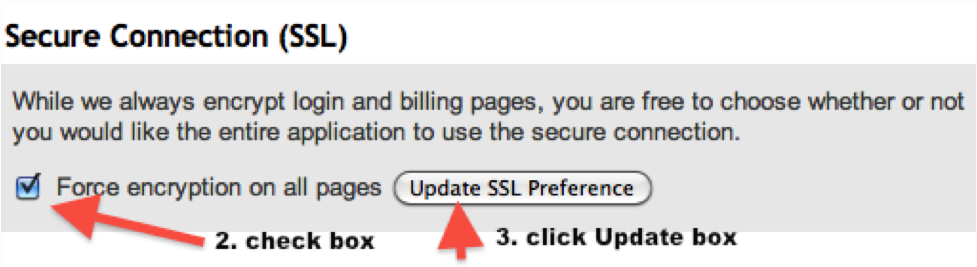
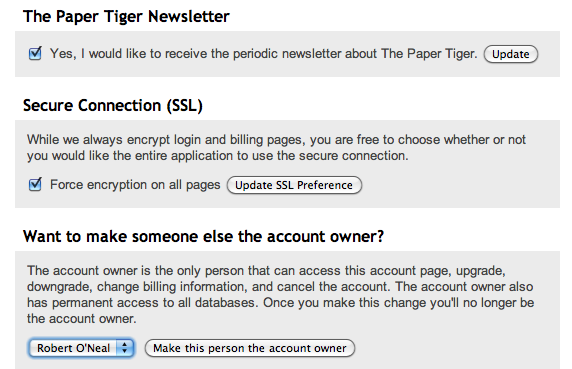
By default only the login page uses SSL, and needs to be turned on for the rest of the application. Turning SSL on for your Paper Tiger Online account is as simple as checking a box.
1. Click the Accounts tab from the Dashboard
2. Scroll to the middle of the page and check the SSL box to turn it on
3. Click on Update SSL Preference
~~~~~~~~~~~~~~~~~~~~~~~~~~~~~~~~~~~~~~~~~~~~~~~~~~~~~~~~~~~~~~~~~~~~~~~~~~~~~~~~~
~~~~~~~~~~~~~~~~~~~~~~~~~~~~~~~~~~~~~~~~~~~~~~~~~~~~~~~~~~~~~~~~~~~~~~~~~~~~~~~~


How many times has this happened to you: You are running late for a meeting, and have to take time to find the files you need, only to end up being late for the meeting, and never did find those files? Things like this have happened to pretty much everyone who has ever been in business. It seems as though everyone has their own different way of paper filing, and most of the time, none of the methods used actually work all that well, and can even end up being quite complicated.
For the last ten years, many business owners have relied on the paper filing system offered by Paper Tiger Filing System Software for Document Management. Now in its fourth generation, this is an easy-to-use filing system that allows you to keep all of your original paperwork, while it is also indexed, so you can find anything you need with a few keystrokes on your computer. It is an incredibly easy system to learn how to use, and also very easy to teach to members of your staff.
When it comes to time management, it can often seem like there is just way too much to do, and things can become quite overwhelming, especially when it comes to the mountain of paper files we often end up having to sift through just to find one little thing. Having the Paper Tiger Filing System Software can eliminate these problems, leaving you with more time to take care of many other little details involving your business, and your life.
Another option you have is hiring a new staff member just to take care of the paperwork that keeps on building up every single day, no matter how hard you try to get it all organized. This can be a really costly option and an unnecessary one. All you need is to have a great paper filing system like the Paper Tiger Filing System Software to take care remembering where your files are so that you can find them when you need them, and you can spend your time on more worthwhile things.
You may have also tried other methods of looking after your files, only to find that they did not work as well as you would have liked. One of course is the traditional method of alphabetizing everything. Unfortunately, we all start out with the best of intentions, but after a while, things do not get filed properly, and sometimes, not at all. Since the alphabetical system is limited to what fits on the file folder tab, you put off filing because you’re afraid you won’t remember what you filed things under and won’t be able to find them again so you would rather keep your paper files in stacks.
When you are trying to run a business, the last thing you need to worry about is dealing with paper filing. Let Paper Tiger take care of your files by indexing them, so you can find everything you need, any time, quickly and easily. You will be able to access everything you need, without having to spend hours fumbling through stacks of papers, and you will be wondering why you didn’t implement a paper management system like this ages ago. See how Paper Tiger Filing System Software for Document Management works by watching the videos on our Why Paper Tiger page.
~~~~~~~~~~~~~~~~~~~~~~~~~~~~~~~~~~~~~~~~~~~~~~~~~~~~~~~~~~~~~~~~~~~~~~~~~~~~~~~~~
~~~~~~~~~~~~~~~~~~~~~~~~~~~~~~~~~~~~~~~~~~~~~~~~~~~~~~~~~~~~~~~~~~~~~~~~~~~~~~~~

Paper is by far the #1 reason people contact us. The paperless office that was promised back int the late 70s / early 80s never happened. My friends at The Monticello Corporation created a new video that does a great job of talking about how to gain control of paper. Take a watch and tell me what you think! (click here to see the video)
I’ve been using and consulting with this tool, Paper Tiger Filing System and Document Management Software, for a number of years now. It is one of the tools that we introduce you to when you claim your Office Miracle(tm).
Sound interesting? Contact us today for a no cost / no obligation telephone consultation to see if this is the right tool for your situation. Want to buy it right now? Check out Paper Tiger Filing System and Document Management Software for more information on the tool.
About the Author:
Stephanie Calahan is The Business Vision Catalyst and founder of Calahan Solutions, Inc. She works with purpose-driven entrepreneurs, visionaries, coaches, consultants, health practitioners, authors, speakers and all sorts of remarkable service professionals who are experts in their field, to help them embrace their brilliance, leverage their business and get their message out with power, ease and joy; so that they can make a powerfully positive difference in the world, exponentially grow their income and enjoy a highly-successful and meaningful business… while working less. Learn how you can have more freedom in your life! http://www.StephanieCalahan.com
~~~~~~~~~~~~~~~~~~~~~~~~~~~~~~~~~~~~~~~~~~~~~~~~~~~~~~~~~~~~~~~~~~~~~~
~~~~~~~~~~~~~~~~~~~~~~~~~~~~~~~~~~~~~~~~~~~~~~~~~~~~~~~~~~~~~~~~~~~~~~
[audio:http://www.thepapertiger.com/blog/wp-content/uploads/2010/12/Fred-Holgado-Interview.mp3|titles=Fred Holgado Interview]
Hi I’m Janet Baker, office manager of The Monticello Corporation, makers of Paper Tiger Filing System Software. We have with us today, Fred Holgado, who is our Information Technology Director here at Paper Tiger. Hi Fred, it’s good to have you.
Fred: Hi Janet, thanks for having me.
Janet: So tell us, we want to know a little bit about what’s going on in our IT department. Can you tell us why did The Monticello Corporation decide on Paper Tiger Online?
Fred: Well there are a few reasons why we decided that moving to an online app was our best choice. First and foremost, was that we wanted our customers to focus on using our product and not having problems while installing it or getting it to work. You know we sell 2 versions [of the desktop edition], one is single user version and we have had issues in the past with customers not being able to install it and a lot of it is because of difficulty of installing programs in Windows. It really makes it hard for people to focus on filing and take 20 to 30 minutes to try to install this program. On the other hand, our Network edition which allows multiple people to use the software, that’s a lot more complicated too because it involves Windows networking and that’s something that unless you have a lot of experience and knowledge with, it can be difficult to install.
The online product, it takes about 30 seconds from the time you sign up until the time you actually get to file, and the same thing with the multi-user version [of Paper Tiger Online.] All you have to do is basically open the email and you’ll get to start filing with your team right away. We think it’s a lot easier and much more streamlined for people to use compared to our Windows offering.
Janet: Awesome! And we’ve had a lot of great results from Paper Tiger Online, as well. Can you tell us what is it about online that makes Paper Tiger unique?
Fred: I think for the online version, we’ve really worked hard on making it easy to use. So from the first time you sign in, the application guides you along and tells you exactly what you need to do and the steps you need to take. Also we’ve worked really hard on our knowledge base articles to make sure that at any point in time that you need help, there is some documentation there, and as always, we’re here available and ready to help you with what you need. We’ve also put together some screencast videos that show you how to get started. Those are really easy to follow. It’s just a matter of loading the video and watching for a little bit and you’ll be able to get going with Paper Tiger Online in no time.
Janet: Tell us what are you doing currently to improve Paper Tiger?
Fred: One of the things we’ve recently just added is international character support. Now this doesn’t mean that the application has been translated into different languages, but now it allows you to put in any type of character like accent marks, or other types of languages like Chinese, Japanese, Arabic, etc. This is something that our customers were really requesting; and it took a little bit of work on our part, but now the whole application will accept any of those types of characters.
The other thing that we’ve done, that we’ve just recently finished, is our new support portal which allows you to search all the help articles that we have in real time. It’s really cool and easy to use. All you have to do is look up in the top right corner of the [online] application and there is a help button and it will take you right to our new support portal and you may be able to learn some cool new tricks about Paper Tiger Online.
Janet: So can you tell us what is in the future for Paper Tiger?
Fred: Sure, I can’t go into any specifics, but one of the things is that we’re really interested in and we really see a need is for people to be able to handle digital files properly. I think we do a great job of handling your physical paper, but establishing a relationship between physical paper and your digital files, we think it’s something very interesting. We also have some great ideas to organize actual information, as well, to start establishing relationships between some of the information you may have, whether it be on paper or whether it be on Facebook or other social media or a digital file like .pdf or email. So we’re really looking ahead and looking forward to working on these new things so that we can see what our customers are thinking about it.
Janet: Wow that does sound interesting. So I’m assuming that our customers will be able to make suggestions and that kind of thing; and they will be able to do that through our new tech support portal, right?
Fred: Absolutely, they can get in touch with us either through our tech support portal, shoot us an email, write on our blog, and be looking in the future for blog posts talking about this and we would love to hear what people have to say about our product and any way we can make it better for you.
Janet: Very cool. Well thank you Fred. We appreciate you being with us today. Now go back to work!
Fred: ok, no problem Janet. Thanks so much.
What suggestions would you make for the future of Paper Tiger Online? Take this short 2-minute PTOnlineDigital Survey and make any comments/suggestions in the feedback boxes provided. We have had some really great feedback so far. Thank you for being so passionate about Paper Tiger Filing System Software for document management!

Whether your business is a small one-person operation or a large company, you are bound to have all kinds of paperwork. Often, you have so much paperwork surrounding you that you don’t have a clue as to what is where, or which file is which. Even the smallest of businesses have this type of problem, and it can often be quite a task to come up with a filing system that actually works. No matter how hard we try, or how much we dream, it is hard to go paperless and we are never going to be able to get rid of all of the paper flow that just keeps coming. So why not find a way to keep it organized so that you can find anything that you want in just a few seconds?
When you use the Paper Tiger Filing System Software for document management, you will be able to organize all of your paper files. Now this does not mean that you will be getting rid of your paperwork and just using your computer. Quite the contrary. Actually, with Paper Tiger Filing System Software, you will keep all of your paper files, so that you always have the original hard copy available, but index these records in the software database, so you can find anything you want at a moment’s notice. Some people just feel scanning is still not the solution. Often in attempts to go paperless, more copies are printed that have been stored electronically than ever would have needed to be printed had the one paper copy been kept. This can be used as your very own professional organizer and will really help when it comes to time management.
Did you know that a lot of business owners spend more than 150 hours each year just searching for lost files? When you use the Paper Tiger Filing System Software, you will be able to put these hours to much better use. So, you are probably wondering how Paper Tiger can help you, and what it is all about. Well, Paper Tiger is not a system that involves document scanning. Instead, Paper Tiger uses an indexing method. This means that you keep all of your physical paper files, and index them by inputting an item name and relating keywords for each file, so you can conduct a google-like search in the database and be able to find whenever you need them, instead of having to sift through a stack of paper files or trying to remember that one or two-word title you input on the hanging folder tab, which can really take up a lot of time that could be used in better ways. This indexing method enables a more flexible filing system, and you don’t have to worry about trying to remember where you’ve filed something.
Some of the advantages to using Paper Tiger Filing System Software include:
Indexing is the lowest priced form of document management. Having been in the market for more than 14 years, Paper Tiger has a proven track record of document management and helping people get organized and be more productive. Implement Paper Tiger Filing System Software for document management today and you’ll be on your way to saving time and money.

Many people think that all that teachers do is teach our kids the things they need to know in order to be able to graduate and go on to college, or get jobs. They do not realize all of the little things that teachers do in order to be able to teach their classes. After all, lesson plans don’t just appear out of thin air, and tests don’t make themselves up. Teachers have to create their own lesson plans, create tests and exams, grade tests and other assignments and keep track of those grades, and so much more. Often, you will find quite a few filing cabinets in a typical classroom, and these are filled to capacity with all of the things that teachers have to deal with every single day. This is a really good reason why teachers should switch to a much easier form of paper management, such as that offered by Paper Tiger Filing System Software for Document Management.
If you are a teacher, you know all too well how much paperwork accumulates on your desk in the course of a day, and at the end of a week, you may even be buried under all of the paper files that you know needs to be filed away, but how to file for easy retrieval is mind-boggling. You may think that a file management system such as indexing software for filing is something that is just for businesses, but it is something that can really make your job a whole lot easier and free up a lot of your time. You can eliminate a lot of the clutter from your classroom, and your mind, so you are free to do what you really want to do: teach.
Some of the things that you can use this system for include:
Paper Tiger Filing System Software is an excellent tool for teachers and professors who want to free up their time and space. Because this is an indexing system and not a scanning system, you will still be able to keep all of your original paper files. You can keep what you need, and toss what you don’t. This filing system software is designed to save you time and effort when you are ready to either file or retrieve your paper files. You simply indicate where that item is stored and assign it a series of relevant keywords. Then you never need worry about misplacing a file again. When you need to find something in a hurry, you won’t have stacks of paper files to go through or have to remember what name you put on the hanging file folder tab, because you can find it with just a few keystrokes on your computer.
The next time you are trying to find something in a pile of papers, perhaps a test that you want to hand out to your students the next day, and are ready to give up and make a new one because you have so much to go through that it is overwhelming, consider implementing a different sort of paper filing system that will save you a lot of time. If you’re filing the old-fashioned, alphabetic way without Paper Tiger Filing System Software for document management, you’re working too hard!
Learn what Paper Tiger can do for you, and how it can make your life a whole lot easier.

Document Management – How Long Do I Have To Keep My Paper Files?
by Ramona Creel
At work, at home, no matter who you are or what you do — we are all bombarded with paper. Some days, as I help clients sort through their mail, I’m amazed that we have any trees left on this planet at all! Junk mail, bills, magazines, newspapers, memos, reports — it’s an endless source of stress. Things have gotten so bad that we’re developing a new fear in our society — “paperphobia,” the fear of having to deal with that stack that’s been sitting there for a week. But a good document management system is the key to overcoming your paper-induced worries!
Thinning The Herd
Remember the first rule of clutter — “the less you have, the easier it is to organize.” The paperless office is still a long way off — I can’t guarantee that you will ever be able to eliminate paper from your life completely, but you can certainly reduce the size of the piles. Let’s start by going through your old files and doing some cleaning out. I believe strongly that if you don’t have a good reason for keeping it, get rid of it — but a lot of folks are afraid to ever throw a document away because they might need it again “someday.” How do you define “someday?” I suggest that my clients ask themselves some basic questions about why they are keeping their paper:
That last question leads us to the subject of purging financial and legal records. This is a sensitive (and somewhat scary) issue, because there could be some harsh consequences if you throw something out too soon. I agree that it’s better to be safe than sorry, but fear is a poor organizing guide. If you simply take the time to educate yourself about how long you are legally required to retain each document, you’ll never go wrong. Effective document management is all about having the right information and acting on that knowledge.
Records Retention Guidelines
In recent years, an entirely new field of study called “records management” has arisen — dedicated to helping people understand how long they must keep certain documents. Based on the information gathered by this industry, I have compiled standard schedule for purging your files. But please understand that this is a complicated issue (especially in today’s litigious society), and each situation is unique. Many professions set their own legal guidelines for records retention, and you may have some unusual or extenuating circumstance in your life — so check with your accountant or attorney before pitching out any important legal, business, or financial paperwork.
You must keep the following documents forever (yes, forever!):
Businesses are held accountable to a much stricter set of rules than individuals. In addition, specific industries set their own legal standards, including but not limited to healthcare, insurance, law, etc. In addition to the items listed above, all companies should create permanent files for the following, but be sure to ask your professional association for any additional policies for record management and retention.
Hold onto the following paperwork for six years. The IRS may go back 6 years to audit your tax returns for errors or incorrectly claimed deductions, so it’s important to keep all tax-related documents.
Keep these records for three years:
You should retain these records according to the following guidelines:
Safely Disposing Of Paper
Just because you cleaned it out, does not mean that it goes in the trash! Did you realize that once you put something in a garbage can at the curb, it becomes public property? And reports of identity theft are increasing every day. When someone else gains access to your personal records (social security number, tax id, drivers license number, address, bank account information) and pretends to be you, the results can be disastrous. Using your identifying information, this person can take out loans, run up credit card bills, and run up a tremendous amount of debt — all in your name. And most times, you never know until you get the collection letter. It can take years to clear up the legal and financial problems this causes you, and it can temporarily ruin your credit. Proper document management is synonymous with safety.
So to protect yourself from this threat, be sure to dispose of your important records properly. Any piece of paper that contains account numbers, your social security number, or any other sensitive information should be shredded. If you only have a small amount of paper to destroy, consider visiting your local office supply store to pick up a personal shredder — they run as little at $20 or $30. If you generate a large quantity of “shredable” paper, or just don’t want to sit there feeding in one page at a time, think about using a mobile shredding service. These companies will come to your home or office and shred your documents on-site for a fee. Just be sure that you choose a reputable company that provides you with a certificate or letter guaranteeing that your paper has been shredded unrecognizable.
Welcome To The Digital Age
In order for your filing system to be truly effective, it should really have two components — a paper side combined with electronic document management software. Software such as Paper Tiger Filing System Software for Document Management is designed to save you time and effort when you are ready to either file or retrieve your paper files. You simply indicate where that item is stored and assign it a series of relevant keywords. Then you never need worry about misplacing a file again. Simply search by the name of the document or one of the keywords and voila! If you’re filing the old-fashioned way without document management software, you’re working too hard!
About the Author
Ramona Creel is Professional Organizer, NAPO Golden Circle Member, and the original founder of OnlineOrganizing. A former Social Worker, she has always enjoyed helping people find the resources and solutions they need to improve their lives. Ramona now travels the country as a full-time RVer, sharing her story of simplicity with everyone she meets. She leads by example — having worked for more than 10 years as a Professional Organizer, and having radically downsized and simplified her own life as a full-time RVer. Ramona now considers herself a “Renaissance Woman” — bringing all of her passions together into one satisfying career. As a “Virtual Organizer”, she can create a customized organizing plan for your home or office. As a “Simplicity and Accountability Coach “, Ramona provides a proven program for making every area of your life a little bit easier — perfect for those who want to make the time and space to focus on their true priorities. As a Professional Photographer, Ramona captures powerful images of places and people as she travels. And as a freelance writer and blogger, she shares organizing techniques, travel tips, and social commentary with others. You can see all these sides of Ramona — read her articles, browse through her photographs, and even hire her to help get your life in order — at www.RamonaCreel.com. You can also follow her on Twitter, check out her Facebook profile, and subscribe to her blog feeds.