

With people working from home and diving into self-employment, home offices are quite common. It has been said that at least one in four households have a home office. When is the last time you organized your entire home office (besides when you initially moved in)? If you can’t answer this question, it’s time. With clutter on the kitchen counter, dining room table and other areas of the house, this article in particular is designated to getting the home office organized.
Sometimes this isn’t a task that can be tackled in one day, but with Paper Tiger Filing System Software for document management, these tips can help you make huge strides.
Since you are cleaning out your office, you might as well make sure that you are not storing documents that you no longer need or use. Your organizing system needs to be organized as well, and once you have your Paper Tiger database set up with your paper files indexed, you can print the File Clean-Out report to help you clean out papers from existing files. Also use the Transfer Report to help you physically move documents from one location to another so the documents in your hanging file folders match what you have in Paper Tiger.
These are steps to help you get started. Of course, depending on how cluttered your home office is, it might be quite difficult to clean out your entire home office in one day. Completing one of these steps a day, (in order of course), can ensure a clean and tidy office in less time than you think. Remember to relax and take your time when cleaning your office. Don’t get overwhelmed in organizing your home office. You’ll feel so accomplished and proud, you will want to go from room to room, and maybe even tackle organizing the garage. Happy Organizing!
In the article below, Anne McGurty, a Paper Tiger Expert of Strategize and Organize, relays the benefits of getting organized. Think of it as a small investment in the long-term events of your future. Do you think it’s a waste of time to get organized? Read on to see the benefits of being organized. She also recommends implementing Paper Tiger Filing System Software to help you save time and money!

Are you ready to get organized, but stalling because of a lack of time, money, or motivation? Don’t despair! A professional organizer is just what you need! Make an investment in yourself that will provide amazing advantages for years to come.
Here are some of the benefits you can look forward to once you get organized:
Once you get organized, you’ll know what you already own, eliminating the need to buy duplicate items. You’ll also be able to buy what you need when it’s on sale, rather than buying at the last minute. Your professional organizer can also help you find the perfect organizing products for your space and lifestyle, so you can stop wasting money on containers that just don’t work.
A professional organizer can create order and structure out of chaos. You’ll receive systems that work for your dominant learning style, your lifestyle, your needs, your challenges, and your dreams. Whether at work or at home, you’ll increase productivity once you have an organized and efficient schedule to keep you on track. You’ll be amazed at how much you get done in shorter amounts of time. And by focusing on your priorities and goals, you’ll be able to finally move ahead toward reaching them.
Once your home or office is neat and tidy, you won’t feel embarrassed to have guests visit. The guilt will fade away as you take pride in your surroundings. Your organized office will allow you to present a professional image to co-workers, clients, and superiors. Your organized home and new-found habits to keep it that way will set a great example for your children and/or spouse.
Physical and emotional clutter obscures your surroundings. A clutter-free environment is simply easier to manage. A professional organizer can help you clear out your space so you can see that your surroundings in a better light and easier to maintain.
When you can find what you need, are on top of your to-dos, and arrive on time for meetings or events, you’ll feel calmer and have more peace of mind. No more feeling overwhelmed by life — you’ll be in more control and feel less stressed.
When you’re organized, your days go as planned, and you get a lot done. That leaves more time to indulge in a little “me time.”
Clutter is a mask. A professional organizer can help you take off that mask and let people see your vibrancy! Once the clutter is removed, you can showcase your talents, skills, and personality and have the life you deserve.
About Anne McGurty
Anne McGurty is CEO of Strategize & Organize, a company devoted to training individual’s to be more effective with the tools and resources to be productive in their work environment.
If you like this issue, you’ll love Anne’s transforming productivity training and organizing products to help you organize your business — and yourself — ranging from productivity consulting for individuals and executives to small business coaching programs to keynote speaking and corporate training programs to improve efficiencies in the workplace and improve productivity.
While Anne is best known for her expertise in productivity and expert office organizing, her clients share that her biggest impact comes from her philosophy of “personalizing her programs to fit the needs of her clients so they can streamline more efficiently with existing processes” – ensuring to create a sustainable work environment. This, Anne says, is the most important key to bringing an individual to personal freedom with time and organization.
You can learn more about Anne at www.StrategizeAndOrganize.com.
You can contact Anne at amcgurty@strategizeandorganize.com or by phone at 303 881-0174.

Anne McGurty, a Paper Tiger Expert of Strategize and Organize, shares her top ten tips for using the Paper Tiger to get organized, work efficiently, and be more productive. Read on to see how a small investment in time implementing Paper Tiger Filing System Software can help you to simplify your life!

Did you know that the average executive spends six weeks per year retrieving or replacing lost documents? Naturally, it makes sense to create a system that is quick and easy so you can save that lost time. Here are some ideas to get it done now once you have Paper Tiger. If you don’t have Paper Tiger now, click this link to get started. Here are the top ten tips I recommend:
1. Look at the “hot spot of files”. You know the pile that seems the most urgent and makes your stomach churn every time you look at it. Take the paperwork and make a decision on each piece and separate into four piles:
a. Reference: those items you need, just not right now
b. Action: current projects, ongoing projects
c. Toss: you know where those are going
d. Timed: you need these on a specific date
2. When deciding on whether to file something or throw it away, ask yourself how difficult would it be to find this information again? Does it have any legal or financial ramifications if you were to throw it away? If you can live with the answer of throwing it away after those thoughts, let it go.
3. Set up the Paper Tiger Filing System Software and Document Management, an indexing system that works like a search engine for paper files to help you get organized and stay organized. It’s essentially creating an inventory for all of your files.
4. Use names that you will be able to recall easily. The obvious file names that you’ve used in the past. Then the interesting thing with Paper Tiger is that you will also be able to add keywords into the database so that any name you think of when you need to find a file, the software will be able to tell you where it is in seconds. So in the case of “Auto” the item name would be “Ford Explorer”, and in the keywords section, you would input the name of the company, i.e., “Vehicle, Car”, possible the name of the dealer, the service person’s name, etc., and you might use “Personal” in the Category section.
5. Oftentimes, people receive notices of an event and they never know what to do with the postcard. Set up a monthly filing system (a Tickler File) to keep track of when to throw them away. Create 12 hanging file folders, one for each month. As you rsvp or pull the information for “dress code” or directions. When the day rolls around, you can retrieve it for a reminder. This will ensure that you never miss an event or an expiration date on an rsvp or offer.
6. When sorting through paper files, make a decision. If you’re not in a decision-making mood, have a place set up for “unprocessed paperwork.” Then when you’re ready, if you need to take action, do it now or place it in the appropriate action file. If someone else needs to attend to it, give it to them. If it is something to reference later on, index the appropriate keywords into Paper Tiger and add it to the corresponding reference hanging file. Putting it back in the pile to address later is no longer an option for you as an organized person.
7. When you have a lot of tasks to do for the day, quickly sort the tasks in order of importance. Do what is most profitable or important to you first, then move on from there. Therefore, if you only have a little bit of time, you will be addressing the most critical issues first. All other tasks need to be scheduled for when it makes sense. This final step is critical, otherwise you’ll be starting a new pile.
8. Print out reports of what you have inventoried in your filing system, place a folder in the front of each file drawer, as appropriate, labeled “File Index.” Having a quick and easy reference when you don’t want to open your computer makes it easier to find quickly.
9. Get into a maintenance habit of printing out a ‘File Cleanout’ report of all of your files, quarterly or no less often than annually, and identify what you no longer need and purge or create steps to archive via off site store or scanning.
10. Finally, create a time management habit. Take 10-15 minutes every morning looking at your priorities, including your Actions within your Paper Tiger system and pulling files from your Tickler File. Do the same thing each evening by placing all documents collected through the day back into your systems.
Celebrate your progress, if you haven’t done it yet. Set up your Paper Tiger Filing System and get started now. As you go throughout your day, keep in mind the task at hand and focus on completing that one task. Remember that “things don’t clutter, people clutter”. When we make simple decisions and take action, we can improve the quality of our life at work and at home.
Anne McGurty
About Anne:
Anne McGurty is CEO of Strategize & Organize, a company devoted to training individual’s to be more effective with the tools and resources so they can be productive in their work environment.
If you like this issue, you’ll love Anne’s transforming productivity training and organizing products to help you organize your business — and yourself — ranging from productivity consulting for individuals and executives to small business coaching programs to keynote speaking and corporate training programs to improve efficiencies in the workplace and improve productivity.
While Anne is best known for her expertise in productivity and expert office organizing, her clients share that her biggest impact comes from her philosophy of “personalizing her programs to fit the needs of her clients so they can streamline more efficiently with existing processes” – ensuring to create a sustainable work environment. This, Anne says, is the most important key to bringing an individual to personal freedom with time and organization.
You can learn more about Anne at www.StrategizeAndOrganize.com.

Earth Day is Monday, April 22nd, and each year individuals across the globe participate in events geared towards environmental protection. Wouldn’t you like to get involved?
According to the Environmental Protection Agency (EPA), each year in the United States, Americans use about 71 million tons of paper and paperboard. Many organizations and individuals are making an effort to go paperless. A paperless environment is certainly good for the Earth as the amount of waste in the landfill is reduced in addition to greenhouse gas emissions and the energy used by printers.
Whether you are trying to go paperless or not, most of us still have some paper files, but we can still work toward less paper. Here are a few tips to help you be more environmental, and don’t forget to index the hard copy paper files into Paper Tiger filing system software for document management, so that when you need to retrieve a document, you can find it without having to print it again.
Here are just a few benefits of using Google Docs/Drive that can help you participate in Earth Day this year.
-Google Docs allows you to access your word processed files, spreadsheets and presentations. You can easily share these files with others. You can edit and work on these documents in the same location they are stored in. This can all be done without ever having a physical sheet of paper. The only time physical documents are involved is if you must first scan them into Google Docs. Sometimes you might need a hard copy in file, but also an electronic file. Using Digital Tiger, powered by Google Docs, function in Paper Tiger Online Basic or Pro plan, will allow you to index the physical paper file into Paper Tiger and also search Google Docs for the digital file.
-Google Docs has one of the cheapest digital file storage available. This means you can create and store all of your files digitally without physical paper clutter while also saving valuable space on your hard drive.
-Worried about the safety of your documents? While Google Docs is very secure, you have the option to send automated backups to your computer and also synchronize through Google Drive.
You can easily do your part to reduce your paper footprint by rethinking how you work with paper files and digital files. These tips can help you do your part in keeping the environment healthy. Whether you have digital files or hard copy paper files, you can easily do your part by reducing paper use for Earth Day.
Thanks to Roberta Lile-Lindsey of Kentucky for submitting this article on how she uses Paper Tiger Filing System Software for Document Management, and how much the software has helped her, especially since an accident left her with a brain injury. We wish Roberta continued recovery in her health and improved memory.
Read on to see how Paper Tiger has helped Roberta get organized and be able to retrieve what she needs even with long-term and short-term memory loss. This shows how important it is to get organized without delay while healthy, because you never know what tomorrow will bring in your life.

by Roberta Lile-Lindsey
I purchased Paper Tiger Professional 4.1 Desktop Version a few years ago after I got married and needed to consolidate all of my paperwork with that of my husband. My main use, of course, is for my filing cabinet, which contains active content and what I call ‘ancient’ archive content. You never know when you might need to use some of this ‘ancient’ content for present use; personal or business.
We were both very busy at the time I purchased Paper Tiger. My husband was working full-time and I was a full-time student and mother of two. We had just bought and remodeled our home. We did all of the work ourselves. So, you can imagine how busy and tired we were.
Using Paper Tiger was very easy and self-explanatory. I not only used it for my filing cabinet but I also have used it for organizing my closets that have both of our past memorabilia stored. All I have to do is open up Paper Tiger and I can find all of my important files or memorabilia.
I have always tried to be organized but what I did not know at the time of my purchase of Paper Tiger was how vital its use would become.
On August 13th, 2012, my husband and I were involved in a car accident. We were rear-ended by a teenage boy who was driving on a suspended license. That Monday was the first day of our vacation and we were only a few miles from our home when the wreck occurred.
The car sustained minor damage; however, I suffered a Mild Traumatic Brain Injury and Whip Lash. Among other injuries, I lost my long-term and short-term memory. Needless to say, with the pain and memory loss, my everyday living was and has been very difficult.
Not long after the accident, I received a call from my daughter needing some important information that normally I would be able to tell her from my memory. I could not remember the information that she needed; however, I did remember that I had Paper Tiger on my computer. I told her I would have to look up the information, IF I had filed it and I would tell her what she needed to know.
Thankfully, I was able to open Paper Tiger and look-up the information that she needed, call her back and give it to her. I was so relieved that I had organized all of my important files and at-a-glance can find everything that I need in spite of my long-term and short-term memory loss!!
I have started searching my family history after the accident in order to improve my memory and cognitive skills and once I feel better, I plan on adding those files to Paper Tiger also.
I continually use Paper Tiger to find and archive paper files, memorabilia, photos, Christmas decorations and the list could go on-and-on.
Winning an Apple iPad at this point and time could really improve my chance for a full recovery, as there are many apps available for traumatic brain injury patients, such as myself. I follow brainline.org and there are some fantastic Life-Changing iPad apps for people with brain injury.
Daily life continues to be a struggle even after six months of recovery time. I am so thankful to have Paper Tiger to make my life more organized and less stressful!
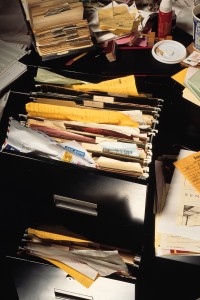
Whether you’re just starting a new business or you’ve been in business for years, you will always office organization. Often times, new gadgets come on the market that business owners get talked into purchasing, and these gadgets aren’t really useful in the long run, so money has been wasted. Then, there are other ideas that are helping business owners save heaps of money. One of these ideas is Paper Tiger Filing System Software for office organization, which is being used in companies of all sizes, ages and types. Employees won’t be wasting time searching for paper files when they could be doing things that are much more productive, thus saving companies money while increasing productivity.
Paper Tiger allows companies to maintain their paper files that they need to keep in hard copy format. Keep your paper in its original form (you do not have to scan it), but simply index your paper files into Paper Tiger’s database and use the power of the computer to quickly and easily find the information when you need it. Paper Tiger can index anything; it’s not just document management! Some things just can’t be scanned, i.e., passports, contracts, binders, books, CDs, DVDs, etc. That cannot be done with systems that require scanning into an electronic file. The beauty of Paper Tiger is that keywords allow everyone to find the document that might have been named many ways by many employees.
No matter how large or small a company, time management is a must. After all, when people are wasting time, they aren’t being productive, and the company is not making any money. Searching for files is a huge waste of time, especially when there is Paper Tiger to make the job faster and easier. The less time one has to spend searching for files, the more time can be spent doing things that are actually fruitful. The better you and your employees are at managing time, the more efficient your company. When documents are saved, various keywords are used, granting anyone who has permission easy access just by using certain keywords.
If you want to keep up with the times and make sure that your company is using the most modern paper management techniques, then you need Paper Tiger Filing System Software for office organization. Of all of the office supplies you pay for, this software is one of the most important. In addition, Paper Tiger will virtually return the investment when the time wasted is put towards working! Allow Paper Tiger to help with your office organization to cut back on time and keep your profits up where they should be.
During this webinar, Anne discussed the basic concept of Paper Tiger to organize both paper files and other physical items of which you need to keep track so that you can find them when you need them, and the concept of Digital Tiger, powered by Google Docs to organize and find your digital files. She demonstrated how to use Digital Tiger more effectively for digital filing, in addition to the following to show how to use Paper Tiger with Digital Tiger, so you can get organized and be more productive.
Find Anything In Your Office In 5 Seconds or Less…Guaranteed! Watch the webinar to learn more.
As information, Anne is a professional speaker, productivity expert, professional organizer and author. If you want to learn more about Anne and her services, please visit her website at www.StrategizeAndOrganize.com.
She may be in Colorado (and sometimes in Arizona!), but she’s nationally recognized as an expert and works with people throughout the US in person and virtually.
You can contact Anne at amcgurty@strategizeandorganize.com or by phone at 303 881-0174.
See more information here on Paper Tiger Filing System Software for Document Management
Q: How do you start when all of your files are in drawers and on your desk? It would be helpful to have ideas for where to start – baby steps.
A: We always recommend starting with the files on your desk to get your desk cleared. If you already have files set up, you might start with the drawers in your desk and index each file. We recommend starting with naming your Paper Tiger locations as Action Files, Reference Files, Archive Files. Then you can add other types of files later, such as Binders, Books, CDs, DVDs, etc. Locations could also be an actual physical location, such as File Room, Library, Garage, Basement, Storage, etc. Please take a look at this blog post that we created to help those needing a little guidance that you might find helpful: Customize Your Filing System with Paper Tiger’s Indexing Method
Q: Is there any way to search all of your databases or can you only search them individually?
A: You can only search within the individual database that you’re in at the time. You cannot search across all of your databases. Having different databases is only advantageous if you want to keep different filing systems separate and do not want to search for all files in all databases at one time. For example, if you have an Office database and a Home database, you do not want items to pop up from your Office database when conducting a search for an item in your Home database.
Q: I have several “side jobs” for non profits etc. Do you recommend setting up locations for each type of side job? For example, I have several clients that I work for from home. Should I set up a location for each client? Perhaps it depends on what the physical location is?
A: It does depend on how you want these filed, but think about if you need to have a location for each client. Do you have several manilla folders for each client or do you simply have 1 hanging file folder per client? If you only have 1 hanging file folder per client, create a location named Clients, then 1 item per client. However, if you have several manilla folders for each client, and you don’t want to itemize each manilla folder into 1 item, then you might consider naming a location per client. In this latter case, you might only have 5-10 items in each location, but it would give you more flexibility in differentiating between clients.
Q: If I use the cloud version, vs the desktop version, I could access from multiple PC’s, is that right? e.g. access from home and work
A: Yes, you would be able to sign in from wherever you are with an Internet connection. Paper Tiger Online works on any computer with an Internet access including Mac.
Q: Where do I find the area to change the setting to include digital search? I checked database preferences, but it doesn’t give me that option.
A: You will first need to connect Paper Tiger to your Google account. From the Dashboard, click on the Accounts tab, then find the option to Connect to Google Docs. Please see this blog post that has step by step instructions that you might find helpful: http://www.thepapertiger.com/blog/started-digital-tiger-paper-digital-filing-solution/
Q: Can I attach a picture to an item, specifically, I want to inventory fabric for a small sewing business, pictures or links to pictures in the notes would be helpful.
A: Paper Tiger is an indexing system, and doesn’t allow you to attach an electronic file, however you would be able to upload the picture to Google Drive and title that digital file with keywords. Then with your Paper Tiger Online account connected to your Google account, you would be able to search from Paper Tiger Online and search results will return for both your physical items that you’ve indexed into Paper Tiger and your digital items that you have in your Google Drive. You can also paste the link into the Notes section if you like, however it will not be hyperlink, but you can copy from there if you wish later.

During this webinar, Anne discussed the basic concept of Paper Tiger to organize both paper files and other physical items of which you need to keep track so that you can find them when you need them, and the concept of Digital Tiger, powered by Google Docs to organize and find your digital files. She demonstrated how to use Digital Tiger more effectively for digital filing, in addition to the following to show how to use Paper Tiger with Digital Tiger, so you can get organized and be more productive.
Find Anything In Your Office In 5 Seconds or Less…Guaranteed! Watch the webinar to learn more.
As information, Anne is a professional speaker, productivity expert, professional organizer and author. If you want to learn more about Anne and her services, please visit her website at www.StrategizeAndOrganize.com.
She may be in Colorado (and sometimes in Arizona!), but she’s nationally recognized as an expert and works with people throughout the US in person and virtually.
You can contact Anne at amcgurty@strategizeandorganize.com or by phone at 303 881-0174.
See more information here on Paper Tiger Filing System Software for Document Management
Q: I am very interested in reducing the amount of papers to be filed or that perhaps are not needed at all. What papers are critical to keep, even after scanning them?
A: We have several blog articles under our Category of “Retention Guidelines: How Long Should You Keep Records”
Q: I want help with useful item and category names.
A: See this blog post which contains suggestions for Location names, Item names, as well as Categories: “Customize Your Filing System with Paper Tiger’s Indexing Method.” Hopefully this will be helpful to you.
Q: How do I switch over from the old version and is it hard?
A: After creating your Paper Tiger Online account (Pro or one of the multi-user plans), email support@thepapertiger.com, attach your database(s) and let them know that you need it imported to your online account under which email.
Prior to sending your database, make sure all pending items have been confirmed by clicking the Confirm box, and empty the Trash for each database. Then export your database(s) to .CSV file(s) by following the instructions below for all databases if you have more than one database. To export a Paper Tiger CSV file from Paper Tiger 4:
1. Open Paper Tiger and the appropriate database.
2. From the File menu, select Export.
3. Check the Select All box.
4. Click the Browse button to select the preferred directory so that you will know where the file will be saved to and type in a file name for the CSV file, click the Save or Open button
5. Then attach the .CSV file to your email that you’re sending to our tech support team
Q: What is the difference between paper search to digital search?
A: Paper Tiger searches your paper files that you’ve indexed into Paper Tiger, and the Digital Tiger function allows you to also search your digital files that you have in Google Drive. Digital Tiger is a free add-on with a paid Paper Tiger Online account (Basic and Pro plans for now and then later for multi-users), to connect your Paper Tiger Online account to your Google Drive account, then you will be able to search from one place (Paper Tiger) to find both your paper/physical items that you’ve indexed into Paper Tiger and your digital files that you have in Google Drive. Since Google Drive in this case would be your digital file storage location, you can prepare for Digital Tiger by creating, scanning or uploading your digital files to Google Drive. Again, Paper Tiger is for indexing the paper files that you need to keep in hard copy format and other items, such as passports, instruction booklets, or CDs, DVDs, Books, home or office inventory and/or storage, etc.
Q: Is there a mobile app for Paper Tiger?
A: No we do not have a mobile app for Paper Tiger, but it works well on the iPad and other tablets.
Q: I would like to organize my jewelry, and I have a lot! What do you think the best way would be to do so? I did purchase clear-lidded jewelry boxes and have also taken the photos! I was trying to figure out about the photos. I am thinking of also putting info to Google Doc’s so that I don’t have to store all this information in a drawer.
A: We recommend arranging your jewelry so that you can number each piece, then index each piece in Paper Tiger matching item numbers as you go. You can photograph your jewelry with corresponding numbers, and upload the pictures to Google Drive. Be sure to put keywords in the title of each photo that you upload.
Comment: I love the fact that you have “loaned to Frances” under your keywords for your books. It is way too easy for me to not get borrowed books returned to me. Using your method would help me put a stop to this.
A: Awesome!

Being a teacher or professor is one of the most important jobs, however, it can be a bit of a challenge to keep everything organized. In order for a teacher to do the most proficient job possible, it is key to have a structured organization system in place. If you are a teacher or professor, you already realize how much there is to keep track of and try to find a way to keep straight.
If you are planning on becoming a teacher or about to graduate and become one, you should have an idea of what to expect. Not only that, but you should also go ahead and plan to implement an indexing filing system in order to have everything make sense, and to start out organized so that you can easily retrieve what you need when you need it without a lengthy search through stacks and stacks of paper files.
In addition, you’ll also have books and notebooks to keep track of and depending on your subject matter, you most likely will have different kinds of supplies that you need to keep track of. All of which can be indexed into Paper Tiger’s filing system software.
Teachers and professors have to come up with lesson plans and keep these on file for years to come. They can refer back to these lesson plans to reuse them throughout the years. Educators must also bring home students’ papers to grade and may sometimes keep copies of these papers to refer to later for various reasons. Teachers also have to give out assignments and may keep track of the assignments they drafted as well as copies of their students’ work. The bottom line is that there is a great deal of paper work involved with being a teacher.
It was once nearly impossible to keep track of all these papers from the past. Filing them under some type of alphabetical system kept them neat, but far from an easy retrieval or finding system. In fact, unless you could remember exactly what you would have filed something under, these filing cabinet drawers and tons of paperwork can be useless. Fortunately, Paper Tiger Filing System Software for document management, an indexing filing system software can help you get your paper files organized and turn your filing system into a ‘finding’ system.
Now you can have your lesson plans, past assignments and tests on file and find them easily. Instead of having them alphabetical when one file could be under several different names or titles, you can simply include any and all keywords that you may use for your files. This is especially important for those who teach more than one subject. Your substitute teachers can also benefit from getting your files organized.
You no longer have to file everything under the title you think you should, which can end up causing duplicate files in some cases when files could be filed under different names. When you want to retrieve something, will you remember if you filed it under H for “History test” or F for “final exam.” In fact, for copies of students’ papers, how could you possibly recall what the title of a student’s paper was from two years prior in case you need to retrieve it again?
Instead, you use keywords, any and all of the keywords and search terms you can think of to help categorize your papers. That way, once you index your files into Paper Tiger’s indexing software by entering item names and keywords into the indexing system relating to the documents in your hanging file folders, you can find anything by conducting a Google-like search of the information in your database based on the keywords you’ve typed in previously. Search results will direct you to the exact hanging file folder. You can add keywords anytime, especially when you need to file a new document into an existing hanging file folder.
With Paper Tiger, you would number your hanging file folders to coincide with what you index into the database, enter the data into the software relating to each document or set of relating documents such as the item name and additional keywords that you might relate back to the files in each hanging file folder. You can also rest assured that you, and others working with you, will be able to find the file at a later date.
Really no matter what profession you are in, with Paper Tiger Filing System Software for document management, you will never again have to spend hours searching through file after file, … or through shelf after shelf of all your books, or through your boxes for the supplies you need to retrieve, … when all it takes is a quick search in your filing system database to find what you need when you need it! See our training videos and a webinar or two on our Training page and get started today!

How many times in your day do you find yourself shuffling through paper files, wasting a lot of time looking for one item in particular that seems to be lost in countless papers in front of you? This has happened to all of us at one time or another, whether we are in busy offices or just trying to keep household paperwork in order.
Getting organized will reduce stress in your life and help you be more productive, and an effective filing system method, like Paper Tiger Filing System Software for document management can help get your life in order, both personally and professionally. Think about how much time you could save and how much more you could do if you’re not always searching for things.
It is said that the average American spends over 150 hours per year, just looking for lost information. Some estimates are even higher than this! How much does lost information cost you and your staff?
The problem often is, once you have a disorganized system, it can be difficult to get out from under it. Many people claim to have a “method to their madness” or that the filing system they have in place, with random papers stacked on every flat surface of a room, “works for them.” Truth be told, though, this most likely isn’t true and they waste a lot of time searching to find what they need.
It takes more effort to deal with clutter and spend time trying to find documents and other physical items than it would if you had a system in place. Besides, if someone else had to work with that same system, he or she may not be as able to adjust to the madness. Also consider the stress having this type of home or office causes. Even if it is subconscious, people who live with clutter in their home or office life are reported to feel stressed out, depressed and generally overwhelmed all of the time.
It is easier to start off organized, but even if you have already started to live in or work in a world of paper chaos, you can still change things and turn it around. If you’re not organized, there is hope. Paper Tiger is a great tool to get you started on your way to filing and being able to find what you need, as well as make it simpler to get an organizational system into place and then maintained. Paper Tiger is flexible enough to fit your needs and preferences.
If you have done any filing, you most likely know that some documents can be filed under different file names, for example you might file your “auto” records but someone else is looking for “car” records or even “vehicle” records. It almost doesn’t matter how pretty the system in place is if you have to look under 3 or more hanging file folders to find the file you need. It is also very easy to duplicate files, having some documents under “auto” and some under “car” and “vehicle” so you’re still wasting time and file space in this instance.
When you use Paper Tiger Filing System Software for document management, you can use keywords so that any one of these terms could be typed in to search for the location of a document. It keeps everyone who has access to the filing cabinets and the filing system software on the same page.
If it can be numbered or indexed, it can become part of your filing system. This very same program you use to get your papers in your home or office in order can be used to keep your books or garage or storage shed in order as part of your effort to get organized. Imagine a life free of clutter and finally making sense when it comes to how things are organized. So, you keep tools in the garage, basement, the backyard shed and an offsite storage rental unit. Because of that, how will you have any idea of where to find what?
No more lost items! Doesn’t that sound good? All you do is take the time to enter the item names and keywords relating to the items you are organizing; indexing them into Paper Tiger’s database, whether it be paper, books, CDs, DVDs, collectors’ items or tools, or anything else you can put a number onto. Then when you need an item, you can conduct a quick Google-like search in the software database and find any of your belongings at the time you need them instead of having a time-consuming search. Implement Paper Tiger Filing System Software for document management and see for yourself how quickly you can get organized!
Don’t let the idea of getting organized overwhelm you. Asking for help can be a sign of wisdom, not weakness. If you were not born organized, or if you haven’t thought about getting some training in how to get organized or be more organized, then give yourself a break!
Ask someone in your family or a friend that can help you. Hire an intern. Or better yet, organizing and productivity consultants are available to help you create a customizable work flow and help you implement Paper Tiger so that you can get organized and work more efficiently. Click here to see Paper Tiger Experts who can help you.
Sherry Borsheim, a Paper Tiger Expert of Simply Productive, has published a short video to help us understand that ‘going paperless’ is a process, and may mean that you have ‘less’ paper, instead of ‘no’ paper. Not necessarily that you have to get rid of every piece of paper to go paperless.
Sherry’s Organizing Bootcamps will give you a JUMP-START on ORGANIZING your office, home and life. She will give you her trade secrets and steps to setting up your organizing systems, including recommending Paper Tiger filing system software for document management, to be organized and manage the paper files that you need to keep in hard copy format and other physical stuff in your life.

Sherry says,
Making the decision to go paperless is a great step in the right direction. But it isn’t a single step … going paperless is a process. Even after I thought I had cleared everything, I still find it is important to keep going back in and clearing more out! Staying organized is about staying on top of your systems.
~~~~~~~~~~~~~~~~~~~~~~~~~~~~~~~~~~~~~~~

During this webinar, Nancy Hagan of Effective Day demonstrated how to get started with Paper Tiger Online. In addition to demonstrating examples requested during webinar registrations, Nancy demonstrated work-flow examples by filing items from her inbox to help you use Paper Tiger Filing System Software for document management more effectively to get organized and be more productive.
Nancy also presented how to organize things other than paper files, such as books, bank box, and storage boxes. She also demonstrated how the search from Paper Tiger Online works with the Digital Tiger function activated.
Please visit www.effectiveday.com to learn more about Nancy and the services she provides, and click here see her Productivity Coaching special. You can contact Nancy at 513 899-9949 or email at nancy@effectiveday.com
To learn more about Paper Tiger and Digital Tiger, visit www.thepapertiger.com
Q: How many separate locations can I have in each database and how many databases can I create?
A: if you have the free or Basic plan, you are limited to how many, but if you have the Pro plan or one of the multi-user plans, you are basically unlimited as to locations within a database and how many databases you can have.
However, you would only want multiple databases if you do not want to search across them because Paper Tiger only searches within the database that you’re in. It does not search across databases. Having different databases is only advantageous if you want to keep different filing systems separate and do not want to search for all files in all databases at one time. For example, if you have an Office database and a Home database, you do not want items to pop up from your Office database when conducting a search for an item in your Home database.
Q: Please explain what Categories are for.
A: “Category” is a word or words you may use to classify groups of related folders or items. Paper Tiger allows you to file information physically one way, but easily organize files virtually in a totally different way using Categories.
For example, you may use the Category “Benefits” to classify the folders relating to “Stock Options,” and “Day Care.” The Category, “Bills” may include “Utility bills”, “Car repair bills” e.t.c. The Category “Self-Help” might include all your books that relate to self-help or motivation.
Q: So when I assign Categories to files, the files become searchable by Category and keywords?
A: The category title you assign is not searchable, but there is a button for Category (beside the Location button) that you can click on and Paper Tiger brings up a list of your Categories similar to your Locations list. You can then choose the category you want to see all the items that you’ve assigned to that one.
Q: Oh also when you are in the Categories list, and you click on the category that you want to see all the items, can you search within that?
A: No, when you search from the search bar, Paper Tiger searches all of the database, not just within the category you’ve chosen. However, once search results come up, you can sort by the Category column.
Q: After you set up a Location, you say you might add 200 items. I would assume those items are files in the drawer. Can you branch off one of those items to say in this item there are these files? I’m confused as to after you add the 200 items or hanging folders, how do you say what is in the hanging folder if there is say 10 different papers in the folder that deals with that hanging folder.
A: The 200 items would coincide with the hanging file folders in your drawers. You can add keywords for each item in Paper Tiger that relates to as many documents that you have in a single hanging file folder. So if you have 10 different papers in a single hanging file folder, you would input as many keywords as necessary relating to the 10 different papers. That being said, if your hanging file folder contains your monthly cable bills, you would only need keywords for the entire folder not necessarily for each monthly bill unless there is something that you want to remember about a specific bill.
Q: What if in the hanging folder there are 2 manila folders that deal with the one hanging folder, but are separate from each other. Is the only way to say what is in the hanging folder in the keywords or can you have a tree that has a title for each manila folder, then you can say what is in each manila folder so you know they are in the same hanging folder, but separate from each other?
A: What I do in this instance, is number each manilla folder, and then when inputting keywords for each, I would for example, Item Name might be Paper Tiger Training and manilla folders would be numbered to coincide with the number I input into the keywords section, i.e.: 1. Paper Tiger single user instructions, 2. multi-user instructions, 3. database information, 4. etc.
Q: How does Paper Tiger compare to Evernote?
A: Evernote is a different kind of tool in which you can save notes, ideas, things you like, hear, see and other things that you want to remember or have in one place.
Q: Would the digital files feature work with Microsoft Live accounts (SkyDrive)?
A: No, our Digital Tiger function connects Paper Tiger Online to Google Docs or Google Drive through a Google app or Gmail account. Click here to go to our blog post for how to get started with Digital Tiger, where you can view 2 screen casts that show how Digital Tiger works and a demonstration of using the Fujitsu ScanSnap 1500.
Q: What is the name of the scanner you mentioned?
A: Fujitsu ScanSnap 1500
Q: Do I need to hit save after I edit something and if so, where is the save button?
A: In the Edit box, you do need to save your changes. You should see Save Changes button in the lower left corner of the Edit box.
************************
Nancy Hagan of Effective Day, works with business people who want to be more effective and productive, focus on their highest priorities and be free to do what they do best! Effective Day provides Organizing and Productivity Coaching, Consulting, Workshops and Products for busy people who want to make the most of their day and enjoy their life.
Stephanie Calahan, of Calahan Solutions and a Paper Tiger Expert shares 3 great tips in this article to eliminate the avalanche of paper piles. Be sure to watch the video she mentions later in this article to help you create an action system that works for you!
Stephanie recognizes, as we do, that different people need different tools to help with their daily lives, including Paper Tiger Filing System and Document Management Software, which she recommends based on her clients’ needs and the way that they work. She understands that every person is different and requires systems that work for them.

Your desktop, and frankly any other horizontal surface, are the hardest places to keep clear of paper. Bills to pay, to-do lists, event invites, magazines you have been meaning to read, orders you need to fill, and the list goes on and on.
Often, we keep things “out” – either spread around or stacked – on our desk and other surfaces because we don’t want to forget to do something that we have deemed important or don’t want to forget.
Today I’ll share 3 tricks that have worked for me and my clients.
Rather than thinking of your papers in terms of a topic or a list of things that you need to do, think in terms of “next action.” You may have many things that ultimately need to happen with a particular piece of paper, but by only thinking of the next action, you can eliminate overwhelm and process your paper faster. (If there is no action necessary, skip to trick #3)
Once you have determined the next action, either write it directly on the paper, or attach a sticky note to the page with the next action you need to take. If you know the information, also write down how and when you will best perform that action. By writing down the action you need to take, you will save yourself loads of time later when you pick up the paper again! Why rethink about an action over and over when you can decide once and move on?
Example: I was working with a client the other day and we were going through his paper work. He picked up a piece of paper that contained a name and phone number of a contact. He told me that his next action was to make a phone call to that person for a project they were working on together. I then asked him if he had everything he needed to make the call successful. No. He didn’t. He had to do some quick research first. So, the next action was not the phone call, it was the research.
When you have action items, it is OK to mix various project or topics as long as they are organized by the type of action you need to take.
Create an Action System! Action Systems come in a number of different forms. One way is to label file folders with each Verb and store your papers in those file folders on your desk in a vertical file holder (the graduated kind where you can see all of the file tabs is best) or you could use the Pendaflex PileSmart Organizer
– Call
– Write
– Review/Decide
– Pay
For a detailed look at how that might work for you, check out the video I did on YouTube a while back – Creating an Action Filing System for the Way You Work.
The Action System is great to keep things looking neat, but you must actually open the folders and take action to get the full benefit! By taking action by verb or type of action, you will eliminate multi-tasking, save time and increase concentration. If possible, it is best to empty each folder in one sitting. Once you have completed the action, ask “What is the next action?” and file accordingly.
Example: The paper my client had identified with the contact and phone number originally went into a “Research” folder. Once he had completed the research, he added that information to the paper and moved the page from “Research” to the “Call” folder. When the call was complete, he would either toss the paper, or file it into permanent reference or assign it a new action based on the results of the call.
Sometimes we keep papers on our desk because there is information that we want easily accessible but there really isn’t an action needed. Start by making sure that the information really is needed for quick reference. If you don’t need the information on at least a weekly basis, file it away in your permanent reference files.
The fastest way to create a quick reference system is to get a 1 – 1 1/2 inch binder and a numbered tab system. Either 3-hole punch each page or put them in sheet protectors. Each topic gets its own number. At the front of the binder, have an index to tell you what each number represents. You might have something like this:
1 — Emergency Contacts
2 — Service Providers
3 — Passwords
4 — Product Codes
and so on.
Once you have your Action System and Quick Reference system in place, it is a matter of consistently asking yourself “what is the next action” and then processing the paper. These small decisions will help you keep the paper piles under control and eliminate avalanche concerns. Before you know it, you will be getting things done rather than pushing papers around your desk!
If you would like help getting all of your paper piles figured out and systems put in place that match the way you think and work, let’s talk!
To your success!
About the Author:
Stephanie Calahan is The Business Vision Catalyst and founder of Calahan Solutions, Inc. She works with purpose-driven entrepreneurs, visionaries, coaches, consultants, health practitioners, authors, speakers and all sorts of remarkable service professionals who are experts in their field, to help them embrace their brilliance, leverage their business and get their message out with power, ease and joy; so that they can make a powerfully positive difference in the world, exponentially grow their income and enjoy a highly-successful and meaningful business… while working less. Learn how you can have more freedom in your life! http://www.StephanieCalahan.com

Meggin McIntosh, is “The Ph.D. of Productivity”™ and a Paper Tiger Expert. She will help you better understand Paper Tiger Filing System Software for document management to be able to use the software more effectively and see how you can get organized in every area of your life — not just paper filing! Meggin has been able to file & find paper files, notebooks, boxes, and lots more for over 13 years.
Click here to see a pre-recorded class Meggin taught where she shows how she has used Paper Tiger for over 13 years.
About Meggin McIntosh
Meggin McIntosh, Ph.D., “The Ph.D. of Productivity”(tm). Through her company, Emphasis on Excellence, Inc., Meggin McIntosh supports smart people who want to be more productive so that they can consistently keep their emphasis on excellence.
Phone: 775.853.5510
And to keep moving forward on your goals for more peaceful productivity, join others (worldwide) who receive Meggin’s weekly emails, and see what is available for download at no cost at any of MEGGIN’S WEBSITES:
http://meggin.com (Primary site)
http://GetaPlanGuides.com
http://KeepingChaosatBay.com
http://TopTenProductivityTips.com
http://JustWhelmed.com
http://OwningWordsforLiteracy.com
http://PumpernickelPublishing.com
http://StayingPositiveinaFreakedOutWorld.com
http://LifeofEs.com
Twitter • www.twitter.com/MegginMcIntosh

If you have your own business, you realize how difficult it can be to keep things organized and in order. Paperwork alone can be a real nightmare, but Paper Tiger Filing System Software for document management, not only can you finally get all your paper files in order, but anyone in the office can find them.
Using Paper Tiger, you never have to worry about whether to file a paper under “Smith’s dog care,” or “Fido dog walking schedule” again, and solves the many problems with filing such as:
The best thing to consider is using document management software as your ultimate tool for a filing system. The great news is that Paper Tiger can be used for more than just your paper files, but start with the paperwork part of your business. This is often the most important aspect of your business because it affects you, your clients and even how you get organized and prepare for tax time reporting.
Consider how the alphabetical method filing system would work. You would have to make sure everyone who might need access to the document would be in agreement with the labeling system and then make sure you had everything in the right alphabetical order. One simple slip and you could spend a lot of time searching every file of every drawer in all of your filing cabinets looking for one single piece of paper.
You can index the document into Paper Tiger’s database with any item name you want without any worry about finding it later, because the system will allow you to add as many keywords as you want to describe all documents that you put in your hanging file folders. For documents that you want to add to the same file, simply edit the Item and add additional keywords necessary for the new document(s).
Because the hanging file folders are already set up numerically and waiting for your documents, you eliminate the time-consuming hassle of having to find and create a file folder each time you want to file something.
When you’ve indexed your paper files or other physical items into Paper Tiger, and you need to find an item, you simply conduct a Google-like search in the database and Paper Tiger will let you know where the needed item is located, then no matter what someone types in to search for the Fido Smith dog care and walking schedule, the answer will appear based on the keywords entered previously. Find that file number and you have your paper without even having to think about putting it in alphabetical order, or what you would have put on the file tab.
So after you have your papers in order, you realize that you and your staff waste a lot of time finding things you need relating to the business, such as inventory or office supplies. Now you can use your document management software to keep track of the bin number you keep extra flea collars in, the box number where your back stock for leashes is and even if you have those personalized dog beds in your business, home or at some offsite storage unit.

Below is another example of how to use Paper Tiger to index and organize your CD’s, and can be used to implement the same concept to index your office supplies or inventory or your books or any other physical item that you can put a number onto:
1. Name a Location CDs, with capacity of 100 (you can increase this later if you need to) Then print labels for the 100 items ready to affix onto each CD as you index it.
2. Begin indexing your CDs individually by adding a new item in this Location. I would name the item by the name of the movie or topic or singer of the CD, and continue with something like the following:
-Item Name: (name of the movie or topic or singer of the CD)
-Keywords: (actors/speakers, length, rating, brief description)
-If you have Professional or Pro edition, you will be able to apply a Category to the item. If so, add new category for either drama, fiction, comedy, historical, etc. (as info, the Basic edition does not have the Category function) If you have Basic, then you can add the category to the keywords section as well, then when you search for a specific category, Paper Tiger will bring up all of the CDs that you’ve indexed with that category, which is basically the same thing that would happen if you were to select the Category drop down box in Professional or Pro.
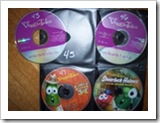
3. As you index each CD, affix the corresponding label to it and store in your new place. As you’ll see in this picture below, both the CD and the CD jacket are numbered so when you search Paper Tiger, you can go to the corresponding CD jacket number, and you’ll also know to match the numbers when replacing the CD.
The bottom line is that if you can put a number onto an item, you can index it into Paper Tiger… then whether the physical items are paper files, boxes, bins or books, etc., type in a keyword for an item the same way you do with an online search engine, you can find it. Start making your organization system work for you and your entire office by using Paper Tiger Filing System Software for document management and get organized today!



