Do you have trouble managing a home office? Add the kids and their activities, along with your busy schedule, and the managing with efficiency gets more difficult. Things get left undone, and the piles of paperwork, mail, magazines, kids’ artwork, not to mention all the stuff totally unrelated that finds a place on your desk you haven’t taken time to put away.
Whether you work from home or your home office is a place where you pay the bills, read the mail and file paperwork, you should be able to actually work from your desk. Your desk should not be a landing pad for everything that can be put away later. Stop procrastinating and make the decisions necessary to keep your desk looking good and a place where you can actually work. Of course, tips such as the ones listed below could relate to any area of your home that collects clutter.
You know what you have to do, but without scheduling time and a concentrated effort, the job will not get done. So take a look at what piles up on your desk. Is it just mail and magazines that are piling up? Or are there CDs, books, kids’ artwork, tools that need to be put away, office supplies, and other trinkets?
Have a family meeting to discuss what needs to go and what needs to stay. Whatever is on your desk that should not be there, create a ‘home’ for each type of item that would be best kept elsewhere so they don’t land back on your desk. You simply have to take the time to decide what you need to do with the problem area, what is your vision for the area, create a plan of action, clean and organize, and then maintain it.

Click here to see an example of how to organize kid’s artwork in this video by Sherry Borsheim of Simply Productive in which she describes how artwork and awards can be filed in a file tote bin, from preschool through grade 12. Sherry says, ‘By the time they graduate, you will have created an organized, preserved, collection of your kids artwork.’
How will you all work together to maintain the space? Once you have a ‘home’ for everything, and everything in its place, everyone needs to continue to do what you’ve agreed to so the area doesn’t get cluttered again. A simple reminder, ‘Whoa, that doesn’t go there! It has a home!’, will keep everyone on task, and you’ll be creating good habits that benefit everyone. Then have everyone take a few minutes a day or once a week, to work together to clear any clutter, rethink something that isn’t working as well as you thought and reorganize for more efficiency. It will be so much easier, take less time, and you’ll have more time to spend together doing the fun stuff with less stress!
Do you feel like you are the only person that has clutter and don’t have any idea what to do about it? Well, you’re not alone!

If you Google-search ‘statistics on clutter’, you’ll see there are enough stats to fill up this page, but here are a few to note:
With statistics like these, obviously you are not alone. Also obvious is the negative impact that clutter has in our lives. Knowing that productivity, budget, time and health are all affected, it is still overwhelming to think about how to declutter your world. So how do we fight the war against clutter?
Vision for end result: You may only have one room that collects clutter. You know, the proverbial ‘junk room’. Or clutter may be only on your desk or in every room. Whatever your individual situation, you need a vision as to what you want. Some experts suggest taking photos of every room in your home to see a different perspective. It may be there are items cluttering a space that you are overlooking everyday. While you’re thinking about it, also think about why you want it. Sometimes it is not enough to see and feel the pain point in your life in order to do something about it, but when you can have a vision for how it could be better and why or how it would make you feel if it were better, then you will have a better chance of getting started with the determination to get it done.
Prioritize: Don’t feel like you have to clear all the clutter in one day! Remember, the clutter in your life and the habits that got it that way didn’t happen overnight. Make a list of each room or area in the order in which you want to get organized. Decide what area is stressing you the most, and start there. Then schedule time on your calendar, allotting the amount of time you want to spend for each room. Some areas, like the garage, might take more than a couple of hours in one day, so schedule a couple of hours in two different days. It might even be helpful to create a plan of action for an area that is too overwhelming – making a list of what items you want to organize first, then second, etc., in an area so that it won’t seem quite so overwhelming.
Goal/project management & schedule: Set your goal and schedule your time. How many times have you thought, ‘I really need to clean out the garage, but it will take so long, and I have to do this and that, before I tackle that huge job’, and it just never gets done? It may help you to break down a big project into individual steps. For example, schedule an hour to sort through and organize the sports equipment on one day, then on another day, take an hour to sort through and organize the tools. You probably set goals for your business life all the time. It’s the same concept with things you need to do to get organized. Creating new habits and a new perspective need reminders to stay on course. So really, actually put the different project times on your calendar just like any other event in your life.
Willpower for action: Once you have your projects scheduled, make a commitment to yourself that you will stick to it until your vision comes to fruition. You may need help along the way. Don’t be afraid to ask for help. You may need to reschedule a project, because life happens, but make sure to reschedule it on your calendar.

There are all those paper files, mail to go through, magazines, books, training binders, DVDs and video games to straighten up. When you remember that book you wanted to read while on vacation, it takes more time than it’s worth to find it! There are seasonal clothes to move to and from storage, if you can remember which bin in the basement that you’ve put them. You also have that treasured collection, some to showcase and some to store for safekeeping. And of course, the garage!

The good news is that you no longer have to procrastinate. By implementing Paper Tiger Online filing system software, you can now clear the clutter and feel confident to put things in their own place. Paper Tiger enables you to index physical items, and makes it easy to keep track of things. It will be so worth the time invested to clear clutter and get organized, because you won’t be wasting time searching for needed items. You’ll be able to find them again when you need them…in a matter of seconds with a quick search in the database.
If you had a folder for your car repairs and needed to refer to it, could you be certain you could find it when you needed it? Would you remember if you titled it car, auto, Honda or repairs? Did you actually get it filed or is it in that huge stack ‘to be filed’?
By implementing Paper Tiger filing system, you can type in all of those keywords and be able to find anything with a quick search in the database. The traditional alphabetical system has obviously worked, as long as you could recall the name you filed it under previously, that is – so maybe not as efficient as it could be. Using Paper Tiger Online filing system software takes all the confusion out of the equation, even if more than one person is using the system.
Paper Tiger can be used for paper files, but also for many other physical items. Anything that you can put a number onto, you can index with your filing system software. This is especially important for items that may be kept in more than one location. So, for example, if you are going to keep some collectible items on display and want to store some in your basement and others at a rented storage unit, this helps you recall which items ended up where. Each box would have an item number in your Paper Tiger database, and the contents of the box should be typed into the keywords section. All those items you keep cluttered in your home because you’re afraid if you put them away, you won’t remember where you put them, can now be stored somewhere else. When you need to retrieve an item, search your Paper Tiger database, and you’ll know where it is and what box number in seconds.
Go ahead, get started with the steps outlined above to clear the clutter. Before you know it, you’ll feel more organized and accomplished, and less stressed. You can live organized with peace of mind because you have a place for everything, you know where everything is, as well as where it goes when you need to put it back in its place. Clearing clutter will free up so much space and you can have your home and office back!
 Have you lost the ability to be creative? Are you tired of losing important records? Is a growing list of demands getting the better of you, or those around you? Are you ready for a change and want to break the cycle? You are not alone in your challenge to keep clutter and overwhelm from draining you of time and energy.
If you are seeking some calm in your life and work, have piles of paper that need to be organized effectively, or even if you have some big projects you want help getting launched, professional organizing and productivity experts can help. You can have an effective work space and home you love.
The experts we know often say there is a direct correlation between stress and clutter. Recognizing that clutter is significant in the way you feel about your home and office can be a great start to your feeling less stressed and overwhelmed. Psychology Today has a great article you might find helpful, “Why Mess Causes Stress: 8 Reasons, 8 Remedies”.
In WebMD’s article, “Clutter Control: Is Too Much ‘Stuff’ Draining You?”, it states, ‘Professional organizers who are called to cluttered homes and offices say their clients use the same words, over and over, to describe their reaction to the mess: their energy is drained, they can’t find things, and it’s beginning to interfere with crucial parts of life — such as getting to work on time or navigating staircases.
‘They become overwhelmed, nonfunctional and nonproductive…’, says Lynne Gilberg, a professional organizer in West Los Angeles, CA.
The key is to start small: Tackle one room or even one bookshelf at a time. Cleaning the clutter from drawers? “Don’t dump the whole drawer,” says Gilberg, “it’s too overwhelming.” Instead, take out items that can be thrown away, then things you can donate.’
Clutter happens because you’re not making decisions when you need to. You’re putting off or procrastinating because you don’t want to deal with it. If you really want to have less clutter, make the necessary decisions. Decide to decide what needs focus, what can go, what should be kept. Take one room at a time or one section of a room.
Don’t de-clutter alone. Get your family involved. Chances are, it is the family habits that need to be rethought. It’s most likely not just one person that causes all of the clutter.
When you’ve cleared the clutter, you’ll need to switch to maintenance mode to ensure the pile up doesn’t happen again. When there is a place for everything and everything in its place, then it will be easier to maintain.
If you have clutter because you think you need a visual reminder…if you put it away, you’ll forget about it or where you put it, then Paper Tiger can help. You can index anything in Paper Tiger that you can put a number onto. See our article Work SMART! Getting Organized Doesn’t Have to be Hard! for helpful steps to sort, make decisions, file papers, and index other things you can organize and put away, so that not only is clutter no longer a problem, but finding things you put away is no longer a problem.
You, your family, and your staff, can work less, earn more and be more productive. Get started today with just one area. If you need help, ask one of the productivity experts that can also help you implement Paper Tiger so you can clear clutter, and be able to find things quickly.

It’s no secret that there are multiple reasons we choose to get organized. More often than not, we connect being organized with being successful. The truth is, however, that one of the greatest benefits of being organized is time management.
~~~~~~~
~~~~~~~
If you’re constantly searching for things, you are wasting time and energy. When you are organized, you’re more efficient and productive, which in turn helps you to:
-Save time
-Be more focused
-Be less stressed
-Appear more professional
-Able to meet deadlines
-Advance your business or career
-Have more free time
Of course, good time management is important both professionally and personally. It helps us accomplish what we need to do by the end of the day in order to begin the next day fresh and new. Above all, it enables us to have more free time to spend with our friends and family.
Experts tell us the average person wastes 150 hours every year looking for lost information. Without an organized filing system in place, you can’t accomplish what you need to in a timely manner.
Using Paper Tiger Filing System software helps you with time management because you can always find what you need with little or no effort. This indexing system can be used to organize almost anything that is composed of multiple items, because anything that you can put a number onto, you can index into Paper Tiger. For example, you can use Paper Tiger to organize:
-Work documents, paper files, hanging file folders
-Taxes
-Bills and expenses
-Family medical records
Paper Tiger can also help you organize and inventory:
-Sports memorabilia or other treasured collections
-Holiday decorations
-Book collections
-DVDs, CDs
-Contents of storage bins, boxes
These are just a few examples to give an idea of the wide variety of things Paper Tiger can help you organize. The possibilities are endless, and the potential to get organized will be so beneficial.
Paper Tiger Filing System software can save you time and help you to be more efficient. Implementing and maintaining Paper Tiger’s database for everything you need to organize becomes the ultimate time management tool. You can stop wasting time searching for the things you need because you’ll be able to find what you need, when you need it.
Go ahead, implement Paper Tiger today! You’ll be pleasantly surprised how much time you will save and how much more productive you’ll be.
Does organizing your filing system seem overwhelming? Are you thinking that converting your files to Paper Tiger filing system is just not worth it? Do you have an office full of stacks and stacks of paper to be filed and lots of file drawers to convert? Maybe the better question is, do you have trouble finding what you need, when you need it? Do you look in several hanging file folders when you need to find a file because you can’t remember the name you filed it under? Every time you have to do this, you’re wasting time. The time it takes to convert your piles and files is justified!
Retrieval is the main goal of a filing system. Paper Tiger is not just a filing system, it’s a ‘finding system’, so as long as you put in a few keywords for each hanging file folder, you will be able to find anything you need…and when you need it without time-wasting searches. A simple search in the database for whatever keyword you’re thinking of that day, will help you find the file quickly.
There is an initial investment of time to set up your new file system with Paper Tiger, but when you consider that the average person wastes 150 hours per year looking for lost and misplaced papers, even if it took two (8 hour) days to convert … that would be 16 hours vs. 150 hours. Therefore the time spent is well worth it because you will be so much more productive for years to come.
Click here to calculate your cost of being unorganized and estimate your return on investment.

Paper Tiger actually makes filing easier and quicker, because you set up the empty hanging files prior to filing, (a hanging file labeled with a number can be labeled ahead of time), so they are waiting in the file drawer to receive your paper files. When you’re ready to file, you don’t have to search for a hanging folder nor do you have to create a printed label at the time you create a new file.
Decide how much time you can devote to converting your filing system each day or week, and plan for it. Block the time on your calendar as if it were an appointment. Listed below are some plans of action for converting your filing system to Paper Tiger:
Note: If your hanging file folder has several items that you want to include into one Item Name in Paper Tiger, you would simply add keywords for all document items into the Keyword section of the same Item Name. In addition, you may want to separate the physical documents in the hanging file folder with manilla folders. In this case, you might also want to number the manilla folders and include the number that you input on the manilla folder with the coinciding keywords in the Keyword section.
Do a combination of the above in some way that will work best for you. When you’ve completed your filing system conversion to Paper Tiger, and you want to file something, you simply find an empty container (hanging file folder), or an existing container with other paper files on the same subject, put the paper in the folder, type in a few keywords, and you’re done!
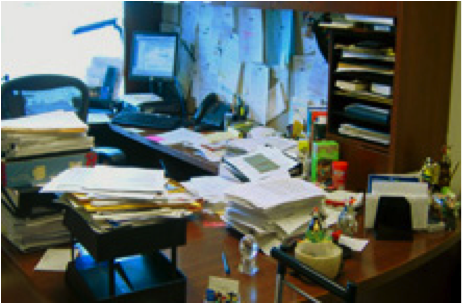
You can go from this:

To organized and able to retrieve a file in seconds using Paper Tiger’s search engine:
No more worrying about what to name a file! No more worrying about filing it away because you might not remember what name you filed it under! Paper Tiger will pay for itself many times over, because you will:
Of course the frequency of filing to maintain your organized system depends on the amount of paper you have flowing through your office. You might decide to index the documents that need filing as they come in immediately instead of waiting to file a stack of ‘To File’ at the end of your day or once a week. Below is an example of how to file once a week after your Paper Tiger filing system has been set up, but if you have a lot of paper, you might consider following these steps in about 10-15 minutes at the end of every day. Whatever you decide is the timing and how long it will take you (daily or weekly), put this in your calendar as a regular reminder….and don’t be tempted to short-change yourself by skipping this calendar appointment. Otherwise, your ‘To File’ stack will get out of hand again!
Did you know Paper Tiger is Not Just For Filing Paper!? Basically, anything that you can put a number onto, can be indexed into Paper Tiger. Click here to see even more ways to use Paper Tiger to get organized. Paper Tiger Filing System software enables users to manage paper and other physical items to get organized more effectively.
It can be overwhelming just thinking about what you have to do and the decisions you have to make to get organized. You might be tempted to give up before you start – but don’t! Whether you’re organizing your desk drawers, filing cabinets, a stack of paper files, a closet, attic, or the garage, Paper Tiger Filing System software will help you get organized! You can have a system in place so you can maintain organization, and be able to live and work in an more productive environment.
You may be asking yourself, why do I want to add another ‘system’ to my chaos. Will this really help me get organized? Think about it this way. You are already wasting a lot of time searching for things, whether it be a file under a name you don’t remember what you filed it under, or maybe you’re looking for something that you’ve boxed up in the attic, but you don’t know which box?
You also may dread the thought of having to make decisions about what to throw away or what to keep. Remember the Pareto Principle, you know the 80/20 rule … we only use 20% of what we have, and the other 80% are back-ups, mistakes, things we have held on to because we haven’t made good decisions about what to do with them. If you don’t try to figure out a system that will help you get organized so you can find what you need when you need it, you may come to realize that you’re only using 20% of what you can find!
Sort: Whatever you’re organizing, you will need to sort through the clutter. Put similar or like things together.
Think about the similar items you have scattered throughout your home or office, and make a home for those like items to get them together. For example, do you have appliance manuals and warranties scattered, but cannot find the one you need? Depending on the volume of these similar things, designate a drawer, a hanging box file folder, or a box for these. Note that you don’t have to go searching for these items now. This could waste a lot of unnecessary time, however you will at least have a home for these items and will know where they go when you organize and sort through another part of your home or office and come across them at that time.
Make good decisions now! You’ll need to ask yourself some questions about your paper files and other stuff. Set yourself up for a maintenance plan that can be continued.
When using Paper Tiger, you have the decision as to how you want to differentiate your types of files by creating what we call ‘Locations’ in the database. A Location is a group of like items, and could relate to where you will store your physical items or could relate to the types of physical items that you plan to index (paper files, books, CDs, DVDs, storage boxes, etc.) Your Locations can be named anything you want – however you relate to what you are indexing, i.e., Office files, Home files, Action files, Reference files, House, Basement, Garage, etc. Paper Tiger uses Locations to represent these places where you store the items you want to be able to find later. For example, your Reference files Location might contain an index of all files in your 5 file cabinets of 4 drawers each, and Item #1 in Paper Tiger starts with the documents in the first hanging file folder in file cabinet 1, and end with Item #500 in with all documents indexed from the last hanging file folder in file cabinet 5. Or you could differentiate your paper files even further with additional Locations such as Clients, Financial, Administrative, Research, etc.
You decide what is best for the way you wish to file. Remember, Paper Tiger is not just a filing system, it’s a ‘finding system’, so as long as you put in a few keywords for each hanging file folder, you will be able to find anything you need…and when you need it without time-wasting searches. A simple search in the database for whatever keyword you’re thinking of that day, will help you find the file quickly.
Paper Tiger experts recommend starting with Locations named ‘Action’ and ‘Reference’. Later you can create an ‘Archives’ Location for those files that you can’t part with for legal or tax reasons, but need to be moved from your general file area. These items can be transferred from one Location to another in your Paper Tiger database so you can still find them if you ever need them.
Action: For things that need action by you, either do it now or place a note on it that outlines what action needs to be taken and by what deadline. (See Paper Tiger Action Files)
Reference: Paper files that you need to keep for reference occasionally, but do not require action, can be indexed into your Reference file location. (See examples of Reference Files)
Toss/shred: If you don’t need a piece of paper, then throw it away or shred it! If you don’t need that old bike anymore, give it away to someone you know or maybe a non-profit agency such as http://www.bearingsbikeshop.org/. If you can’t wear or haven’t worn some of your clothes or shoes in a year, then give them away to someone you know or maybe to Goodwill.
Other Physical Items (not paper files)
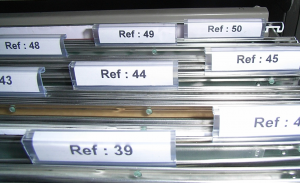
For other physical items, (such as books, CDs, DVDs, boxes/containers, etc.), decide if the items need a location in Paper Tiger or if you can index keywords for the items in with other things. See other Location suggestions described on our Not Just For Filing Paper page. Basically, anything that you can put a number onto, can be indexed into Paper Tiger. For example, for CDs or DVDs, you can either place a numbered label that matches the item number in Paper Tiger, on the CD/DVD jacket or you can place the CD/DVD in a binder such as the one pictured below, index the name, author, and other pertinent information into the item’s keywords section in Paper Tiger. As you can see, the item number was written with permanent marker on the DVD and on the DVD binder slot. So the DVD numbered 45, would match what was indexed in Paper Tiger’s item number 45 for the DVD Location (DVD 45).
Other Locations might be for information only (unless you keep related papers in your Reference files), such as:
To create your custom Location labels or more Action or Reference labels, Paper Tiger makes it easy. In case you’re wondering, there is no limit to the number of locations you can have! Click here to see even more ways to use Paper Tiger to get organized.
Paper Tiger Filing System software combined with a proven methodology, enables users to get organized and manage paper and other physical items more effectively.
When using Paper Tiger, you have the decision as to how you want to differentiate your types of files by creating what we call ‘Locations’ in the database. A Location is a group of like items, and could relate to where you will store your physical items or could relate to the types of physical items that you plan to index (paper files, books, CDs, DVDs, storage boxes, etc.) Your Locations can be named anything you want – however you relate to what you are indexing, i.e., Office files, Home files, Action files, Reference files, House, Basement, Garage, etc. Paper Tiger uses Locations to represent these places where you store the items you want to be able to find later.
You decide what is best for the way you wish to file. Remember, Paper Tiger is not just a filing system, it’s a ‘finding system’, so as long as you put in a few keywords for each hanging file folder, you will be able to find anything you need…and when you need it without time-wasting searches. A simple search in the database for whatever keyword you’re thinking of that day, will help you find the file quickly.
Paper Tiger experts recommend starting with Locations named ‘Action’ and ‘Reference’. Later you can create an ‘Archives’ Location for those files that you can’t part with for legal or tax reasons, but need to be moved from your general file area. These items can be transferred from one Location to another in your Paper Tiger database so you can still find them if you ever need them.
Reference Files are files you need to refer to from time to time, maybe occasionally, maybe once a year, or maybe just hold onto just in case you need to review the file again. For example, your Reference files Location might contain an index of all files in your 5 file cabinets of 4 drawers each, and Item #1 in Paper Tiger starts with the documents in the first hanging file folder in file cabinet 1, and end with Item #500 in with all documents indexed from the last hanging file folder in file cabinet 5. Or you could differentiate your paper files even further with additional Locations such as Clients, Financial, Administrative, Research, etc.
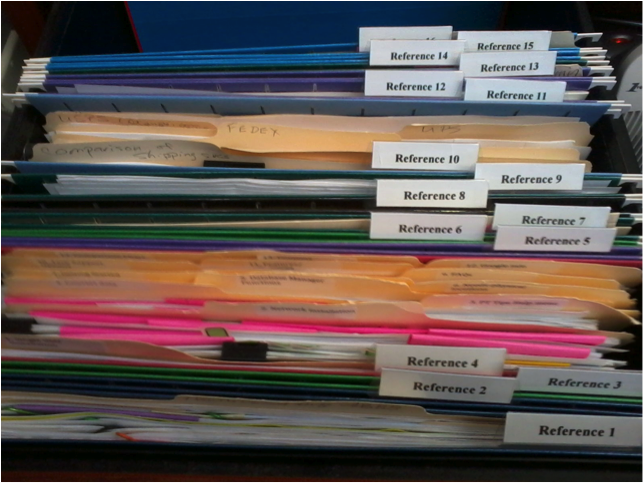
In the Reference Files Location, you might have hanging file folders for the following:
1. Invoices (within this hanging folder, you can file invoices either by month, chronologically or alphabetically)
2. Purchases (within this hanging folder, you can file purchases either by month, chronologically or alphabetically)
3. Expenses (within this hanging folder, you can file expenses either by month, chronologically or alphabetically)
4. Taxes (within this hanging folder, you can file the documents relating to only the current year’s taxes. Previous year’s taxes should be Archived, along with the invoices, purchases and expenses for those respective years.)
5. Utilities (within this hanging folder, you can file utility bills either by month, by the type of utility or company name. You might have manilla folders within this hanging folders with the type of utility: -Electricity, -Gas, -etc….then you could just input each new bill in the front of the respective manilla folder so the latest bill would be at the front)
6. Insurance (within this hanging folder, you might have manilla folders filed alphabetically for Autos, House, and Office) The Item name would be Insurance and keywords might be ‘automobiles, cars, Ford, Honda, State Farm, name, address and phone number of agent(s), policy, home, office, equipment, health, employee, employers, personal, workers compensation, … You could also sub-divide this to Insurance-Auto, Insurance-Home, Insurance-Office into 3 separate hanging folders.
7. Software
8. Passport
9. Sports activities (schedules for tennis, baseball, classes, team members, etc.)
10. Billy (school papers, immunizations, schedules for classes and other activities, awards, etc)
11. Susie (school papers, immunizations, awards, schedules for classes and other activities, etc)
12. Community Service
13. Personnel/Human Resources (within this hanging folder, you might have manilla folders for each person in your company filed alphabetically) However, if the documents for each employee is greater than what will fit into a manilla folder, you might create a Location separately for Personnel/Human Resources. This would give you the option of creating a separate hanging folder for each employee.
14. Medical records
15. Time sheets and/or pay stubs
As you see these are not in alphabetical order, and of course, they do not need to be since we are indexing our files with Paper Tiger, however you might want to think about what types of files that you want to put together. For example, the files that you will be referencing more frequently in the first 1 or 2 file cabinet drawers convenient to you. The list above would be indexed Reference 1, Reference 2, Reference 3, Reference 4, Reference 5, etc. through Reference 15. The next file that you add to Paper Tiger then would be assigned Reference 16 and would go into Reference 16 hanging file folder.
You might also have an Archives Location for the older files that you need to keep for legal or tax or various other reasons for longer periods of time, but most likely will not need to reference again. See our blog posts for Records Retention Guidelines. You would be able to transfer these files in the database from one Location (i.e.: Reference) to the Archives Location so that you can still keep track of where they are. Then move the physical files to the physical location to coincide with the indexed file item number in your Paper Tiger database. (Whatever you change in your Paper Tiger database, you will want to ensure that you match the change in your physical files.) As information, when you transfer files from one Location to another, this opens the Item Number from the original Location for new documents.
When a hanging file has gotten too overstuffed, you can sub-divide that file chronologically by year. For example, your hanging file folder Reference 12 for Community Service for 2010 through 2014 could be moved to new hanging file folders with Item Names ‘Community Service-2010′ and ‘Community Service-2011′, etc. If you move them within your Reference Location, they would be added to the first 2 available open Item numbers in Paper Tiger. Or you could transfer them to your Archives cabinet. Reference 12 would then have room for your new current year community service information.
For the above example, assuming that Reference Item numbers 1-4 all relate to information that you need for your taxes, you would be able to transfer those files to an Archive hanging file folder (or drawer or box depending on the amount of documentation you have and where you will be moving those documents to) named ‘Taxes-2014′ after you have completed your 2014 taxes. Reference Item numbers 1-4 would then be available for your new current year documents relating to the respective Item Names.
How do you manage files that you keep for reference?

There seems to be a never-ending flow of paper coming in every day – whether it be mail, email, materials received from meetings, etc., and the piles accumulate so fast, it’s hard to keep up. You can’t let a day go by without taking at least 10 minutes to go through everything you receive that day. Having a plan for managing your paper flow will save you time. So let’s start with the actionable items.
When you have an action to perform, don’t stick the paper reminder in a stack of other action items. That will cause you to miss deadlines. Create a system that will help you stay on top of what you need to do. Hopefully the action filing system tips below will help you work more focused, organized and productive.
For every piece of paper that comes in, make a decision as to what needs to happen with it the first time you handle it. Sort through incoming paperwork each day, and drop into the appropriate file based on what you’ve decided and set up. Remember, paper clutter will build if you put off making decisions every day. Ask if the document requires some type of action…does it need to be paid, does it require a response, should it be filed or shredded/tossed. If it does not require action, decide if you can do without it and if so, toss it! If you can’t do without it, then file it appropriately in your reference files.
If you have a paper file that requires action by you, it becomes an Action File. There are 3 types of Action Files: 1) Temporary (Project-based) Action Files, 2) Permanent Action Files, 3) Tickler Action Files. Prioritize your action items. Decide if the action can be done immediately, and if so, just do it. If not, either delegate or check the deadline. Decide what type of action file and how long it will take you to complete the task. You’ll need to decide which type works best for you depending on how you work (your preference for work-flow). Project files are most always Temporary Action Files.
However some find that the Permanent Action Files and the Tickler Action Files can be interchangeable, meaning both could be used, but could also choose one over the other. It’s your choice. You decide what works better for the way your work. Once you’ve made a choice, either way makes it quick and easy to decide what to do with your daily paper management. Actionable items that are a one-time action instead of a project, could be placed in a Permanent Action File or a Tickler Action File. This might depend on your preference for the specific action…how you prefer to be reminded. If you want to place the action reminder in a follow-up date file, it more likely would better fit in the Tickler File category. Decide what date you want to work on this type action to be completed by the deadline (or in a timely manner), then place the reminder in the date in your tickler file you want to work on or review the reminder. (see Tickler Action File section below) If however, you would rather have all of your ‘Call’ action reminders in one folder, then a Permanent Action File for ‘Calls’ would be the way to go…your preference.
Tip: for any file that requires action by you, write the next action at the top of the page or on a sticky note to attach to that file so that you won’t need to rethink what needs to be done later when you choose to do what needs to be done. Example notes might be:
1. Temporary (Project) Action Files
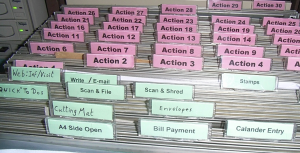
Again, these are the types of files that you might be working on as a project that you want to keep close, maybe in your desk drawer. These are ‘temporary action’ files, and are input into your Action 1-10 or 1-25 folders, depending on the capacity of your Action Location in your Paper Tiger database. In the image below, there are 30 folders….Action 1-30. When a project is complete, you can transfer this file to your Reference Location or toss if you don’t need to keep the documents for a particular project.
If a Temporary project-based action file, go ahead and schedule the time on your calendar for the length of time needed to get the job done by the deadline.
For actionable items that are more of a project than a one-time action, and others in your office might need access to the file, input the Item Name and Keywords information regarding the action file into Paper Tiger, and select the Action date to start. Place the item in the corresponding Action Item hanging folder. This gives you a place to put all files relating to the same project without stacking up on your desk until you’re ready to work on it.
2. Permanent Action Files
Organizing experts have worked one on one with hundreds of individuals, and have discovered that most people had single pieces of paper which required their action that they weren’t sure what to do with, and they are not related to a project. When asked the question, “What is the next action you need to take on this piece of paper?” the most common answers were those that became “Desktop Files” such as “Call,” “Data Entry,” “Expense Reimbursement” or “Waiting on Response.” These are what we call ‘permanent action’ files because they are regular, repeating, frequent, and general, so not a project type action that will need a file folder of its own. Since these papers often move quickly and usually not needed after the action has completed, it is not recommended that you index them in Paper Tiger.
Using this action file system, you can package and do the same actions together, such as phone calls, errands, to pay, to write, etc. You can make all phone calls, pay all bills due, map out errand route, write thank-you notes … emptying each folder before going to the next category.
Permanent Action File examples:
You might also have a hanging file folder divided with manilla folders or notebook divided with divider tabs for information needed for reference only, such as emergency contact information, frequent contact list, school calendars, sport team schedules, list of service providers, and medical providers. These would be files or information that you need ready at your fingertips, and where everyone in your home or office is acquainted with the location and information contained.
3. Tickler Action Files
Organizing for upcoming events or things that you need reminding of on certain days of the week/month can be done in a tickler file system, which has tabs for 1-31 for the days of the month, and January-December. Only those things that you might want to review prior to a specific follow up day or month, are those that you would want to index into Paper Tiger. For example, you have a wedding that you need to attend in a couple of months and you might want to review the invitation again for gift registry. You’ll need to remember if you put the invitation and any other relating documents in your tickler file or if you created a folder of its own.
When placing a reminder in a specific month, write the next action date and what the next action should be on that date on the upper right corner, then place in the month that you need to follow up or take action on that item. Doing this will save you time when you pull the item from the tickler follow-up because you won’t have to re-read the entire document again to figure out what’s next.
At the end of a month, you would pull items from the next months’ folder, and then use the action dates that you’ve written previously to input into the 1-31 for the upcoming month. Each day (or the afternoon prior to the next day…whichever works better for you), you will pull the reminders from that day’s follow up folder.
Below is an example of how a tickler file system might work with birthday cards. The principal will also work with your projects for which you plan in advance, or events that are in the future.
In your January-December folders, you can place birthday cards that need to be mailed in the respective months. All birthday cards that need to be mailed next month can be purchased ahead of time, then placed in next months folder. When next month arrives, take out the birthday cards, address them and then place them in the day (1-31 representing the current month) that you want to send them in the mail. For example, you want to put one of the cards in the mail on the 10th to arrive at the recipient’s location by the 13th, then you would put the card in the day 10 of the 1-31.
Other things that can be stored in your tickler file system are:
I think you get the point. Anything that needs follow up can be input in your tickler file system. You can create your own folder system (12 folders, one for each month of the year, and 31 folders or tabs, one to represent each day of month), or purchase an accordion file sorter from Smead.

Sherry Borsheim of Simply Productive explains in this video how to set up a desktop fingertip action file system for more efficient organization in your office.
Natalie Conrad of Organized Habits does a great job demonstrating how a tickler file system works in this video in which you might find helpful.
Also check out this demonstration for info on how to make your own action filing system conducted by Stephanie Calahan of Calahan Solutions.
Paper Tiger Filing System software combined with a proven methodology, enables users to get organized and manage paper and other physical items more effectively.
Most everyone is thinking about vacation time about now. The beach and time to relax is a welcomed thought, but you can't get away from thinking about all the things that still need to be done before going on vacation. Do you really want to go on vacation then come back to clutter that you've left behind? Sure, you keep meaning to de-clutter your home and office so you can enjoy living organized and feel less stressed. Even though you know it will make you feel much better and less stressed in the long run, the task of getting organized just keeps getting put off.
There are all those paper files, mail to go through, magazines, books, training binders, DVDs and video games to straighten up. When you remember that book you wanted to read while on vacation, it takes more time than it’s worth to find it! There are winter clothes to move to storage and summer clothes to pull out, if you can remember which bin in the basement that you’ve put them. You also have that treasured collection, some to showcase and some to store for safekeeping.
The good news is that you no longer have to put it off. By implementing Paper Tiger Online filing system software, you can now de-clutter and feel confident to put things in their own place. It will be so worth the time invested to get organized, because you won’t be wasting time searching for needed items. You'll be able to find them again when you need them...in a manner of seconds with a quick search in the database.
Paper Tiger enables you to index physical items, and makes it easy to keep track of things. If you had a folder for your car repairs and needed to refer to it, could you be certain you could find it when you needed it? Would you remember if you titled it car, auto, Honda or repairs? Did you actually get it filed or is it in that huge stack ‘to be filed’?
By implementing Paper Tiger filing system, you can type in any or all of those keywords and be able to find anything with a quick search in the software database. The traditional alphabetical system has obviously worked, as long as you could recall the name you filed it under previously, that is – so maybe not as efficient as it could be. Using Paper Tiger Online filing system software takes all the confusion out of the equation, even if more than one person is using the system.
Paper Tiger can be used for paper files, but also for many other physical items. Anything that you can put a number onto, you can index with your filing system software. This is especially important for items that may be kept in more than one location. So, for example, if you are going to keep some collectible items on display and want to store some in your basement and others at a rented storage unit, this helps you recall which items ended up where. All those items you keep cluttered in your home because you’re afraid that if you put them away, you won’t remember where you put them, can now be stored somewhere else. This will free up so much space in your home and you can have your home back!
Prioritize: Don’t feel like you have to ‘get organized’ all in one day! Make a list of each room or area in the order in which you want to get organized. Decide what area is stressing you the most, and start there. Then schedule time on your calendar, allotting the amount of time you want to spend for each room. Some areas, like the garage, might take more than a couple of hours in one day, so schedule a couple of hours in two different days. It might even be helpful to create a plan of action for an area that is too overwhelming – making a list of what items you want to organize first, then second, etc., in an area so that it won’t seem too much at one time. Set your goal and schedule your time.
Goal/project management & schedule: How many times have you thought, ‘I really need to clean out the garage, but it will take so long, and I have to do this and that, before I tackle that huge job’, and it just never gets done? It may help you to break down a big project into individual steps. For example, schedule an hour to sort through and organize the sports equipment on one day, then on another day, take an hour to sort through and organize the tools. You probably set goals for your business life all the time. It's the same concept with things you need to do to get organized.
Before you know it, you'll have the job done, and feel more organized and accomplished. You can live organized with peace of mind because you have a place for everything. Because you've indexed everything, you know where everything is, as well as where it goes when you need to put it back.
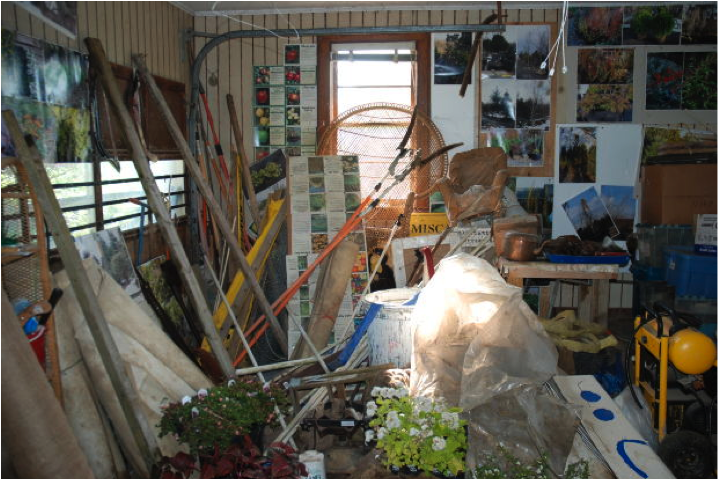
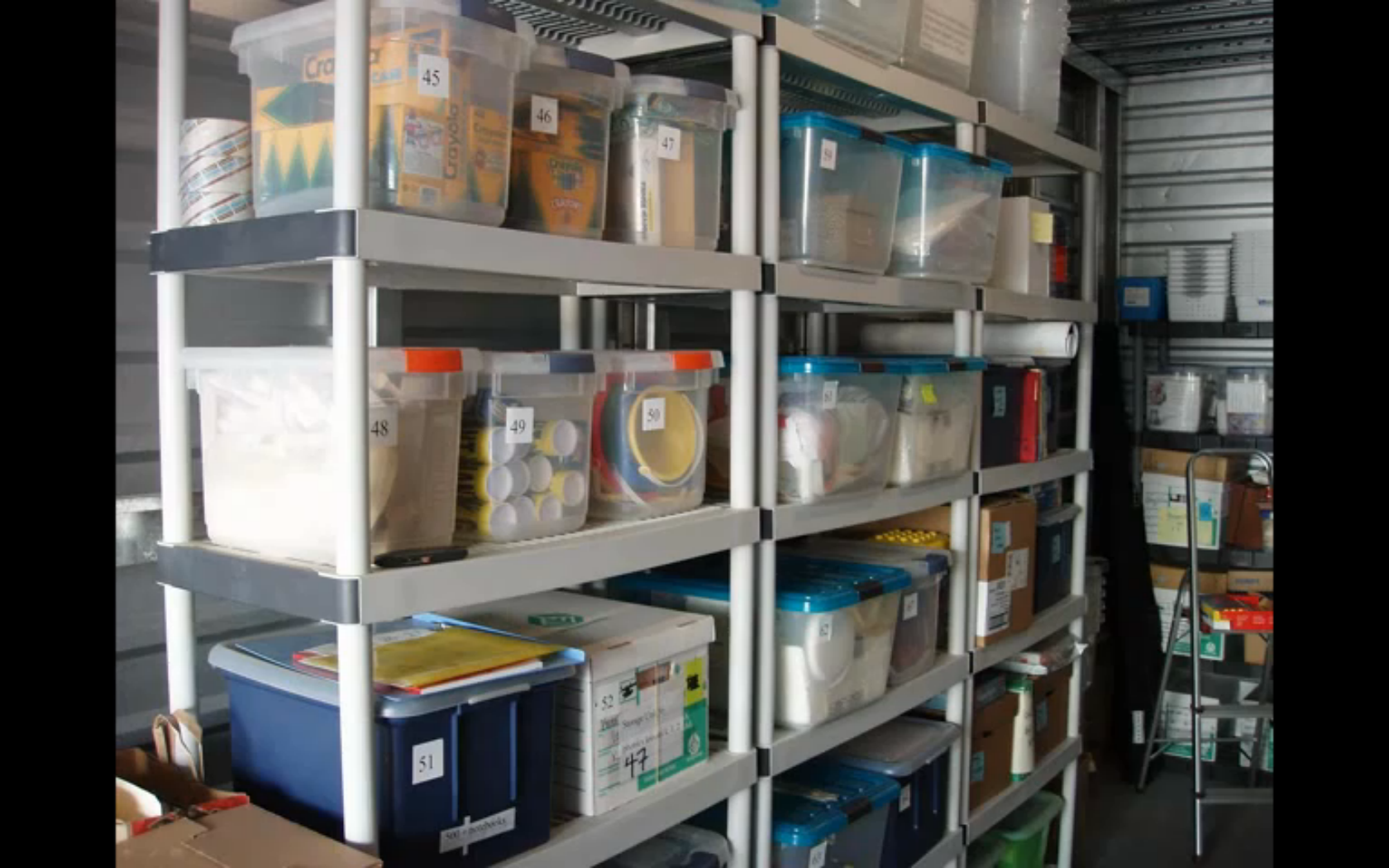
Your storage area may not look like the picture above, but wherever you store your stuff, closets, garage, the attic, basement or other storage area, maybe it’s time to get things organized! Many homeowners make the mistake of putting boxes of things that need to be sorted in the garage, waiting for a better day when there’s more time. Of course, time never allows for you to do any of that sorting, and before you know it, the garage is one big project that keeps getting pushed back on the to-do list.
What you really need to get your storage area organized is the one thing that can help make the entire task as simple as could be. Make it your goal to implement a plan of action and Paper Tiger Filing System Software to get organized so you can find everything later, not just cleared for the sake of clearing. You can get this task completed, and you’ll not have to worry about finding items again. If you are ready to de-clutter and finally check organizing your storage area off of your to-do list, let this be your guide for getting started.
The best way to get started is to realize it is necessary to be realistic and honest, and actually schedule some time to get organized. Then begin by dividing up the clutter into different categories. Choose what goes into the “keep” pile and what goes into the “get rid of” or “give-away” pile. Remember, the more belongings you can cut down on and reduce the amount of clutter, the easier maintaining an organized storage area will be. The items you can part with can be sold at a garage sale or on eBay, or you may choose to donate these items.
You can sort the items you are keeping and index them into your Paper Tiger database, which is an indexing system that gives you a way to catalog all the items you put into a bin or box by adding all relating keywords for each item, and then when you need to find an item later, conduct a keyword search and you’ll know where that item is located quickly and easily. So you would number your storage containers and enter the content information into the keyword section of your database, then later you can search for “Fall decorations” the same way you type keywords to search for intangible items on Google. Your indexing system will bring back search results that tell you what bin number the item is in, and even where the bin is, based on the information you’ve input previously.
Once you have your storage area on the path of de-clutter, your indexing system should be set up to keep it this way. Implementing Paper Tiger Filing System Software will make it easier to maintain your organized storage area. Make sure you and anyone who uses the filing system to find and retrieve an item, return the item to where it belongs to maintain your organized system and prevent confusion later. If you add or remove an item, keep your indexing system updated.
 Meggin McIntosh, “The Ph.D. of Productivity”™ and a Paper Tiger Expert, demonstrated a great example of an organized storage area in her webinar at Paper Tiger Webinar hosted by Meggin McIntosh. Please view the entire webinar as Meggin demonstrates how she uses Paper Tiger to keep her office and training items organized. Using Paper Tiger is one of the reasons she is so productive, simply because she can find what she needs, when she needs it. The section of the webinar that she shows her storage unit is not her garage, but the same concept would be used in any storage area. If you want to view the storage area only, allow the webinar to load, then click in the webinar duration bar and move the timeline button to about 47 minutes into the webinar.
More and more people are keeping less paper each year, but we still have paper files that are important to keep in hard copy format. Not only is it important to keep these paper files, but just as important is the ability to retrieve them when you need them.

Below is a list of documents that we all most likely have somewhere in your home or office, (some more applicable than others), but can we find them when we need them? And usually when we need them, we need to find them quickly. It can be very stressful when these items can’t be found easily. There may be others, but this will get you started in ‘getting it together’.
Some of these items you may want to keep in a safe deposit box, so decide which items those will be. Make a copy for your file at home, and the original can then be placed in the safe deposit box or other designated safe place. Write a note on the copy or on a sticky note to attach that will remind you where the original is located. In the event of an emergency where you’re incapacitated, make sure the appropriate family members know where to find the key to the safety deposit box, with a directive giving them access in such case.
For all other documents, index them into Paper Tiger. The Location name in your Paper Tiger database might be “Family Docs”. You can file them in any order you wish, then type the Item Names and keywords into your Paper Tiger database. The Item Number in the database will coincide with the hanging file folder number in your desk or cabinet drawer.
Just a quick story about myself to show you how easy it can be to allow important documents to get scattered. Before I started using Paper Tiger, I thought I was reasonably organized at home. My husband and I kept titles and financial documents in our desk drawer. All other documents were kept in a file cabinet. When we moved, the big desk we used in our previous home was placed in the basement office where my husband would now work. Those same documents were still there, but now some of the newer important documents found a new home in a file box that was more convenient for me to file into upstairs. When I needed to find a car title, I had to think, ‘is it still in the desk downstairs?’ or ‘did I put it in the file box?’ Needless to say, getting all those important documents together, and documented into Paper Tiger’s database is now a priority. Instead of a 10 minute exercise of going through the upstairs file box, then downstairs to search in the desk drawer, I can now conduct a quick search in Paper Tiger and be able to put my finger on it in about 5 seconds!

Another advantage of indexing your files into Paper Tiger is that you don’t have to be the only one that knows where everything is. According to AARP article ‘Kids and Your Money’, Jane Bryant Quinn says “You don’t want your family scrambling to find documents during an emergency. Help by putting these items in a safe place where loved ones can find them.”

Everything in the above checklist found in that AARP article can be indexed into Paper Tiger. Anyone that you give access to your Paper Tiger database will be able to retrieve what is needed in seconds. Finding files that you’ve indexed into Paper Tiger will no longer be a scramble to search all over your home or office, but will be as easy as typing in a search keyword in Paper Tiger’s search box, and the results will lead you directly to the file where it is stored.
See this blog article to learn how to Customize Your Filing System with Paper Tiger’s Indexing Method. Not only will your important documents be all together in one place, but you’ll be organized so you can find everything quickly and easily.

Everyone has a need to get organized and manage their records and many other physical items, whether it be paper files, contents of binders, or what’s in the file room or basement, so that retrieving an item in a timely manner is efficient.
Many companies have one or more administrative employees whose chief function is to manage company records—often, in an archaic and unmanageable system, and is dependent on the person who knows the filing system. Thousands of hours are literally eaten up with filing and then trying to locate specific information at a later date because the system used for document management is so inefficient or outdated.
One of the chief reasons companies still suffer inefficient filing systems is that every employee is different. People have their own thoughts about what filing should be, and their own way of managing and naming their files. So you have a variety of different methods all intertwined within one company. There has to be a better way to organize your filing cabinets into a uniform, logical style that is standardized throughout your business, regardless of the size company you have!
Some statistics say that about 7 percent of all documents are lost or misplaced and have to be reproduced. Experts estimate that about 150 hours of employee time per year are wasted trying to locate missing files or documents. And even more to recreate the necessary information! At $20 an hour on average—because all levels of employees are involved in this process—that can easily add up to $3,000 per year or more, that you can save simply by using file indexing, like Paper Tiger Filing System Software to manage your files more effectively and efficiently.
It’s quite simple really. With Paper Tiger, you allow employees the access they require, according to your own policies, to use the software. You and your staff need to agree on a records retention policy as a guideline for the types of paper files you retain, how you want records kept and how long certain files should be kept. This policy should also transfer to your digital files as well. We have several articles already on records retention guidelines that you can use to assist you. Company name, common subjects, or other descriptions. Whatever works for you. Use as many keywords as you like. Each employee that has access to the software can also add keywords that they relate to each document or set of relating files.
Paper Tiger is a file indexing system for your paper files or other physical items that has a search engine built in so that lost information is virtually eliminated in your home or office. You can keep your paper in its original form, (you do not have to scan it), and use the power of the computer to index the paper files that you need to keep in hard copy format. You would simply type in the information into the database relating to your paper files or other physical items to get organized so that you can find what you need when you need it, without time-wasting searches. After all, retrieval is the goal when you file something away, right!? Well, maybe there are multiple goals, such as 1) getting the file off your desk and 2) organized in such a way that you can easily and quickly retrieve it when it’s needed again.
Paper Tiger software consists of the following levels:
When you’ve indexed your items into Paper Tiger, and you need to find something later, you simply conduct a Google-like search in Paper Tiger’s database to find where the item is located.
This solves problems with filing or finding any physical item, such as:
So for paper files, every single file will be labelled using the exact same system. And duplication of files are virtually eliminated. From the day you implement this brilliant, time saving system, every document relating to a project will be placed in the same location for easy retrieval.
It’s common knowledge that every document that comes into your office has to be managed in one of three ways.
The joy of indexing is that your filing cabinet now becomes your action file as well. You can create a file just for items that need action without forgetting where you put them, or failing to take action because you “forgot” about them. Then when you’re finished, you can move the file to an archive location or a more permanent file and leave an uncluttered desk ready for more important work. You can file it away and not have to worry about finding it later.
Once your projects are complete and files are no longer needed on a daily or weekly basis, they can easily be moved from your action file location to a reference file cabinet or archived in storage elsewhere, and a quick search in the database will tell you where they’re currently located, in case something needs to be retrieved later. No more worrying about not being able to find a file because someone is out sick! Paper Tiger filing system software eliminates that problem.
In today’s contemporary society with constant Internet usage, video conferencing and urgent meetings are often called with little or no warning. Having an indexed file management system is ideal because you can quickly and easily “lay your hands on” every document in the office you may need for an impromptu meeting or conference call. You’ll no longer be forced to make major decisions without having all the relevant information you need at hand.
Document indexing truly is the most contemporary method to efficient file management. It will not only save you time and money, but it will make for much happier employees, (including yourself), who can spend so much less time handling files and documents in the office. And remember you’ll also be able to index other physical items such as office supplies, training manuals, CDs, DVDs, etc. Paper Tiger Filing System Software can index anything that you can put a number onto, Not Just For Filing Paper, so you can find anything anytime!

Don’t be like this guy…turn your filing system into a finding system. Does your filing system allow you to find what you need, when you need it? It is estimated that people waste 150 hours per year just looking for lost items. Just think about the cost of 150 hours of wasted time per person. An unorganized office can cost you hundreds of dollars every year due to lost time, lack of efficiency, and even duplicated efforts in recreating work you can’t find; or late fees because you’ve lost an invoice and missed the due date.
Of course, everyone knows it’s important to spend your time wisely. Who can afford to spend valuable time searching paper-by-paper, or drawer-by-drawer trying to find a document? Searching for papers that are filed somewhere can be time consuming, if they are filed at all. At worst, this could cause you to miss a deadline; at the least, you’ll spend valuable time searching that could be better spent on more productive tasks.
An organized office is so important for you and your business, and implementing a simple, effective document management and filing system can help. You need to know exactly where to find what you’re looking for, when you need it.
Once you realize the importance of an effective system for managing your office documents, it’s time to turn your filing system into a ‘finding system”.
Of course, you can always use an alphabetical filing system, which is what most companies resort to by default, simply because it’s all they know. After over 100 years, the alphabetic methods are firmly entrenched into our way of doing business. However, the alphabetic filing system method has many flaws and starts to breakdown almost as soon as it is implemented. The alphabetic method requires that a person (or worse, a group of people) in the office remember how they filed the information. The problem is that people forget or they don’t all think alike. Many times, the person who sets up the filing system leaves the company and the knowledge of where things are filed goes out the door with them. (this is a BIG PROBLEM!)
The solution seems elusive. Yet, there is a simple filing system that can be easily implemented in any size home or office. Converting your traditional files to this more efficient system will make you wonder how you ever managed without it.
Paper Tiger filing system software is a program that allows you to easily categorize and organize your files based on a numerical indexing system that makes it a cinch to find what you need by allowing you to search for any keyword you choose—right from your computer! Think of it as the Google search engine for your file cabinet.
For those who need to keep the paper copies and originals, this is the ideal solution to document management. You simply input item name and keywords to index your paper files into Paper Tiger’s database, and file them into your hanging file folders the same way you’ve always done. With Paper Tiger, you really can turn your filing system into a finding system.
Not sure you want to commit to managing your office documents via computer? You can enjoy a free version, learn how the system works and see if this innovative filing system will work for you before you buy. If you find—as tens of thousands of others including large businesses, major universities, government agencies, non-profits, small businesses, professionals and home users have—that this is indeed something you can’t live without, you can upgrade to purchase the full product and get started on managing your files more efficiently right away.
You can find training and pre-recorded webinars with tips and all the information you need to help you create a manageable, effective filing system. You can learn how to use Paper Tiger software in under 30 minutes – and you will never have to remember how you filed a document again!
Since you can print out an index of your files (File List Report), you don’t have to worry about losing everything if your computer crashes or the Internet is down for some reason. With Paper Tiger, you’ll have the ease of computer filing system solution and the security of a paper trail as well. You’ll be able to search for documents and files based on keywords that you choose to input, while creating a custom designed filing solution that’s perfect for your office. It’s the best of both worlds. There is security in having the real paper, when you need it.
An efficient filing system is a must for any size company from the smallest home-based business to the largest corporation, school, or government agency.
The ability to search for files and documents using keywords you choose to input will save time and money every day, while greatly reducing stress and increasing productivity.
The business world today is much too competitive to not be as efficient as possible. The days of using traditional alphabetic filing systems with their inherent disadvantages can be quickly overcome. Indexing is a great, low-cost, low-hassle, reduced risk way to meet your organization’s document management needs.
Try Paper Tiger filing system software today and turn your filing system into a finding system.
Why wait for spring cleaning to get the basement, garage, or attic organized? You may have storage area projects that need to be decluttered and organized now.
Getting storage areas organized may seem overwhelming, but it can be rewarding to declutter your life. You may have things in an attic, a garage, a basement, a storage shed on your property and some belongings in a rented storage unit. One of the biggest problems people face is not even knowing what they have. So, if you are looking for a particular tool and cannot find it, you may end up buying another one and wasting money. People invest a good deal of money into certain things they may only use once in a while, but when you need it, you should be able to locate it quickly. Even if you already have your boxes stored in an organized manner, you may not remember what is in each one. So how do you organize storage areas so that finding what you put away is not a problem?
You may have thought that Paper Tiger Filing System Software is only for organizing your paper files, however you can index any physical item that you can put a number onto into the database, i.e., binders, books, CDs, DVDs, and even boxes and items on shelves. You can get organized, not have to worry about putting things away, and you’ll quickly be able to find them again!
If you want an organized life, organizing storage areas is a great way to declutter your home and life. The best thing to do for organized living is to get an idea of what you need access to on a regular basis. You will need to decide what items you don’t want to keep in the house, or no longer have room for, and what can be stored in the basement, attic or storage building. You may want to take one room at a time and pull out things that should be stored.
Then when you’re boxing the items to be stored, index them into your Paper Tiger database. Each box would represent an Item number in your Paper Tiger database, and the keywords would be the items in the box. Add as many keywords as you think you’ll need for each item, because some things can be called by multiple names, and when you’re ready to retrieve an item again, you may think of a different name than when you first stored the item. Then when it comes time for finding an item, you can simply conduct a quick Google-like search in your Paper Tiger database and you’ll know exactly where it is located. This will save you countless hours, because you won’t have to sift through everything before finding the needed item.
For all those items that keep piling up in your garage because you didn’t want to think about what to do with them before, sort through them and decide what you will keep, what needs to be donated or given to someone in the family, what needs to be tossed. Of course for those items you will be keeping, decide if they need to be boxed or if they will sit on a shelf stand-alone, index the items into Paper Tiger as previously described. Then take everything that should be donated to the appropriate place.
Take care to avoid storing anything that may not hold up well to weather issues, if possible. These types of items will need to be stored in-house or can go to a climate-controlled offsite storage area.
Keeping an indexed inventory of your belongings also helps other people who may need to gain access to things for you. You’ll have a system in place so that continued maintenance will be much easier and less dreaded, as well as you’ll know where to put things back in the assigned space when they are pulled out.
There are many uses for Paper Tiger so it would not be easy to give examples for everything, but below are a couple of examples that will hopefully give you the general idea. Just know that if you can imagine being able to put a number onto whatever type of item that you want to inventory or index, you can let your imagination run.

For those paper files that you need to keep in hard copy format, index the item name and keywords relating to those documents into Paper Tiger. Click here to see more details on how Paper Tiger works with paper files, as well as suggestions on how to file.