
Filing is something that most of us hate to do, but an efficient filing system is necessary to run an efficient office. Filing can be time consuming and it does require space. But it also requires proper document management. What happens when you look for a document that was filed several months earlier and you can’t remember how it was filed? An efficient document management filing system eliminates the stress and expense associated with lost or poorly managed files.
A system for paper filing is important, especially, when you have more than one person who handles filing. When one employee uses different keywords than what others use, you can literally spend hours searching for the documents you need. Sometimes you find them, and other times you don’t. This could mean you have to recreate or duplicate work.
It doesn’t have to be this way!
The Paper Tiger Document Management and Filing System Software offers a filing system that can save you time and money every day of the year. This document management system uses technology you already have available—your computer—which you may not even think of using to manage your files.
Typically, you’re limited to a few keywords on a standard file because file labels are so small. This can cause problems when you search for a file if you couldn’t fit all of your keywords on the label. Often, you have to choose between two or three keywords when you really need more. What happens if you don’t use the right keywords? Of course, you won’t be able to find the document later, or at least not quickly.
With The Paper Tiger, that isn’t the case. You’re able to use as many keywords as you want, so you never run the risk of not being able to find a document you need. You can update keywords any time you choose by adding more words as your business changes.
Once your keywords are entered, you’ll have the ability to use the search function that’s built into The Paper Tiger software to search for whatever you need. When you find the correct file, you’ll see the location and immediately be able to access the file with no hassles and no long, drawn-out paper search.
The Paper Tiger Document Management and Filing System Software offers a powerful training program as well. Easy-to-understand videos teach you everything you need to know about the software and how to use it. No more struggling to train when you hire a new office worker to manage your files. The Paper Tiger training and learning resources are accessible anytime you need them. New employees simply watch the videos and they’re good to go!
One of the biggest advantages to using The Paper Tiger Document Management and Filing System Software to manage your filing system is the built-in reminders. Do you have files that need to be archived or destroyed after a certain amount of time? The built-in reminders can be set to notify you when the time arrives. This is a convenient and important function for busy employees and for company document management retention guidelines.
Printed reports are a great tool for executives who are away from the office. Simply print a file report, then when you’re traveling, you can pull out the report, locate the file you need, and call the office to have your assistant or another co-worker pull the file for you. What could be easier?
The Paper Tiger Document Management and Filing System Software also makes it easy for more than one user to access the program. Your assistant, supervisor, or manager can access your file report as easily as you, which saves time and helps the office run more efficiently. In addition, The Paper Tiger Network edition is designed to allow multiple users to have access to the same database in a networked environment. The Paper Tiger Network is licensed one per computer/user.
The Paper Tiger software utilizes an indexing system that eliminates the need for “file shifting.” You simply add a file behind the last file you placed in the drawer and you’re set. This saves a considerable amount of filing time because you never have to move files from drawer to drawer, or cabinet to cabinet. It can also prevent files from being damaged or lost during such a move.
The unique features of The Paper Tiger Document Management and Filing System Software allow you to utilize the software for practically anything you file. Regardless of the type of business you run, the Paper Tiger can help you handle your files more efficiently. For instance, you can file and manage:
1. Inventory
2. Manuals
3. CD’s
4. Books
5. Passwords
6. Software
For more ideas, see our article on “The Many Uses of The Paper Tiger”
Pretty much anything you can number, you can Paper Tiger! This powerful filing system software is designed to adapt to almost any business filing need.
If you’ve ever spent hours searching for a file, or stored files in an offsite location only to never be able to find them again, you need to try The Paper Tiger Document Management and Filing System Software. This document management filing system is designed to meet the filing system needs of home offices or businesses, large or small. It’s easy to install and will continue to meet your office filing system demands—both now and in the future.
If you run a business governed by OSHA, DOT, or another regulatory compliance agency, you know how important it is to maintain the proper files and keep them easily accessible. If an audit should occur, it’s troubling to think of what might happen if you don’t have the necessary documentation available.
For instance, what if you’re in the middle of an audit and you can’t produce the documents requested? Your company could incur steep fines and potentially be in serious financial trouble. Any fines can be detrimental to your business.
If you have all the necessary documents, however, the best way to locate them when needed is by using a filing system that allows you to search for any document quickly and easily. The Paper Tiger Document Management and Filing System Software is an indexing software that is the ideal solution.
Many people think a color-coding file system works best, but that typically isn’t the case. Color-coding doesn’t allow you to search for files like a computerized index system does. When you’re looking for an important file, you need a system that allows you to find the file quickly, rather than trying to remember what color file you’re looking for.
When you’re rushed or in a hurry to find the right file or documents, the easiest way to do so is to go to the computer, type in a keyword, and have the file location information you need displayed on the screen in a few seconds. That’s what The Paper Tiger does.
Setting up an indexing file system to ensure your regulatory compliance is never difficult with The Paper Tiger Document Management and Filing System Software. Simply input the keywords for each document so that when you’re looking for a file, you’ll be able to access the information easily when the time comes. If you take the time to enter all the necessary keywords up front, you’ll spend less time looking for the files you need in the long run; and you’ll have a much better chance of having the right information on hand, should—heaven forbid!—that dreaded audit take place.
When you enter every possible keyword in your database to begin with, you’ll never have a problem finding the documents you need, regardless of which keyword you search for. This makes finding any document easier, and you’ll find information much quicker than with a traditional filing system.
With an alphabetical filing system, for instance, you’re only able to label the file with a few keywords. This can cause problems if you forget which words you used, or if something changes within the business and you forget to change the file.
If you keep files in multiple locations, you may create duplicates and copies of all the papers in the file to store them in different locations. Not only does that take up more space, but you run the risk of losing important documentation or keeping files that should be thrown away.
When you’re dealing with regulatory compliance agencies like OSHA or DOT, you have to be careful to keep certain information. You must also be careful to eliminate certain information, and file everything properly as well. When you use a traditional filing system and are forced to keep multiple files, you run the risk of forgetting to destroy documents that could cause a regulatory agency to issue a fine. It can quickly become a complicated situation.
Using The Paper Tiger software to manage your document indexing and file system, eliminates this problem completely. You’ll know at a glance where every file is, and you can use the Action Date section, which will make it easy to determine which files to destroy—and which to keep. You’ll never have to worry about duplicate content, or about not being able to find information you need before it’s “too late.”
Regulatory agencies require files to be handled in a certain manner. When you use The Paper Tiger indexing system to manage your files, you’ll be able to handle those requirements much easier than with any other type filing system.
Adding new files is a breeze with The Paper Tiger document management and filing software indexing system! You never need to worry about keeping files in chronological or alphabetical order. Trying to insert new files into an overcrowded file cabinet becomes a difficult task in a busy office using a traditional file system. You have to struggle to squeeze in new folders and move others around to make everything fit. That’s never an issue with The Paper Tiger Document Management and Filing System Software.
You simply place your files behind the others in the file cabinet and label them accordingly. When one drawer fills, you move to the next, and on it goes. This system works like a charm and you’ll always be able to find files and documents with ease, which is critical—especially in the case of an audit!
When managing regulatory compliance files, in particular, you’ll find it’s much easier with a document management indexing system like The Paper Tiger. You’ll spend a lot less time searching for files, which could save your company a lot of money by safeguarding against fines due to lost, misplaced, or outdated documents in the case of an audit.
The Paper Tiger Document Management and Filing System Software and Calahan Solutions, Inc. Announce Two Great Ways for Professional Organizers and Virtual Assistants to Market their Business
The Paper Tiger software is teaming up with Calahan Solutions, Inc. and other professional organizers and virtual assistants to make the most of Get Organized Month January 2010!
ATLANTA, GA – (PRWEB) December 14, 2009 — The Paper Tiger Document Management and Filing System Software has teamed up with Calahan Solutions, a personal productivity and organization consulting company, to help professional organizers and virtual assistants greatly increase their marketing presence in January 2010 to reach new clients during Get Organized Month.
The fact is that many professional organizers and virtual assistants will not be as busy in January 2010 during Get Organized Month as they want to be. The tough economy is not to blame, however. The main reason many professional organizers and virtual assistants will not be serving as many clients as they can, is due to lack of marketing. Many companies, government agencies, etc. do not know what services are available to help them with their organizing and VA tasks. There are two opportunities for professional organizers or virtual assistants to gain greater exposure for their business.
Opportunity #1 – Participate as a Gift Sponsor in the “Great Organizing Give Away”
Calahan Solutions, Inc. is coordinating the first-ever industry give away in honor of Get Organized Month 2010. Professional organizers and virtual assistants are sponsoring gifts in the following categories:
All organizing gifts will be publicized on the Internet using all the resources and expertise of both The Paper Tiger Document Management and Filing System software and Calahan Solutions, Inc. Everything is designed to increase Internet traffic and opportunities for the participating professional organizers and virtual assistants. Further details on sponsorship are available on the “Great Organizing Give Away” website.
Opportunity #2 – Expand Your Business with The Paper Tiger Software
The Monticello Corporation, makers of The Paper Tiger Document Management and Filing System software, invites all professional organizers and virtual assistants to become an affiliate and Paper Tiger Expert. There are tremendous benefits to becoming a Paper Tiger Expert and the cost is FREE. Further details are available on the become a Paper Tiger Expert page of The Paper Tiger website.
“Professional Organizers and Virtual Assistants are very good at delivering excellent results for their clients. However, many of these professionals don’t have all the marketing expertise, tools and time needed to reach their prospect base as often as they would like. They need assistance finding new business and that is where we can really help!”, says Stephanie Calahan, owner of Calahan Solutions, Inc. and
a Paper Tiger Expert located in Bloomington, IL.
“Stephanie Calahan has done a fantastic job of using the power of the Internet to reach potential organizing and virtual assistant prospects. She really understands how to use the web to ‘be in front of people – 24/7/365’. The quality of her educational material is excellent and she is a great teacher. Any professional organizer or virtual assistant can learn how to better market their business by working with Stephanie”, says James D. Grady, President & CEO of The Monticello Corporation, the makers of The Paper Tiger Document Management and Filing System Software.
Founded in 1995, The Monticello Corporation’s mission is to enhance its customers’ business and personal effectiveness by providing the training, tools and motivation to help them solve their problems with filing and document management. The company’s main product, The Paper Tiger filing system software, was created as a type of inventory management system (like a chart of accounts) for physical hanging files (you know, the green, yellow, blue and red ones in your file cabinet!).
Monticello got its name from the legendary home of Thomas Jefferson, U.S. president from 1801-1809. An avid collector of books and music, Jefferson transferred his personal library of more than 6,000 volumes to the Library of Congress in 1815, doubling its size and permanently expanding the scope of its collections.
Contact:
James D. Grady
President/CEO, The Monticello Corporation
Toll-free Phone: 866-701-1561
Calahan Solutions, Inc. is a premier productivity and organization consulting firm, serving national and local clients in corporate settings, home-based businesses, and residential environments. Calahan Solutions, Inc. creates life-long transformations enabling you to focus on the things that really matter in life.
Calahan Solutions, Inc. began supporting industry professionals in 2007 when their Learn from Organizing Experts teleseries was launched. Calahan, known for her innovative and collaborative “get done” philosophy, also coaches and mentors professional organizers to reach their full potential.
Contact: Stephanie L. H. Calahan
President/CEO, Calahan Solutions, Inc.
Phone: 309-826-5263
# # #
Whatever your document management issues, Paper Tiger Document Management and Filing System Software is the ideal solution to help you control the paper flow in your company.
Some businesses have so many files that they must consolidate at times. They may have rules that state that files can be moved to basement storage periodically, to an offsite location, storage shed, or a corporate storage location. When this happens, how do you handle the filing on those still important, yet archived, files? Let’s consider…
1. Basement Storage
Whether you store your files in a file room, unused office, or a basement storage room, you need to keep track of them with your filing system. Some people may think you can’t use an indexing system with archived files, but that’s far from the truth.
Document management via an indexing system makes more sense now than ever because your files are farther away from your “regular” office space. This means you’d have to go further to find the files you need, which of course takes more time and creates added expense.
When you index archived files in remote storage areas, you’ll be able to search the Paper Tiger database to find where the file is located, then go right to the location, pull the file, and be able to get back to work with the file in hand. Then you can quickly return the file to the same location when finished.
An indexing system handles the information required so you know which files are in the basement or other storage area compared to the file room. There’ll never be confusion as to where a file is located with an indexing document management system.
2. Offsite Storage Location
Offsite storage locations can be different than other storage areas. The main reason being you don’t have the ability to easily browse where your files are in those storage facilities. Using indexing to manage your documents stored in an offsite location, you can manage these files the same way as any others. Note the location of the files, add keywords to help you index them and file as needed. The hardest task then will be beating the traffic in your drive to find a file.
3. Storage Shed or Unit
Some businesses use storage units either on location or within a locked gate at a different facility. With this type of storage, you’ll want to use shelves so archived file boxes aren’t directly on the floor. Shelves will protect the files and still allow you to use your indexing file system easily.
For best results, mark each shelf so you’ll know specifically where boxes are located. You can, of course, use file cabinets, but you might not want to purchase new cabinets when you move files to archived storage. Metal shelves will work just fine while still allowing you easy access to your documents.
4. Corporate Storage Location
At times when corporations have small divisional offices, they may not have the room to store archived files, and they don’t want to send them to an offsite storage location. In this case, those files may be sent to the corporate office for safekeeping.
When this happens you can use the same indexing system you’re currently using, even though the files aren’t in the same location. You manage it the same way you would with any other offsite storage location. Simply note the location, the box number and keywords in your index file and you’re good to go. Document retrieval is a cinch, regardless of where your files are stored.
One advantage with corporate storage is that you will typically be able to contact someone in the corporate office and ask them to send you any files you need without you having to make a trip to the office. With another offsite storage location, that wouldn’t work, of course.
At times businesses may run into storage problems and will need to move files around to accommodate space or a change in facilities. Using an indexing system for your document management needs will make this an easy transition and still allow you needed access to your files.
Whatever method you use to archive files, be sure and use the Action Date function in Paper Tiger to remind you when these archived files need to be pulled and destroyed based on your company’s records retention policy. If you don’t already have a records retention policy, see our ‘Retention Guidelines: How long should you keep records?‘ articles that might be helpful to you.
Try Paper Tiger Document Management and Filing System Software today and see for yourself!
(Professional and Network Editions Only)
The Paper Tiger Document Management and Filing System Software is equipped with a Spell-checker that will check the spelling of an item’s text as you enter it into a database. The Spell-check operates automatically in all fields in Wizards and the Browser.
Note: The Spell-checker runs automatically. If you wish to disable the spell-checker, click the Disable Spell-checker checkbox in the General tab of the User Preferences.
In Wizards, the Spell-checker checks the contents of each field as you “tab” out of it. In the Browser, the Spell-checker checks the contents of each row just prior to a row update.
The Spell-checker has an options menu that allows you to choose what options you would like The Paper Tiger to use when checking your entries.
To change Spell-checker options, follow these steps:
1. Select Spell Check Options from the View menu. The Spell-checker options dialog is displayed.
2. Select or deselect options by clicking on the proper box next to an option.
3. Click the OK button. The spell-check options are set.
This section describes the options on the File menu and how you use them to maintain your filing system database. To access a menu option, select File from the main toolbar. Then select the menu option.
Creating a New Database
You may wish to create a new database to keep files separate. For example, you might have a Home database and an Office database. To create a new database, follow these steps:
1. From the File menu, select New, then Add New Database. The name select dialog is displayed.
2. Type the name for the new database.
3. Click OK.
Opening an Existing Single User Database
To open an existing database, follow these steps:
1. Select Open Paper Tiger Database from the File menu. The database select dialog is displayed.
2. Select the database you wish to open from the list of databases. The database is opened. Only one database can be opened at a time.
Closing the Current Database
You may wish to open a different database than the current one. For example, you may have your Office database open and wish to open your Home database. To do this, you must close the database that is open. Select Close Current Database from the File menu.
Importing From a Database
(Professional and Network Edition Only)
The Paper Tiger allows you to import information from another database or text file into one of your locations rather than typing it in. There are two different means by which imports can occur:
Text File or Another Paper Tiger Database.
To Import from a Paper Tiger Text File (Comma Separated Values or CSV)
Text files are generated by exporting from Paper Tiger using the Export function. The file is a CSV File and is a text file that adheres to a specific arrangement of keywords separated by commas. Follow these steps:
1. From the main screen, click on File and Import
2. Make sure Text File is selected from the Type of Import area. (Top Left)
3. Click on Browse to select the CSV file you wish to import from.
4. If you successfully loaded the CSV file, a list of locations from the file should appear in the box below. Pick the locations you wish to import from or simply click Select All.
5. Select which fields you wish to import (top right) then select where you wish the imported items to go. There are three Import Destination options:
a.) Use Import Location – based on the location name from the import file, a new location is created if it does not exist. Otherwise, the data is imported into the existing location of the same name.
b.) Select Location to Import Into – pick a single location to put imported items into.
c.) Enter New Location Name – specify a single new location to put the imported contents into.
To Import from a Paper Tiger Database
1. From the main screen, click on File and Import
2. Click on Another Paper Tiger Database
3. Pick from the options listed in the database list.
4. Select which fields you wish to import (top right) then select where you wish the imported items to go. There are three Import Destination options:
a.) Use Import Location – if the location exists, it drops the files into that location, otherwise, it creates the location
b.) Select Location to Import Into – pick a single location to put imported items into.
c.) Enter New Location Name – specify a single new location to put the imported contents into.
If you are seeking to import from an earlier version of PT, see the Database Conversion page.
Exporting From a Database
(Professional or Network Edition Only)
Exporting can be useful if you wish to merge data from separate databases. Version 4.0 brings fresh, robust utility to Paper Tiger, meaning that exporting and importing is easier than ever. Simply export the data you wish to move to a new database, and then import it into that database. To export data, follow these steps:
1. Click on File and then Export.
2. Choose which locations you wish to export, or simply choose Select All.
3. Select where you want to export the file to and what you want to name it.
4. Click the Export button.
Converting an Old Database
Databases from older versions of The Paper Tiger will not work with the new version 4.0. Old databases must be converted to work with the new version. To convert an old database to the new version:
1. Select Convert old Database to 4.0 from the File menu.
2. Select the database you wish to convert. Click the Open button.
3. A new window opens for choosing the name of the new database file.
4. Click OK. After the conversion process, a message will assure you that the database is converted.
(Depending on the amount of data in your previous database, the conversion process can be lengthy)
————-
If you have a new 4.1 installation and have your old .PTD backups, you can import them by going to
“File > Convert Data > Convert Release 3.0 or Older Database”.
You can find version 3 or older .ptd file: Program files > The Monticello Corporation > then look for the .ptd file
If you are converting the databases to a 4.1 network installation, you will have to be signed in with your Administrator Password.
Also see this knowledge base article to see the Database Manager functions and screenshots: http://www.thepapertiger.net/DownloadManager.aspx?Topic=1002
(Professional & Network Edition Only)
When you are entering new items into your Paper Tiger document management and filing system, you can select an action date for the item from the pop-up calendar. The Paper Tiger will then remind you of upcoming action dates by listing them in the Reminders List in the Browser window and notifying you when you start the program.
If there is a future date you want to review this Folder, such as 4/16/2010, click or tab to the Action Date field. Type the date or click the down arrow button to select a date from the calendar.
This Action Date field can also be used to remind you when the document should be archived to an off-site facility or destroyed.
See the full Press Release.
The Paper Tiger Document Management and Filing System Software Announces “Windows 7 Compatibility”
Modernizing your document management system has never been more compatible…now The Paper Tiger Document Management and Filing System Software is compatible with Microsoft’s new Windows 7 operating system.
Atlanta, GA (PRWEB) December 9, 2009 — The best document management and paper filing system software (http://www.thepapertiger.com) product is now compatible with Microsoft’s new Windows 7 operating system. The new version 4.1.24 of The Paper Tiger document management and filing system software is the most complete solution available to better manage paper files in the office. The update of the software is shipping to new customers now and is available as a free update to existing 4.x current Paper Tiger customers.
In addition to announcing Windows 7 compatibility, The Monticello Corporation, the makers of The Paper Tiger software, is also reminding everyone to sign-up for the free drawing for a 7-day Caribbean sailing vacation (http://www.thepapertiger.com/contest.php) in the British Virgin Islands aboard the 51 foot sailing vessel named the Mañana Maybe with a private captain. The Monticello Corporation has teamed up with Sail With Terry, LLC, in the British Virgin Islands, to provide this once-in-a-lifetime vacation. The drawing will be held during halftime of Super Bowl XLIV on February 7, 2010. The winner of the Caribbean sailing vacation will be immediately posted on The Paper Tiger website. To enter the drawing, simply go to The Paper Tiger website and enter your name and email address. The sailing trip, valued at over $4,500, can be used by the winner or given as a gift. Everyone is eligible and no purchase is necessary.
“After months of development effort, we now have an even more robust software product to help customers with filing paper, document management and getting organized,” says James D. Grady, President & CEO of The Monticello Corporation, the makers of The Paper Tiger document management and filing system software. “As the weather turns colder, the prospect of going on a free7-day sailing trip to the Caribbean with a private captain, has our clients pretty excited!” says Stephanie Calahan, owner of Calahan Solutions (http://www.calahansolutions.com), a Paper Tiger Expert located in Bloomington, IL.
The Paper Tiger Document Management and Filing System software is a very powerful, yet simple indexing system for office files. It works like a search engine for paper files to help companies get and stay organized! Individuals can waste over 150 hours per year just looking for lost information. The Paper Tiger document management and filing system software uses the power of the computer to index the hanging file folders in office file cabinets. This is a great alternative to costly scanning and document imaging solutions.
Tens of thousands of companies, government agencies and non-profit organizations around the world use The Paper Tiger document management and filing system software to manage their office filing tasks much more productively.
What most people do not know is that there are only 5 things you can do with a piece of paper – (1) Toss It (2) Stack It (3) File It Alphabetically (4) Scan It or (5) Index It using a product like The Paper Tiger document management and filing system software. The paperless office never quite made it to reality and scanning solutions are costly and very difficult to implement. Also, many documents (signed contracts, presentations, etc.) must be kept in their original paper form. Some people are uncomfortable with scanning documents (document management solutions) due to the possibility that they could lose everything in the event of a technical malfunction. For a complete list of these options and the pros and cons of each, see our Document Management Software Decision Guide (http://www.thepapertiger.com/decision_guide.php).
For more information and to download a 10-day free trial of The Paper Tiger document management and filing system software (http://www.thepapertiger.com/free_trial.php), visit their website.
Founded in 1995, The Monticello Corporation’s mission is to enhance its customers’ business effectiveness by providing the training, tools and motivation to help them solve their problems with document management and filing systems. The company’s main product, The Paper Tiger document management and filing system software, was created to provide customers interested in document management systems an easy and low cost way to automate their paper workflow, thereby overcoming many of the problems with old fashioned alphabetic filing systems.
Monticello got its name from the legendary home of Thomas Jefferson, U.S. president from 1801-1809. An avid collector of books and music, Jefferson transferred his personal library of more than 6,000 volumes to the Library of Congress in 1815, doubling its size and permanently expanding the scope of its collections.
Contact:
James D. Grady
President/CEO, The Monticello Corporation
thepapertiger.com (http://www.thepapertiger.com)
About Sail With Terry LLC, owners of the 51’ sailboat Mañana Maybe.
Founded in 2006 in Road Town, Tortola, British Virgin Islands (BVI), Sail With Terry LLC’s mission is to offer safe and personalized private sailing vacations that far exceed the expectations of our guests. Specializing in customized yacht charters in the British Virgin Islands, with private captain and if desired, a private chef. We offer incredible sailboat vacations. Our guests work directly with Captain Terry to design the luxury vacation-of-a-lifetime…be it a BVI vacation of total relaxation or high voltage-high activity adventure sailing. Both types of Caribbean vacations are available or a blend of each. So, whether it is your honeymoon (honeymoon sailing), your birthday or any other occasion, we will work together to make your sailing vacation truly unique and memorable. To get you started, we have prepared a free Caribbean Sailing Adventure Travel Planning Guide (http://www.sailwithterry.com/contact.html).
Contact:
Captain Terry Clark
President/CEO, Sail With Terry, LLC
sailwithterry.com (http://www.sailwithterry.com)
Toll-free Phone: 888-679-7245
###
Here at The Paper Tiger HQ we have been hard at work making your experience with The Paper Tiger a more pleasurable one. We have a lot of great ideas coming! After much work, we are ready to release The Paper Tiger 4.1.24, which has many improvements, bug fixes, and compatibility with the new Windows 7 operating system. For existing version 4 customers, find it, hot off the presses at the Software Updates page.
The new Startup Wizard
We are always looking for new ways to make The Paper Tiger more user-friendly. With this latest release, we’ve introduced a new Startup Wizard to help our new users, as well as existing users, get started with The Paper Tiger. The wizard will help you in setting up a new Paper Tiger Database, as well as importing an existing one. See some of the screenshots below!
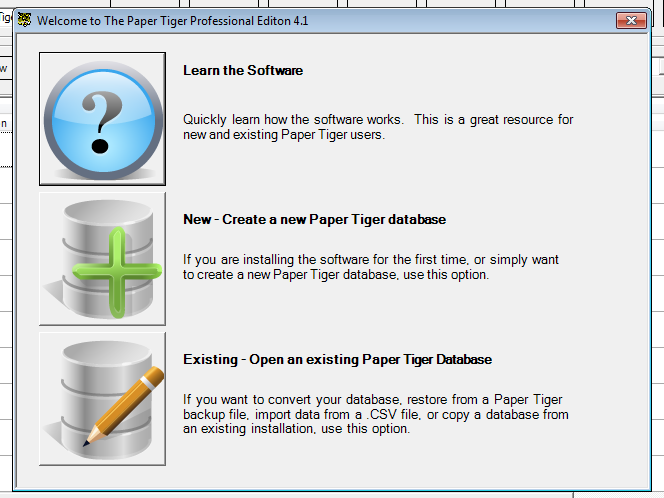
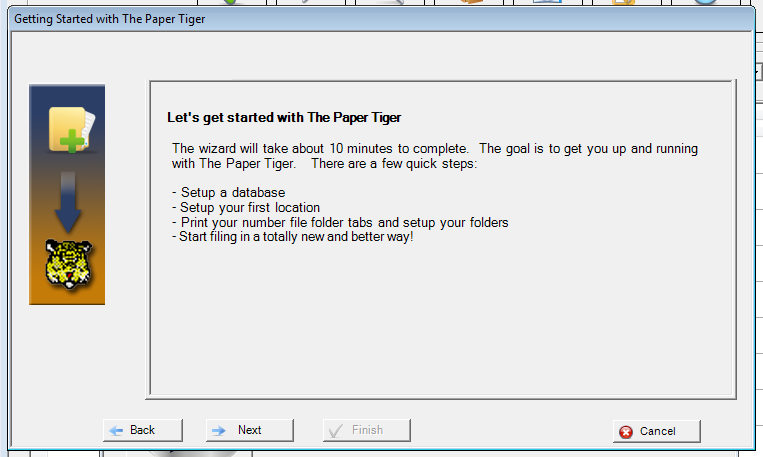
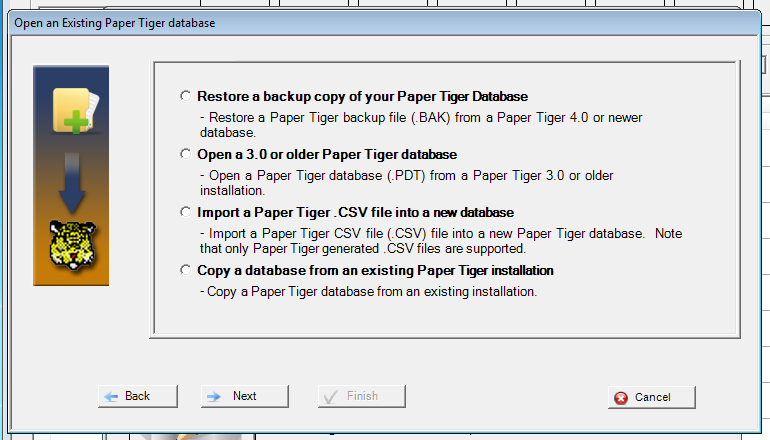
Windows 7 Compatibility
After a troublesome period with Windows Vista, Microsoft looks to have gotten their act together with Windows 7. After testing it internally and it is great so far! The Paper Tiger is now fully compatible with Windows 7, so all of you out there that on the bleeding edge of technology (or just sick of Vista) can upgrade without fear.
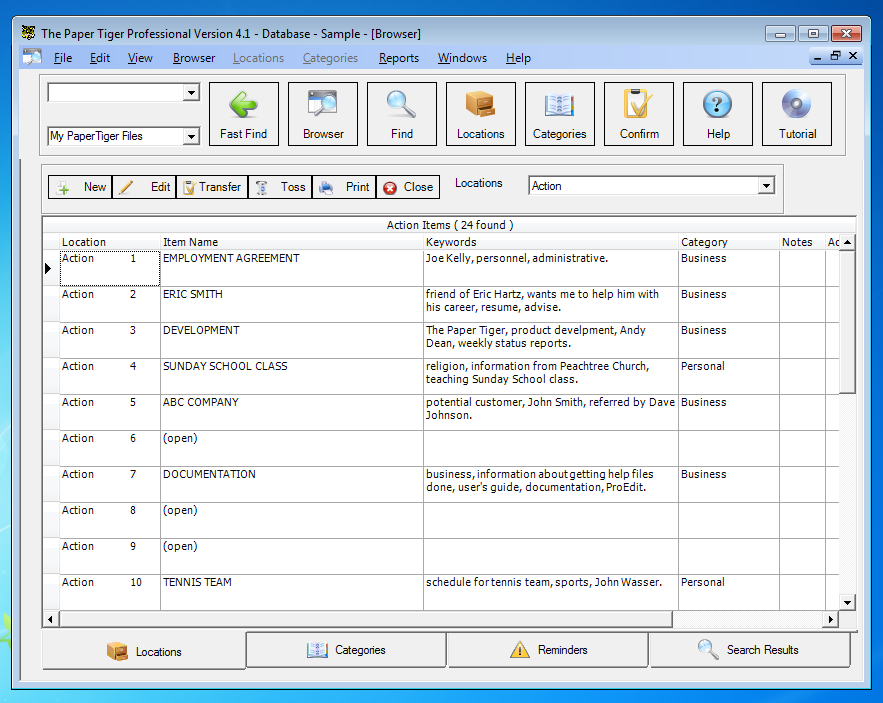
Remember, version 4 users can grab the latest build at the Software Updates page!
When updating Paper Tiger 4.1:
———————————————————–
1. Be sure to log on as the Windows Administrator (recommended) or with an account that has administrative rights (the Paper Tiger software must be installed by an Administrator)
2. Disable any anti-virus software along with any other running programs that may interfere with the installation process then turn your anti-virus back on after installation has completed.
Have you ever been on the road traveling for business and discovered you needed a file from your office? If you have your own file system, it could be a challenge to send someone to your office to look for what you need.
If you used an indexing system such as The Paper Tiger document management software and filing system, you wouldn’t have this problem. You could give your assistant the information needed to quickly and easily find the documents you need, saving you not only time, but money as well.
Worldwide, thousands of businesses, government agencies, non-profits and individuals use The Paper Tiger Document Management and Filing System software to manage their filing. They have discovered a filing system that uses the power of their computer to solve their problems with paper once and for all!
These organizations and individuals have found The Paper Tiger software to be an invaluable tool to help them better manage their office and get organized to stay on top of the virtual mountain of paperwork that they must deal with each day. It is simply the best filing system available. You get all the power of the computer without the risks and time commitment of paper scanning!
The indexing system is the way to go because it gives your employees the ability to access files and documents no matter where you are. It’s the ideal way to find what you’re looking for with ease.
An indexing system saves a company money and it saves time every year because you don’t have to physically search for files you need. Just think how productive your staff can be. It’s like having more hours in the day to accomplish necessary tasks. You’ll also lower your overtime hours when you implement an indexing system for your document management solutions.
Some managers want to ensure The Paper Tiger Document Management and Filing System software is the right program for their offices, and others want to be sure the money they spend is worth the investment, while still others need to make sure they can get a refund if this software doesn’t work as promised. Let’s alleviate some of these concerns.
One question we’re asked often is what happens if my computer crashes or goes down. What will I do since all of the information is stored on the computer? There are a couple of ways to handle this. One suggestion is to print out a report with all of the information that is contained in your software.
Another option is to do a back up of your entire computer and save it at another location. An external hard drive or CD works well for this.
One last suggestion is to make sure your network (if you have one) is backed up regularly.
We’re also asked how we can say The Paper Tiger saves 150 hours a year when it takes so long to create the index? When you consider using an indexing system you need to look at the entire picture. Yes, it will take time to create your index, but compared to the time spent searching for files, it takes much less time in the long run. And you have a full 60-day guarantee!
For some, if not all companies, security and privacy is a huge issue. When your file folders are arranged by contact name, company name, or other pertinent information, it’s easier for someone to look in those files and access confidential information. When you use an indexing system that uses numbers, it isn’t nearly as easy for someone to locate sensitive data. This virtually eliminates privacy issues for client files, in particular.
Training is another big issue for some companies. They need to make the most of their time and money. The Paper Tiger indexing system is easy to learn and it’s easy to train others to use. The more you use the system, the easier it becomes. Start slow and work your way up to larger quantities of files. Before you know it, your entire office will be indexed!
An indexing system for document management is worth every second of investment and time spent setting it up. You’ll see the difference almost immediately. Your employees will be more productive, you’ll spend less time searching for files, and you’ll spend even less time filing new documents or re-filing documents you’ve pulled.
After just a few days of using The Paper Tiger, you’ll feel comfortable with it and you’ll wonder how you survived without it. You’ll feel better about your document management system and you’ll know you made a smart choice. You’ll also know that you’re spending less money and your employees are more productive than they ever were before you chose The Paper Tiger Document Management and Filing System software.



